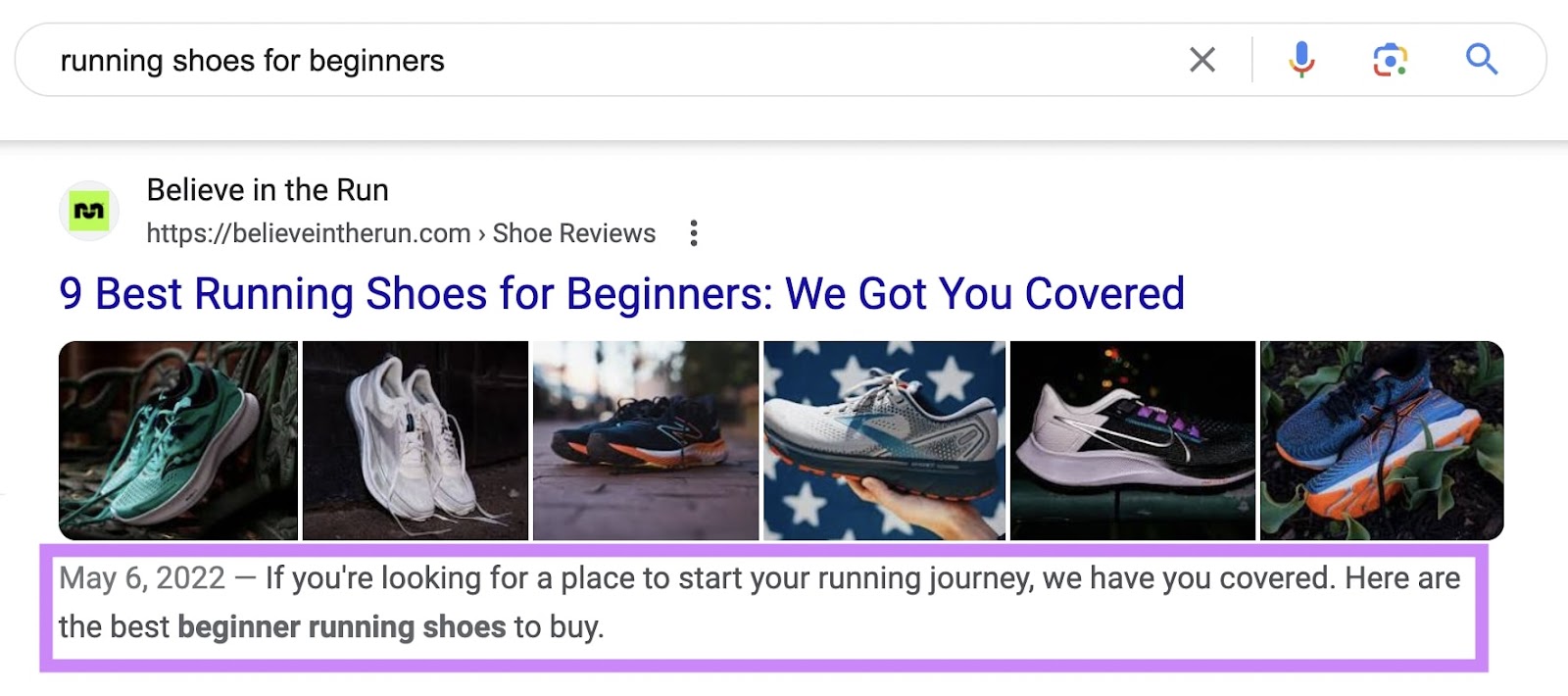
Local SEO: What Is It & How to Do It

What Is Local SEO? 

Local SEO is the process of optimizing your online presence to increase local traffic, visibility, and brand awareness. 

Common local SEO tasks include:

  • Optimizing your Google Business Profile
  • Finding local keywords
  • Creating locally relevant content

Among others.

And any business that has a physical location or serves a geographic area can benefit from local SEO. 

This is an example of a local search result on Google:
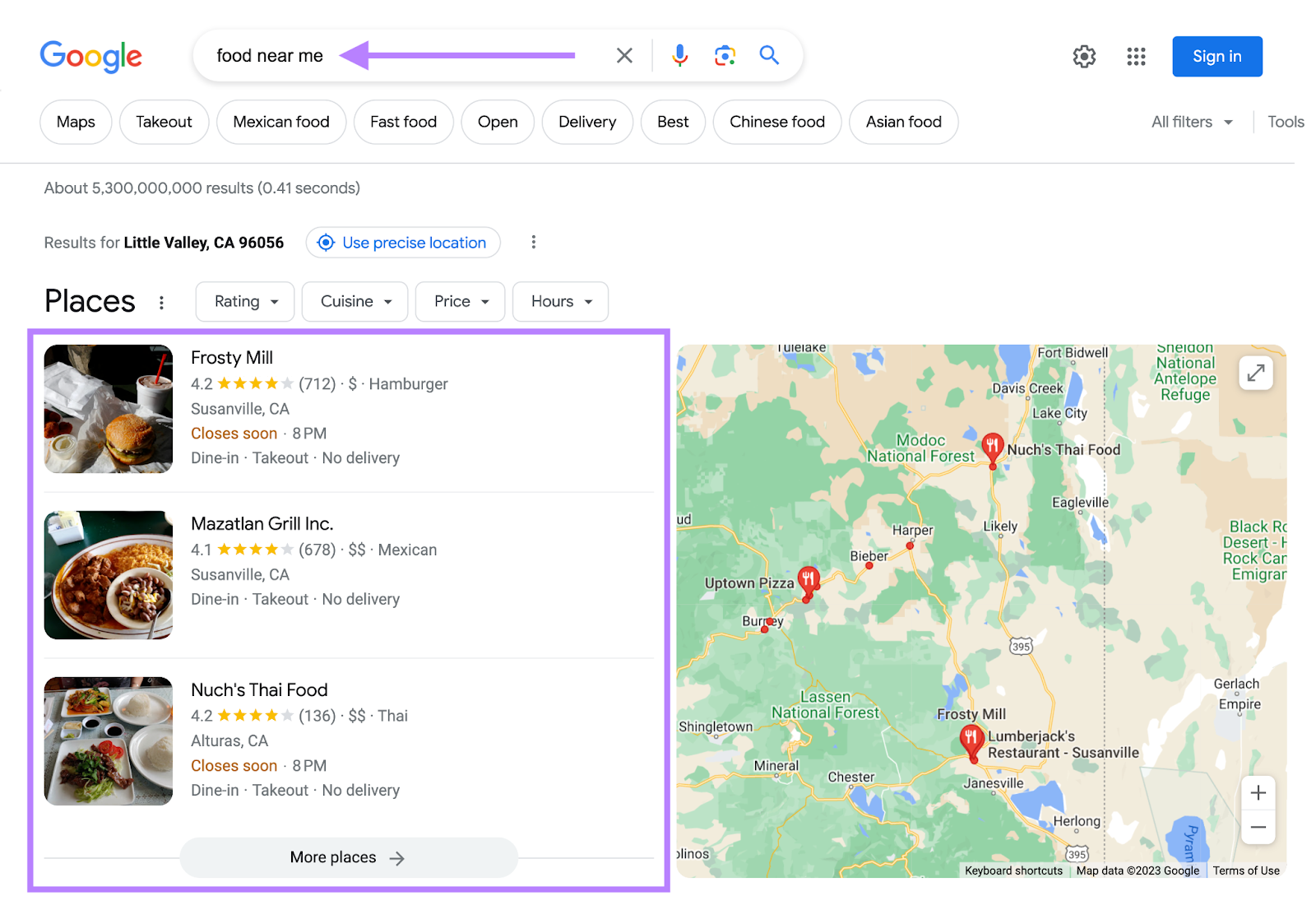
an example of a local search result on Google

Local SEO can help your business appear in Google results for searches like these.

This article explains why local SEO is important, how it works, and how to do local SEO. 

Tip: create a free Semrush account so you can follow along. 

Why Is Local SEO Important? 

The best way to get your site in front of people in your area is to use local SEO marketing.

Over 75% of consumers in the United States, France, Germany, and the United Kingdom use Google when looking for business information. 

Making it the most dominant search engine for local search in those (and many other) countries. By far. 

And Google Maps searches for “shopping near me” have grown globally by more than 100% year over year. 

Mobile searches for “store open near me” also grew by over 250% in a recent two-year period. And “where to buy” + “near me” keywords by more than 200%. 

That’s hundreds of millions of searches every day. 

How Local SEO Works 

On top of Google’s usual ranking factors, its local search algorithms use three main factors to help find the best match:

  • Relevance (how closely related a Google Business Profile result is to the words a searcher uses in their query)
  • Distance (how far Google believes a user is from a business when they search)
  • Prominence (how important Google thinks a business is to its potential customers)

Then, Google displays two types of search results for local searches.

The “local pack” results (Google Maps and Business Profiles) and organic results. 

Organic results are the “normal” blue link search results we’re all used to seeing on Google. 

local pack (or map pack) is a Google feature that shows the top local business listings and a map. 

Like this:
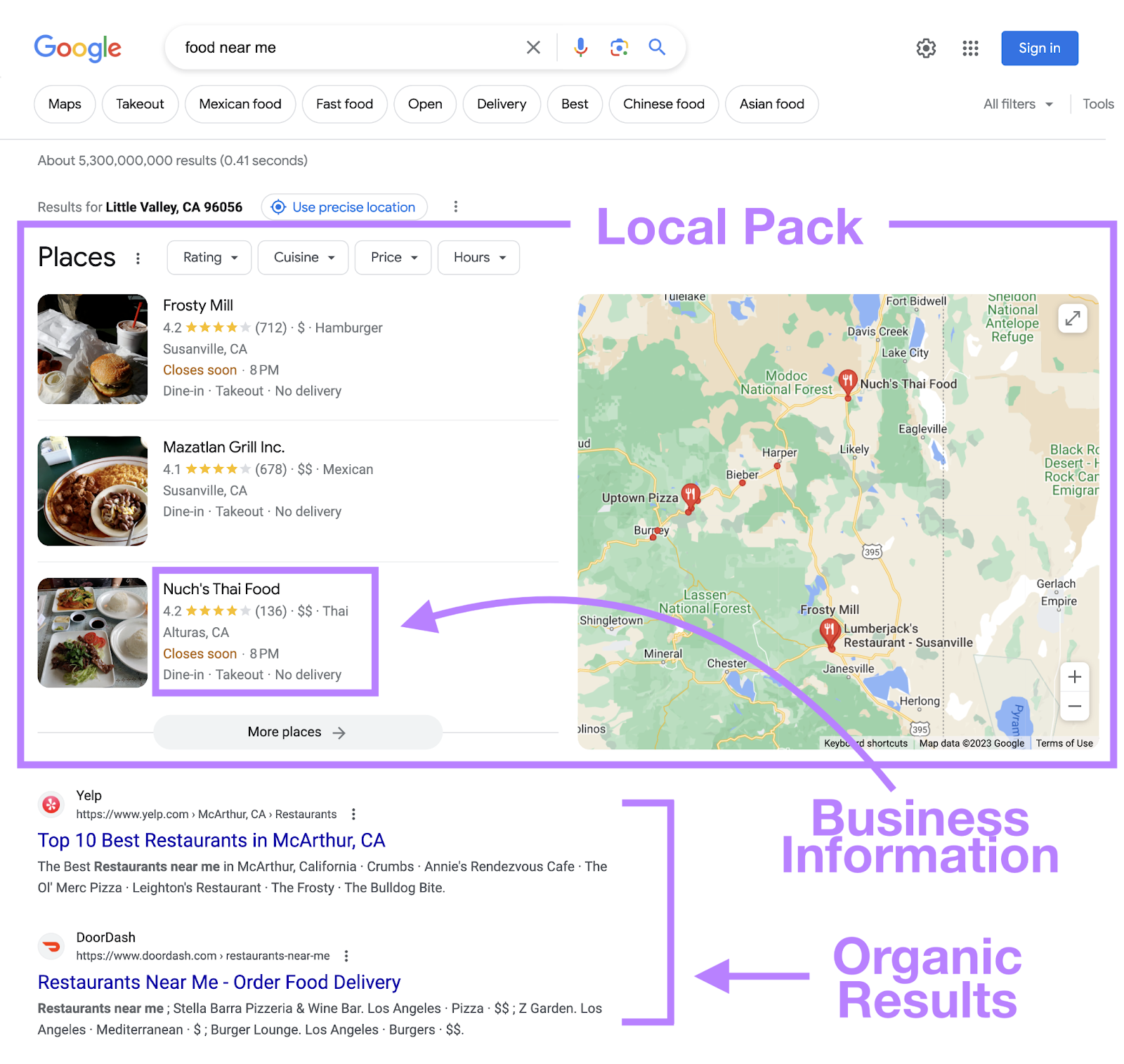
local pack in Google search for "food near me"

For example, when you search for “nutritionist miami,” Google displays a local pack at the very top.
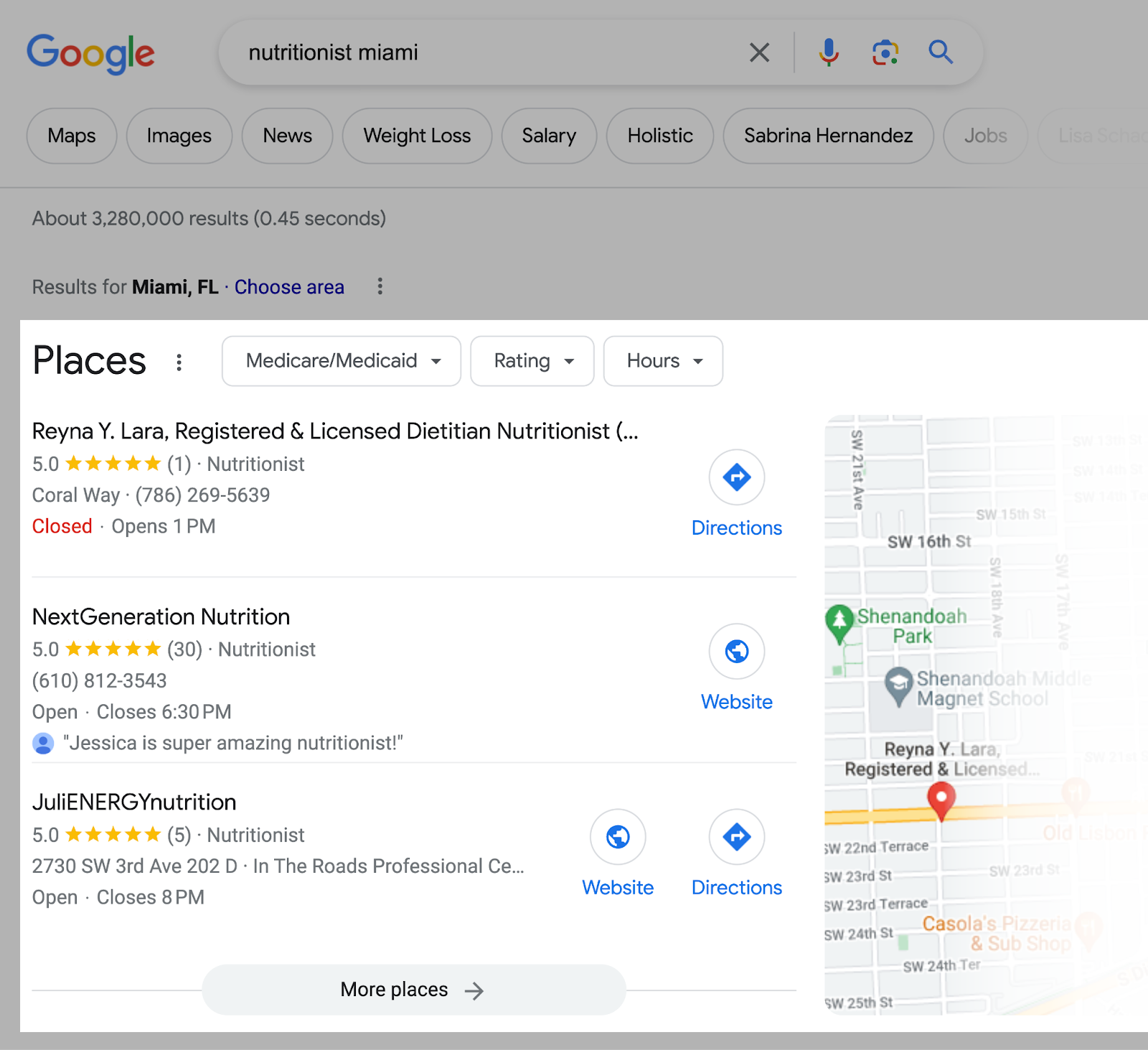
Google search for “nutritionist miami”

And the “regular” organic results underneath. 
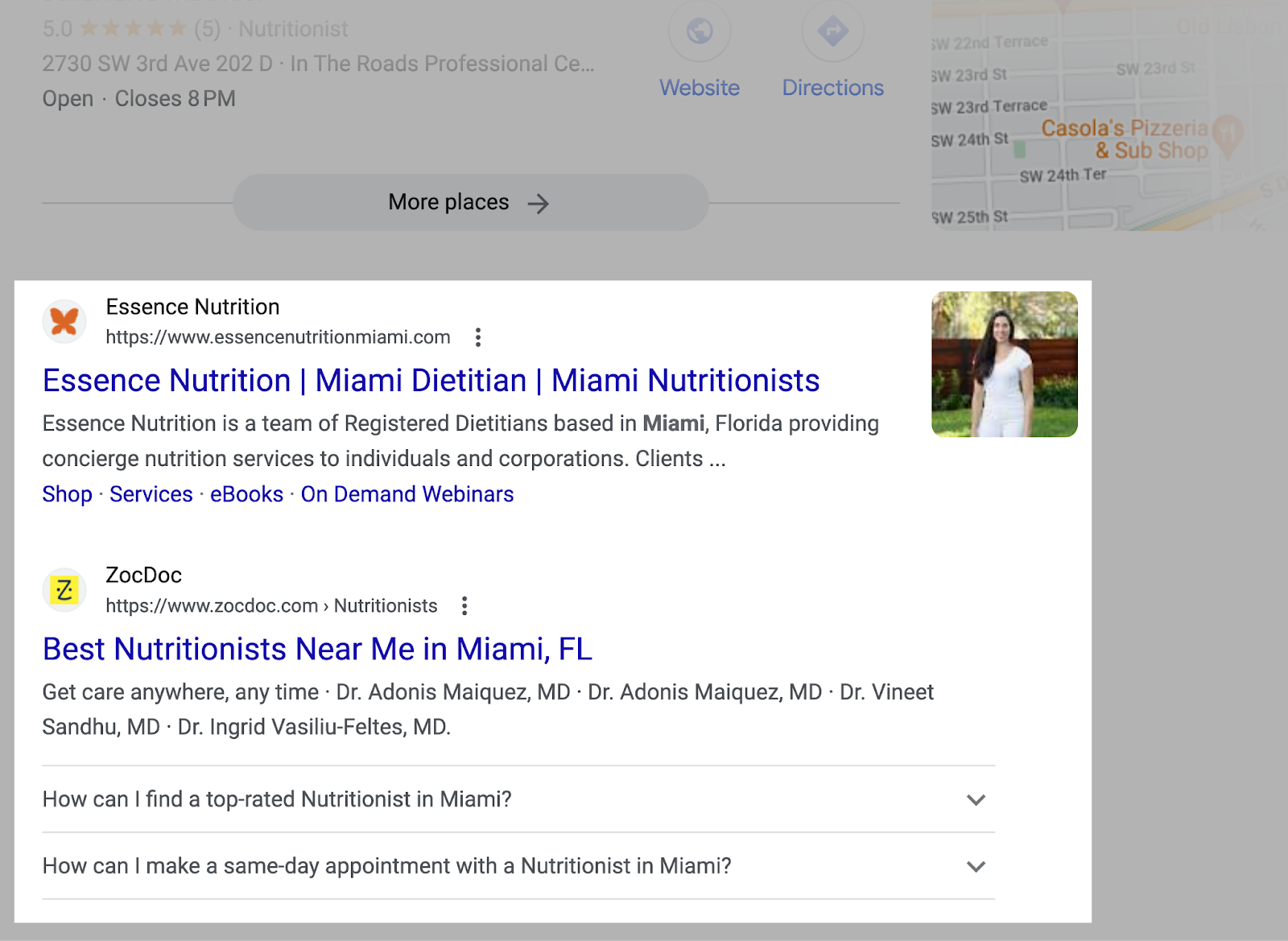
Organic results in Google for “nutritionist miami”

But Google doesn’t just display local results for queries that contain a city, state, or “near me” keyword. 

If Google believes the intent of your search is local, it’ll display local results.

Even if your search isn’t explicitly local. 

For example, if you were in Los Angeles and searched for “barber shops,” Google would still display a local pack for Los Angeles barber shops. 

Like this:
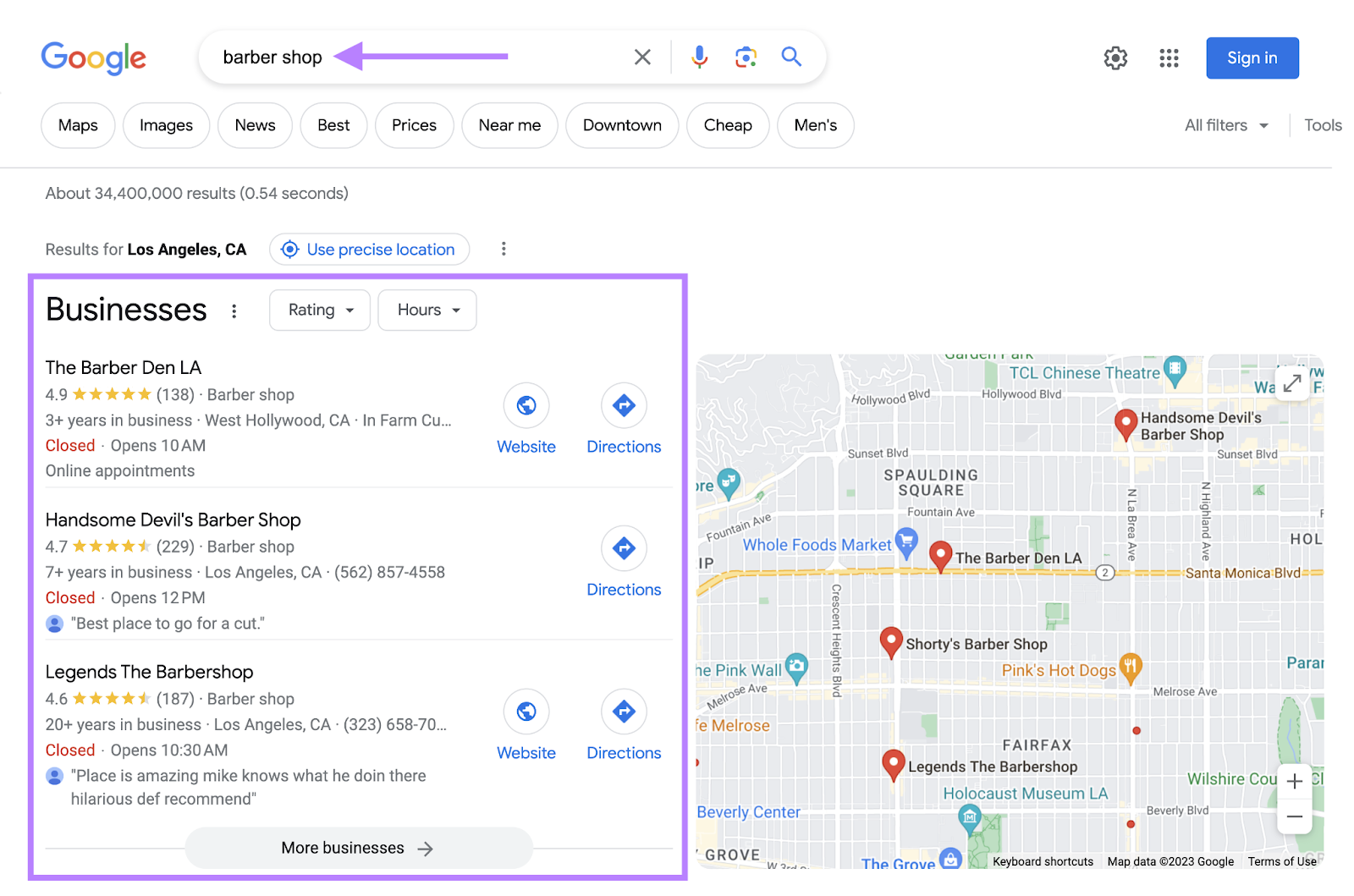
Google search in Los Angeles for “barber shops”

How to Do Local SEO 

Now it’s time to create a strategy so you can increase your local rankings and boost traffic. The following steps will help you get started. 

Tip: Remember—you can create a free Semrush account to follow along. 

Do Local Keyword Research

Keyword research for local SEO is the process of finding keywords people use when searching for local products and services. 

Ranking for these keywords drives highly targeted local traffic to your site and sends more customers your way. 

To get started, you need a short list of keywords people can use to find your local business. 

Here are a few different ways to start.

Research Your Competitors

Seeing what your competitors are doing is an easy way to start gathering ideas. 

One of the best ways to do that is to use Semrush’s Organic Research tool.

Enter a competing site and click “Search.” 

Like so:
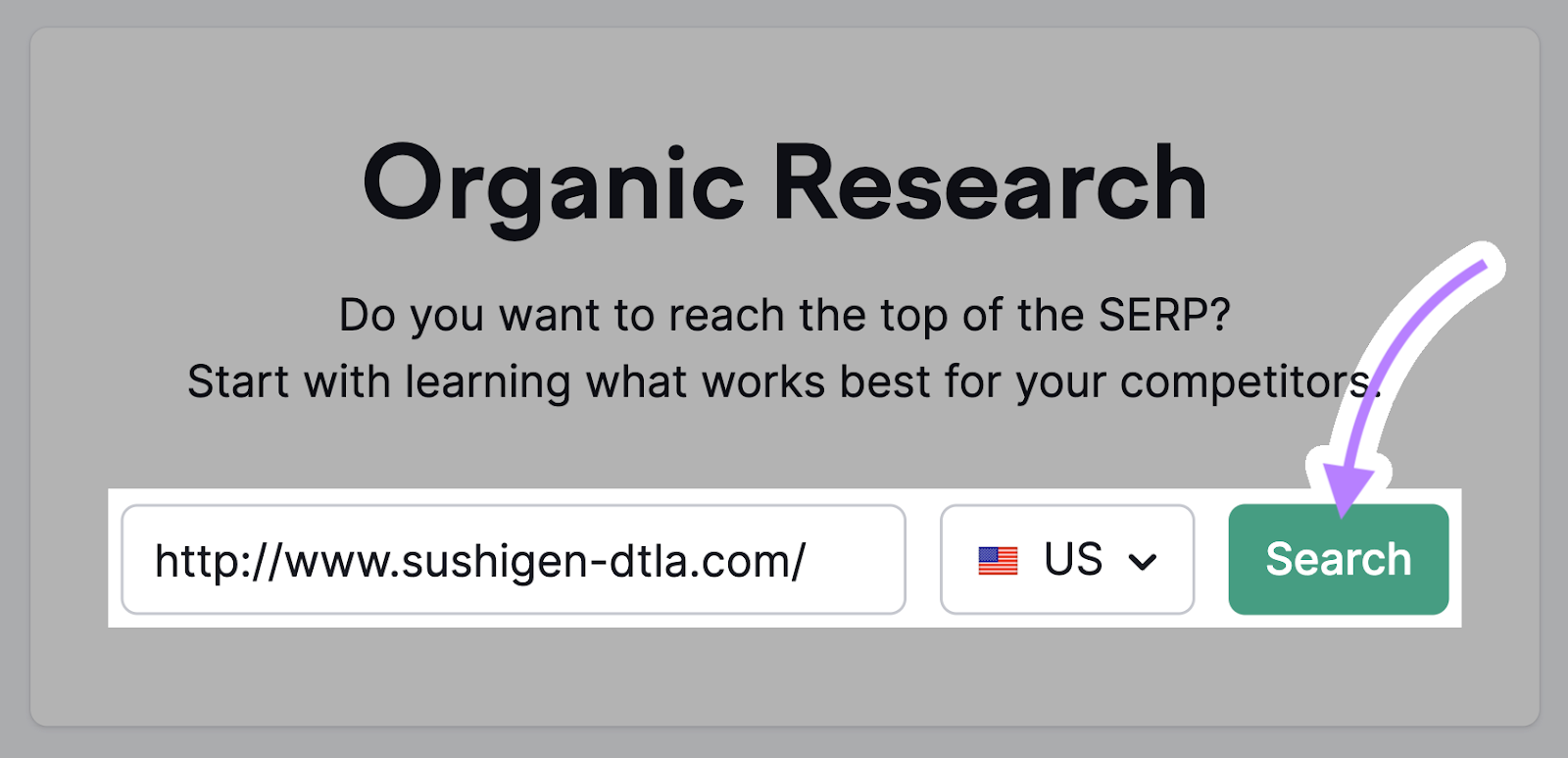
Semrush’s Organic Research tool

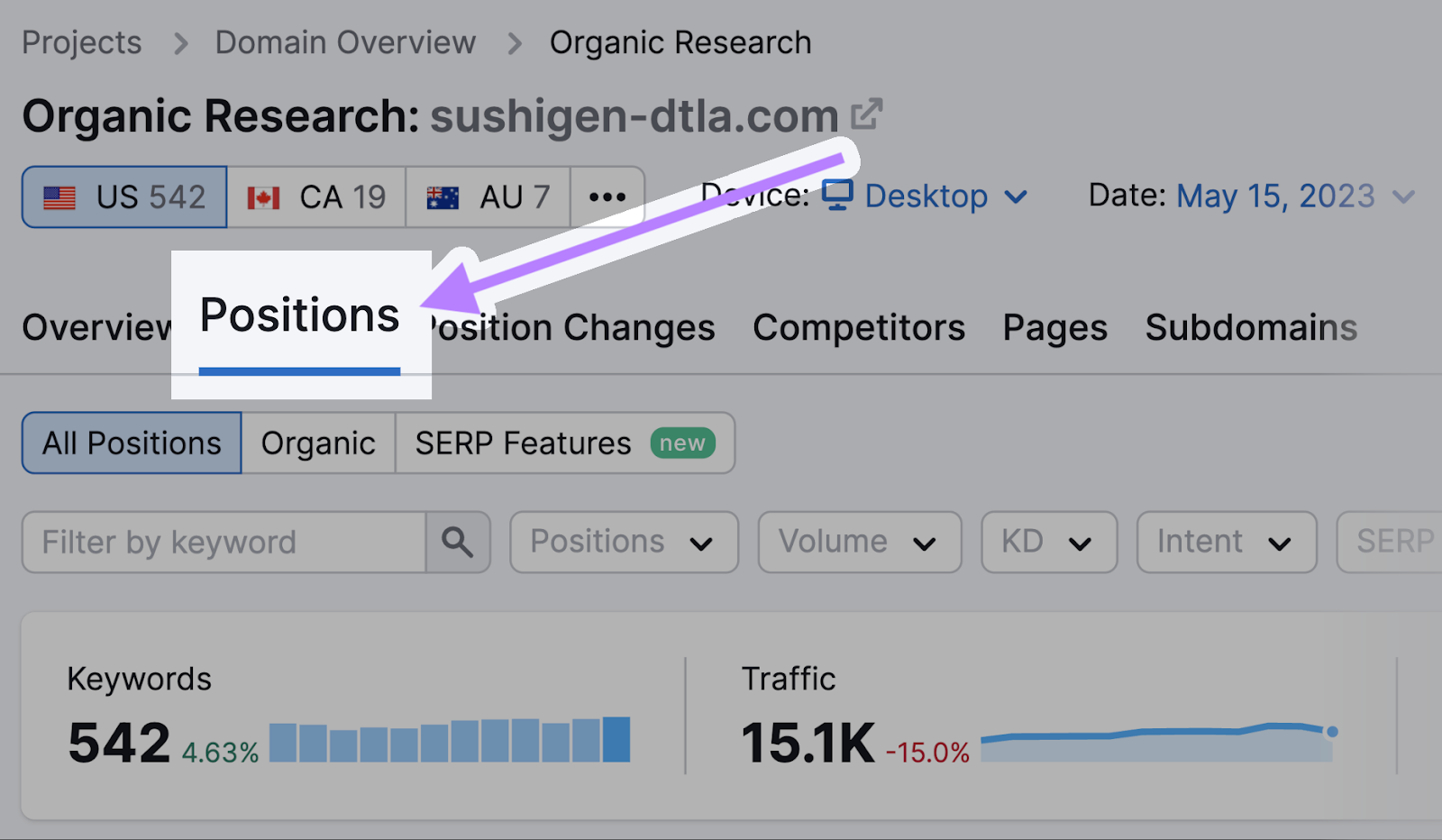
Then, go to the “Positions” tab. 

“Positions” tab

Click on “Advanced filters,” and exclude branded keywords (phrases that contain your competitor’s business name). 
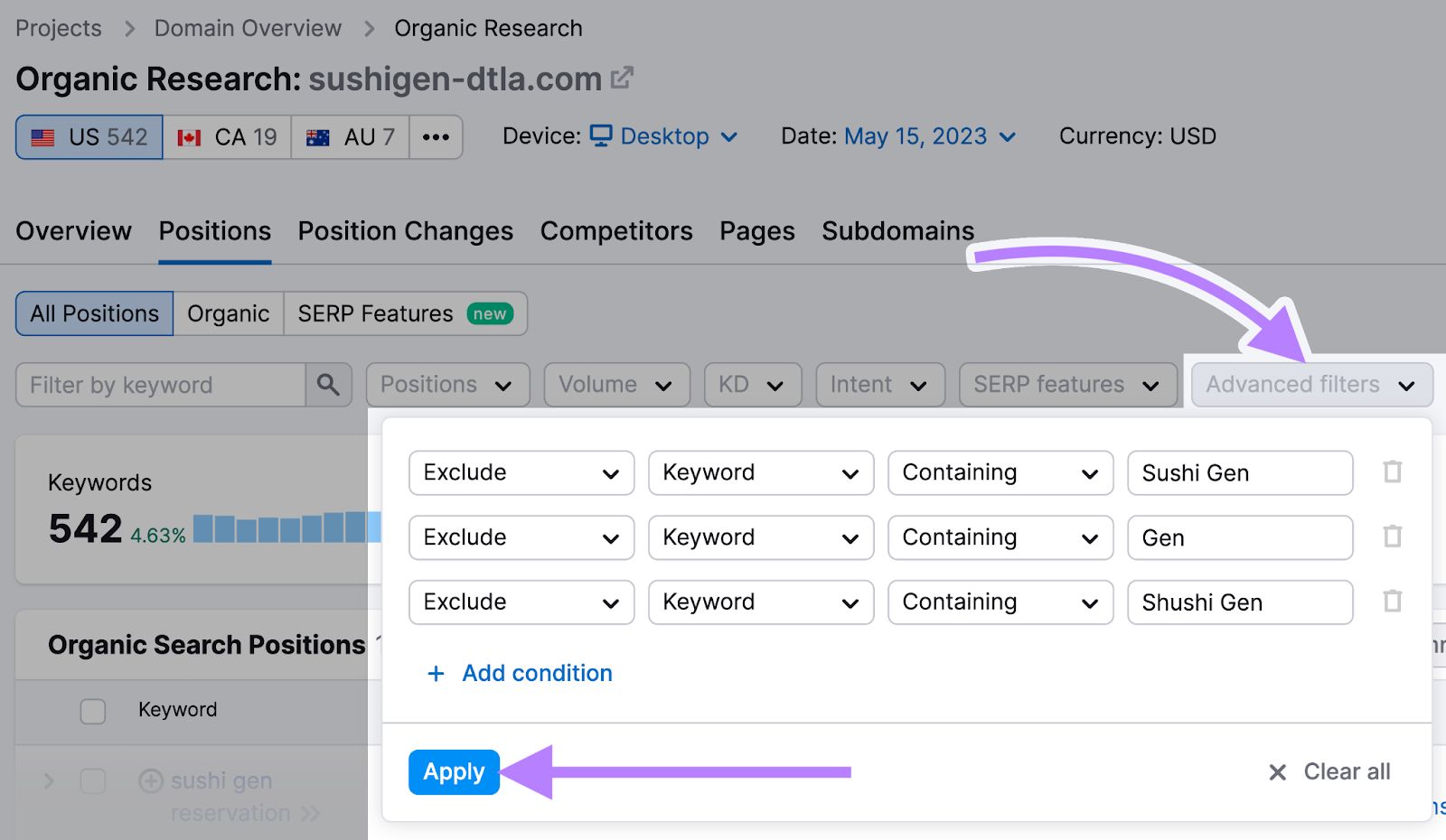
using “Advanced filters” in Organic Research tool

And click the “KD%” column to sort the table by keyword difficulty. 

Like so:
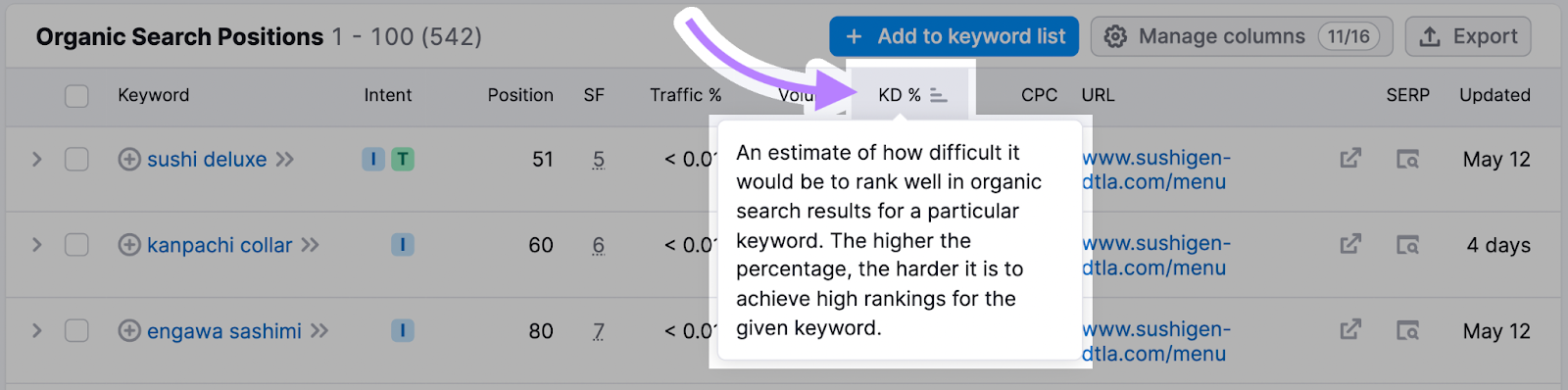
“KD%” column

Now you have a list of keywords you might want to target.
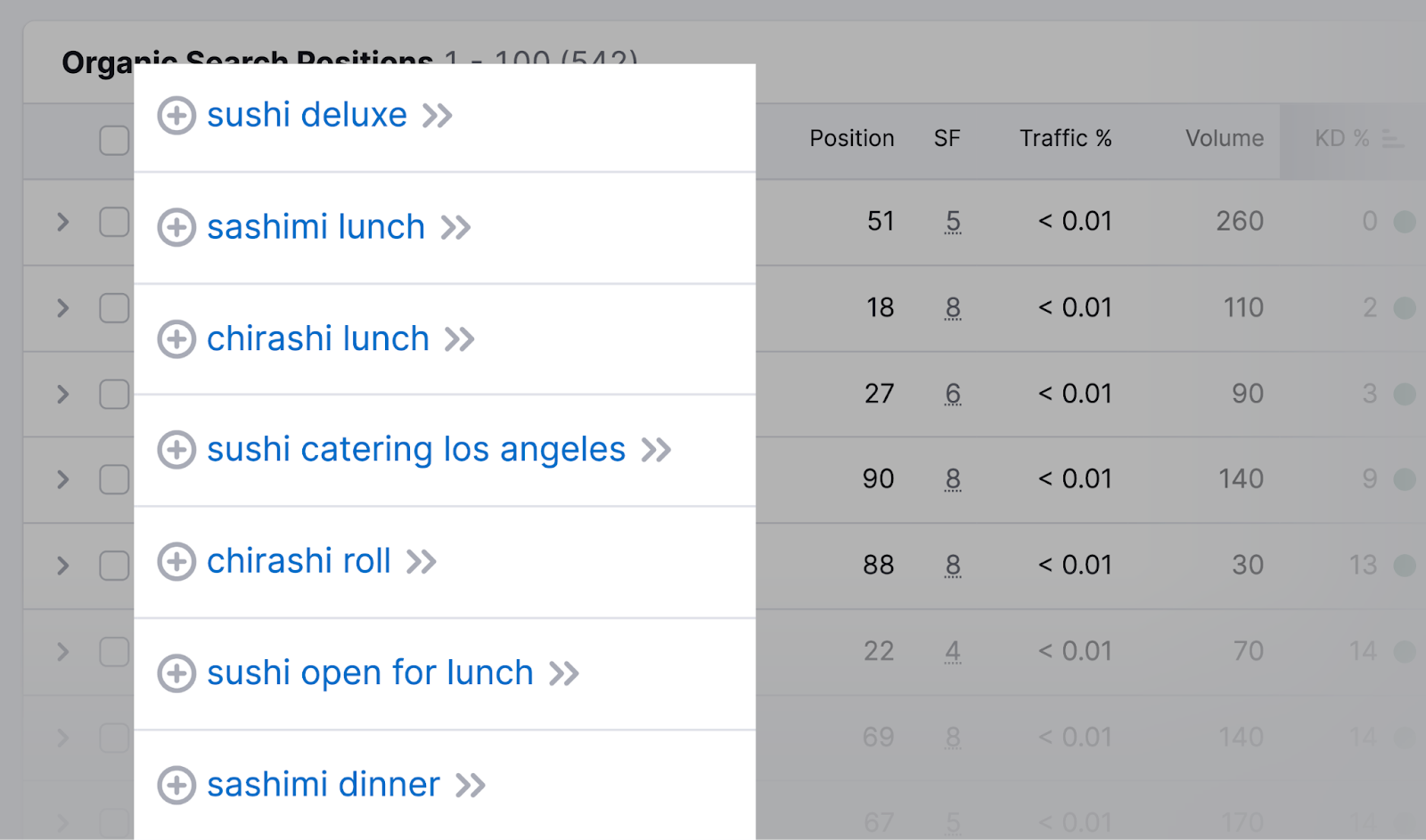
a list of keywords results

If your competitors are targeting these keywords, then they’re likely highly relevant to your business, too. 

Check Local Keyword Volume Metrics 

You’ll also want to get a sense of how difficult it is for your content to rank locally for keywords you choose to target. 

Use the local volume metrics feature in the Keyword Overview tool to identify valuable keywords you’ll want to target in your content. 

Enter your desired keyword into the search bar at the top of the page and hit “Search.”
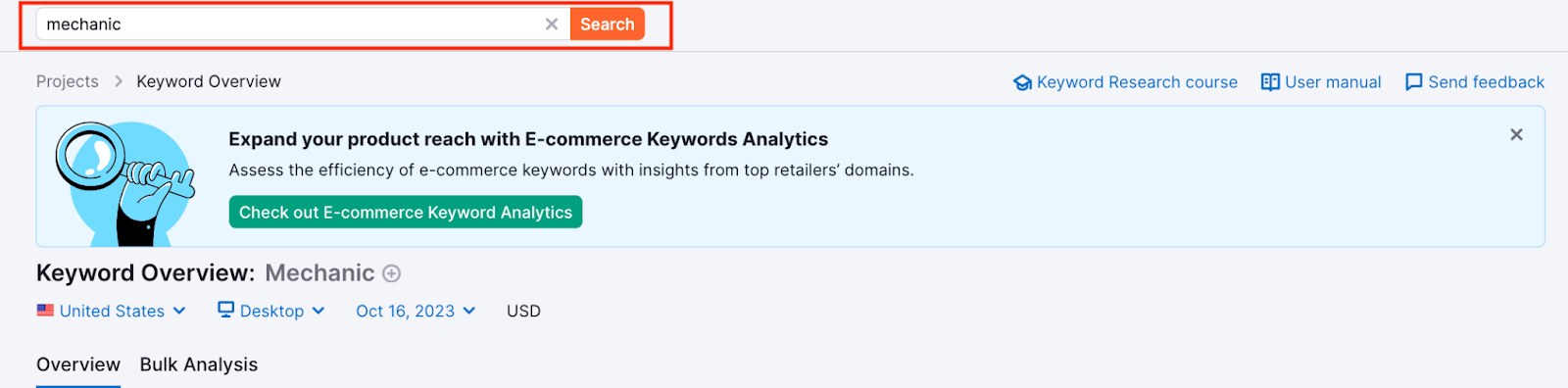
ou4RorXHRDM4svf_0XBlmoyvDmdG6ZiaaDcITtX4LMlvNZxWivxzEs1ZHWkJoqnaHSAn60XMTFxNGfPl8AWATXZjVl0DrzHu8rHgjjyzEa_Ib8yIvtfHPQTAr4KGUZPM93lqBeixrZCuBBc6RK2d68k

Once the tool delivers the keyword results, click on the drop-down bar labeled “Select location.” 
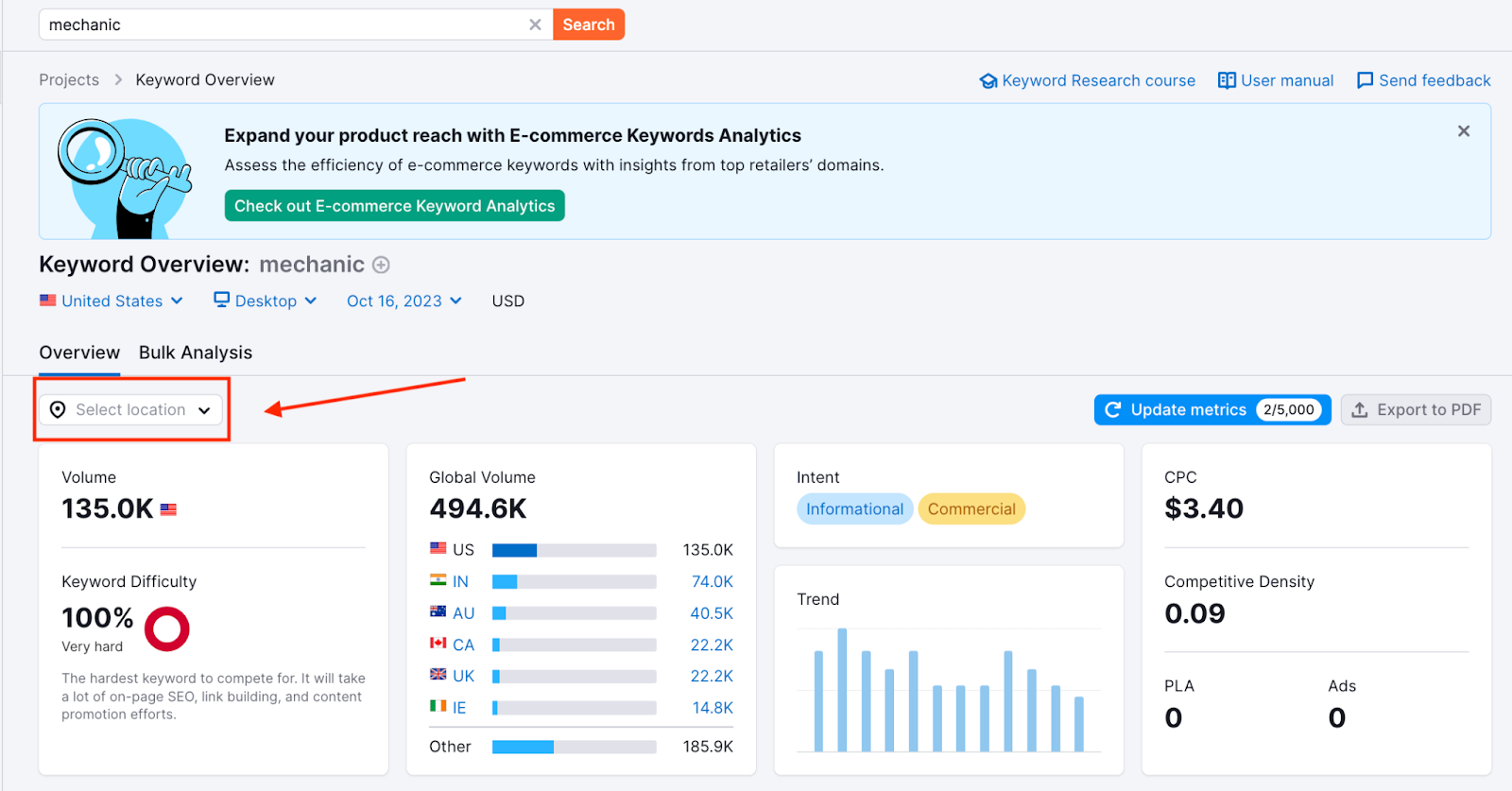
FvajtJ8WYwtcPnoUMjx9tV10tituXYw_oVRsAVHTuUonlJHsIMD9AiBGE7jVbM_QTyJJppCbz3oPVtOQxIvTLNG69uO2P5UuDy1wDl1XT4bQbkBQMiN0ZusSgegm3htqKs7UzKJnR5ly5NA8ddVgW18

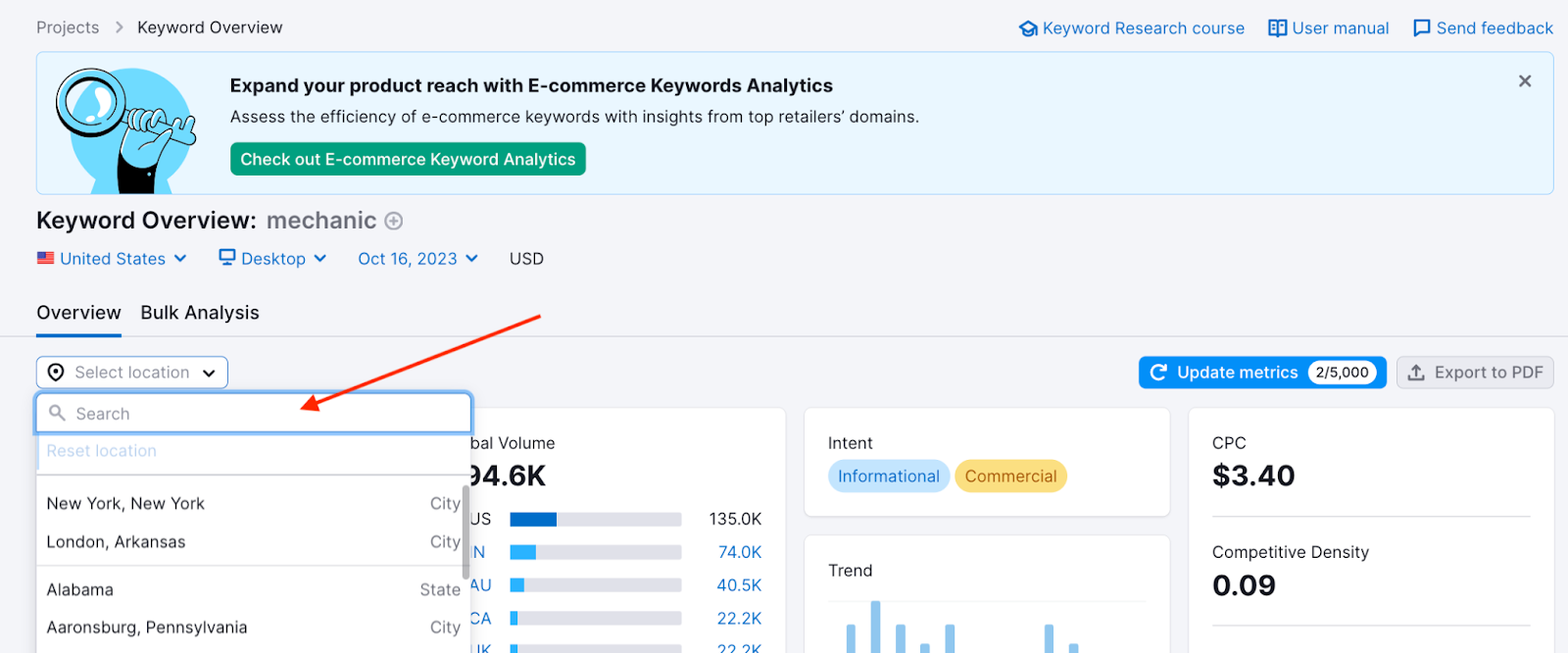
Type in your locale. This could be a state, county, province, city, or municipality. Go as narrow on the location as you wish. 
59Ct9432qkmdX80FXt_27SACwJewRwMvDm2rFJ78NkqnOtv-RNrTxx8d14vPT7-PedwosWoQ5sGx2hrc8nwnuieqUkSkPOvMynXxJ3HrVFbcpB7ne7aQdCpa7XOBzzl9Jj1vz-ixvMVbkuBOuNaNnKw

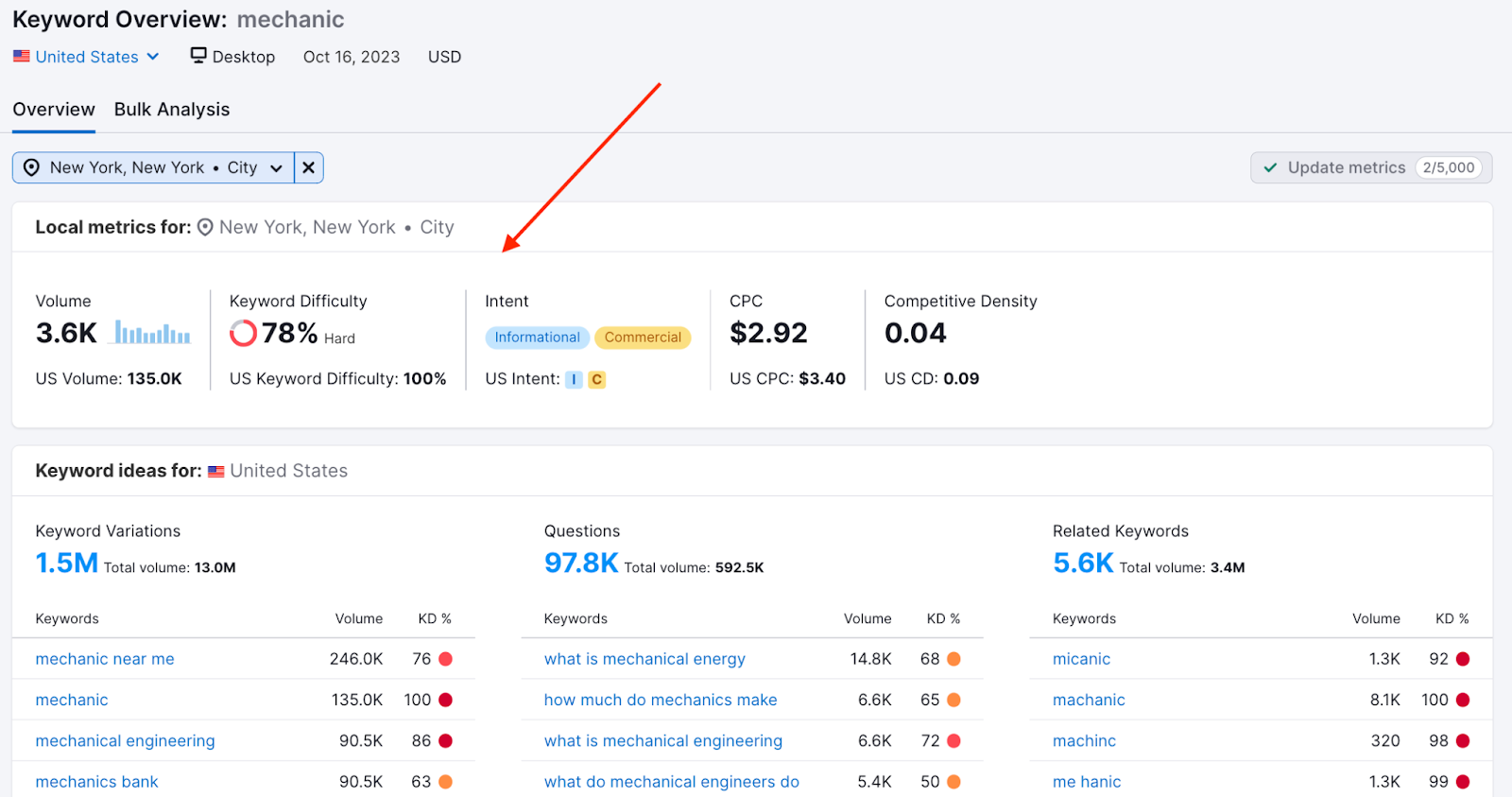
You’ll get local data, as well as the comparative national data. So you can see how easy or difficult it is to rank for your keyword in your exact location. 

Note: Some of these widgets show local data (volume, difficulty, SERP analysis, etc.), while others remain national-level (keyword variations, questions, related keywords).
tgDQGvFDEnQeiHbKXRYnnFw4Sx94snCTVvElkga2kozl7AlYChTAvYEnH_WWO1RJ_jBlprgGjZ_J7uAKKyqEy7B_9a5ZmocdWe9hLmqti_DEYz75JT8E1SJ-p6O-tTiadlQD7RG7068Crj0zJh2mVSE

If you’re a business operating at the local level, this is an essential feature to leverage as you’re building your targeted keyword list. Use the data to get an edge over competitors by optimizing your content for your specific area.

Use Google Autocomplete

Google autocomplete is a feature within Google Search that makes it faster to complete searches when you start to type. 

Its purpose is to save users time by predicting what they’re going to search for.

And it can help you discover valuable long-tail keywords for local SEO.

That’s because Google’s autocomplete predictions depend partly on your location. 

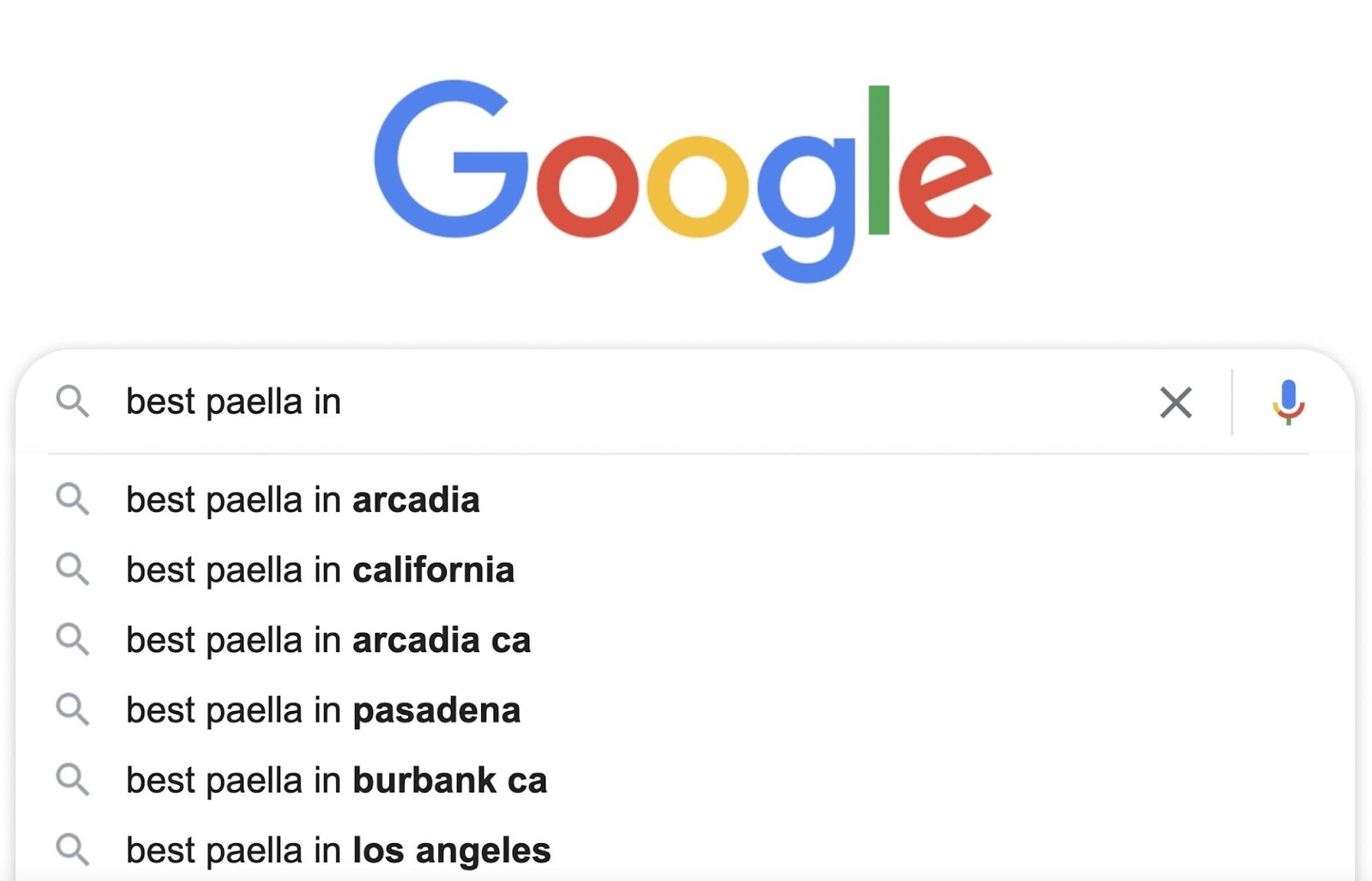
For example, if you’re in Arcadia, California, and you type “best paella in” into the search bar, you’ll see something like this:
Google Autocomplete suggestions for “best paella in” in Arcadia, California

All these locations are near Arcadia or in California. 

So, to find valuable local keywords, start typing in keywords related to your business. 

For example, if you run a cleaning services business, type in “cleaning services” to get a list of local keyword suggestions.


Blog Post Examples and Best Practices to Inspire Your Writing

What Is a Blog Post?

A blog post is a piece of writing typically published on a website’s blog that presents information, opinions, experiences, or insights on a particular topic. Blog posts vary in length. And can include text, images, or videos, depending on the topic.

For instance, travel blogs are often rich in visuals. Showcasing the beauty or uniqueness of the places described. 

Like this blog post from travel blog Nomadic Matt:

Nomadic Matt's blog post titled "Where to stay in Brisbane: The best neighborhoods for your visit"

Business blog posts tend to be text-heavy. Focusing on data, expert interviews, industry news, statistics, and other helpful insights. 

Like this blog post on Entrepreneur

Entrepreneur's article on how AI is changing the way we look at job skills

What Is a Blog? 

A blog, or weblog, is a regularly updated website (or page on a website) that features blog posts on various topics. The content is usually written in a conversational style, addressing the reader directly.

Note

Depending on your goals, you can set up a standalone blog or integrate it into your website (e.g., https://www.myshop.com/blog/). The first option is more suitable if you plan to use your blog as an online journal or diary rather than a business tool.

How Does Blogging Benefit Your Business?

Blogging has many potential benefits. Here, we look at the top advantages of creating blog posts for your business. 

Builds Authority and Trust 

Blogging can be a powerful tool if you’re looking to establish authority in your industry. 

By consistently creating valuable and informative content, you can demonstrate expertise. And engage with your audience in meaningful ways.

Here’s how blogging helps build authority:

  • Showcases expertise: Blog posts that tackle industry issues, explain complex concepts, or provide how-to guides showcase your depth of knowledge. This helps position you as a thought leader in your industry. 
  • Improves SEO: Well-crafted blog posts that incorporate relevant keywords can improve a website’s search engine rankings. Higher visibility in search results can lead to increased website traffic. And leads. 
  • Builds trust: By providing valuable content without a hard sell, businesses can build trust with their audience 

Gives You Full Control 

With a blog, you have full control over the content you publish. Including the length, format, and topics you cover. 

Blogging platforms like Medium and social media sites like Facebook can remove content at any time. And for any reason. 

This may happen if what you write goes against their guidelines, someone (such as a competitor) reports your posts, or the platform goes out of business.

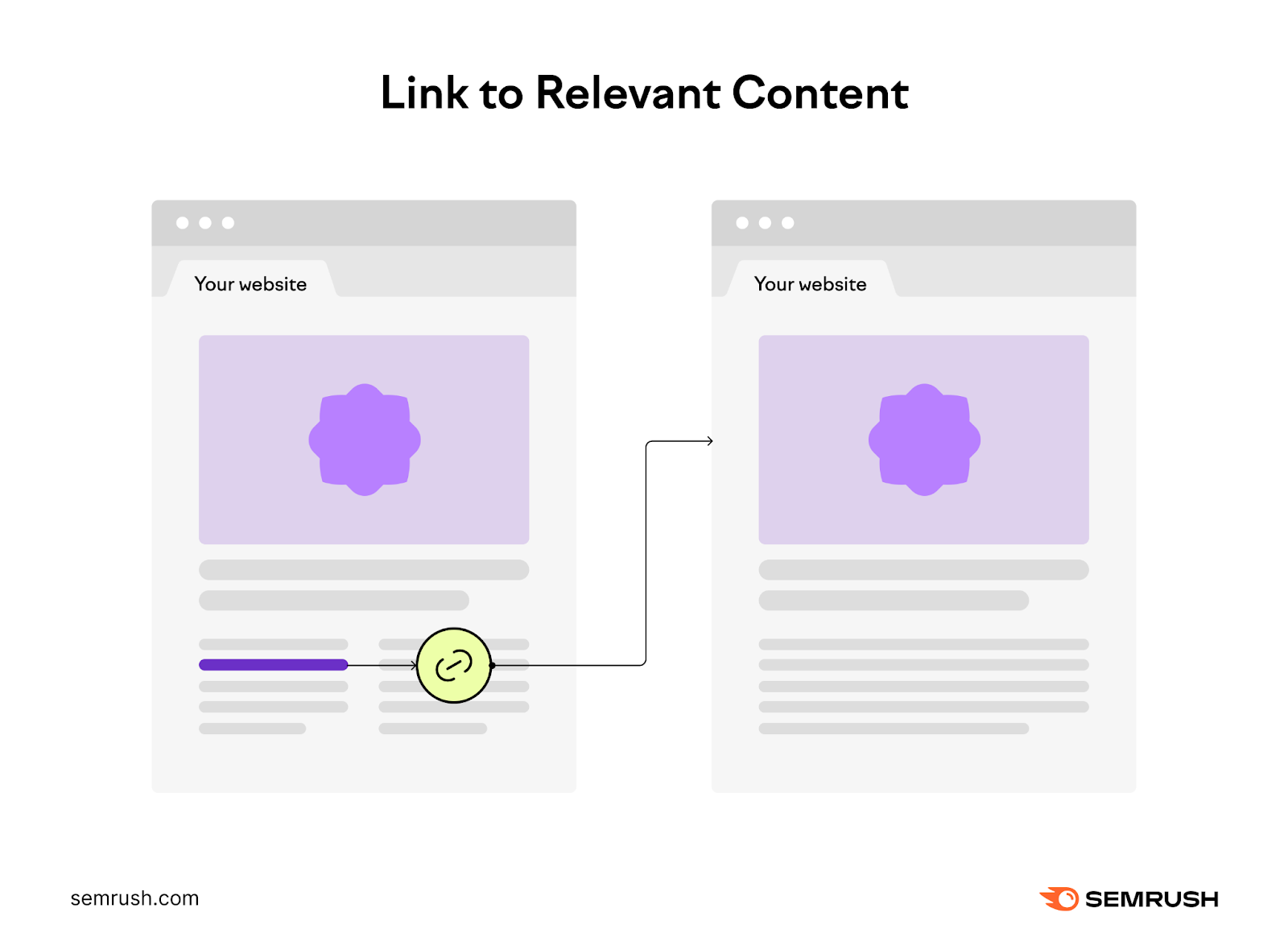
Another advantage of blogging is that it lets you build internal links, which can improve website navigation. Internal links connect various pages of your website, guiding customers through relevant content and product pages. 

A streamlined path makes it easier for customers to find and explore your products and other pages. 

An internal link from one page on your website (left) to another page with relevant content (right)

Let’s say you run an online store selling dietary supplements. You write about the benefits of protein on your blog. And link to product pages selling protein powder, protein bars, or other related products.

If your blog post is relevant and engaging, readers might click those links. And purchase the products you mentioned.

Improves Traffic and Visibility 

Incorporating SEO best practices into your content may lead to higher rankings, resulting in more traffic and exposure. 

For example, optimizing each blog post for specific keywords, such as “whey protein powder” or “vegan protein bars,” can help you get more targeted organic traffic. Keywords are search terms used by consumers to find information or products online.

Additionally, readers may share your blog posts on social media. Which can further boost website traffic and brand awareness.

Pro tip

Use Semrush’s Keyword Magic Tool to find top-performing search terms. Our tool can help you identify high-volume, low-competition keywords related to the topic you want to cover. 

Blog posts are a great way to build backlinks for your website or blog. Backlinks are incoming links from one website to another, acting as votes of confidence that help signal your site’s authority to search engines. 

High-quality backlinks can help boost your search engine rankings. And lead to more traffic. 

The more traffic you get, the likelier your target audience is to discover your brand and products. Some may become paying customers. And help spread the word about your business.

Lets You Target Users in All Funnel Stages

Blogging lets you create content for each stage of the marketing funnel. Which can help you attract, convert, and retain customers.

Here’s a quick look at how to apply the marketing funnel to blog content: 

  • Top of the funnel (ToFu): Create how-to posts, listicles, infographics, and other types of content for new audiences. These people are just discovering your blog, products, or services. The goal is to build awareness of the problem you can solve. 
  • Middle of the funnel (MoFu): Produce longer, more in-depth content, such as ultimate guides, case studies, and comparison posts, for readers who are already familiar with your business. At this point, you’ll want to generate interest in your offerings. 
  • Bottom of the funnel (BoFu): Go into detail about the products or services you promote on your blog with detailed reviews and product demos. Your readers are ready to take the desired action (e.g., book a consultation)—they just need an extra push. 
A visual of a simple conversion funnel, with tofu, mofu, and bofu sections

Further readingToFu, MoFu, BoFu: A Practical Guide to the Conversion Funnel

6 Effective Blog Post Formats

There’s more than one way to format blog posts, depending on where your target audience is in the funnel. And your goals for the content. 

With that in mind, let’s see some of the most common types of blog posts.

1. Listicles

Listicles are articles or blog posts organized in list format. 

For example, a blog post titled “Top 10 Movies to Watch This Weekend” or “10 Must-Have Kitchen Appliances Every Home Needs” would be considered a listicle. 

Use listicles to break complex topics into smaller, more manageable chunks. And share tips, strategies, products, or ideas.

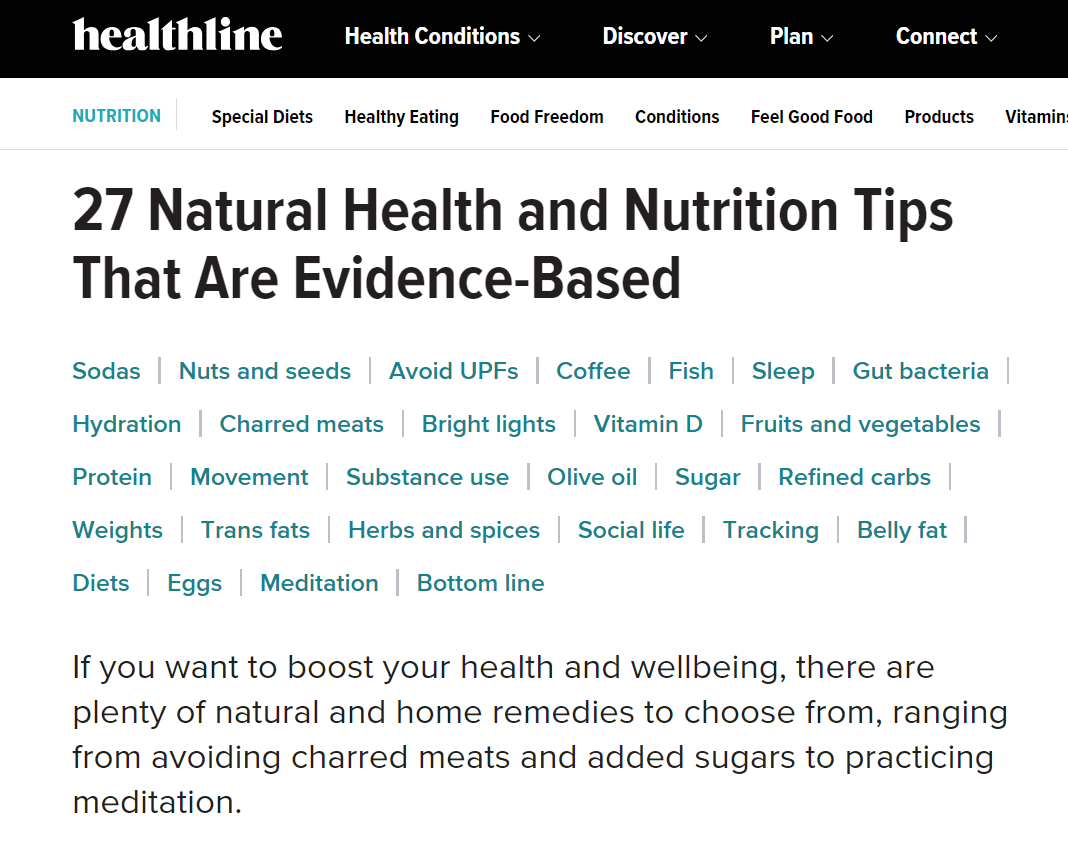
For instance, Healthline uses this format to cover complex topics in a clear and engaging manner. 

Below, you can see a listicle blog post about health and nutrition, broken down into 27 tips.

Healthline's listicle blog post about health and nutrition, broken down into 27 tips

Each tip is numbered and covers one idea, such as “Don’t fear coffee” and “Eat fatty fish.” 

On-Page SEO: What It Is and How to Do It

On-page SEO (also called on-site SEO) is the process of optimizing webpages and their content for both search engines and users. It can help rank pages higher on Google and drive more organic traffic. 

Common tasks associated with on-page SEO include optimizing for search intent, title tags, internal links, and URLs.

Below, we’ll cover different techniques for optimizing your site for on-page concerns.

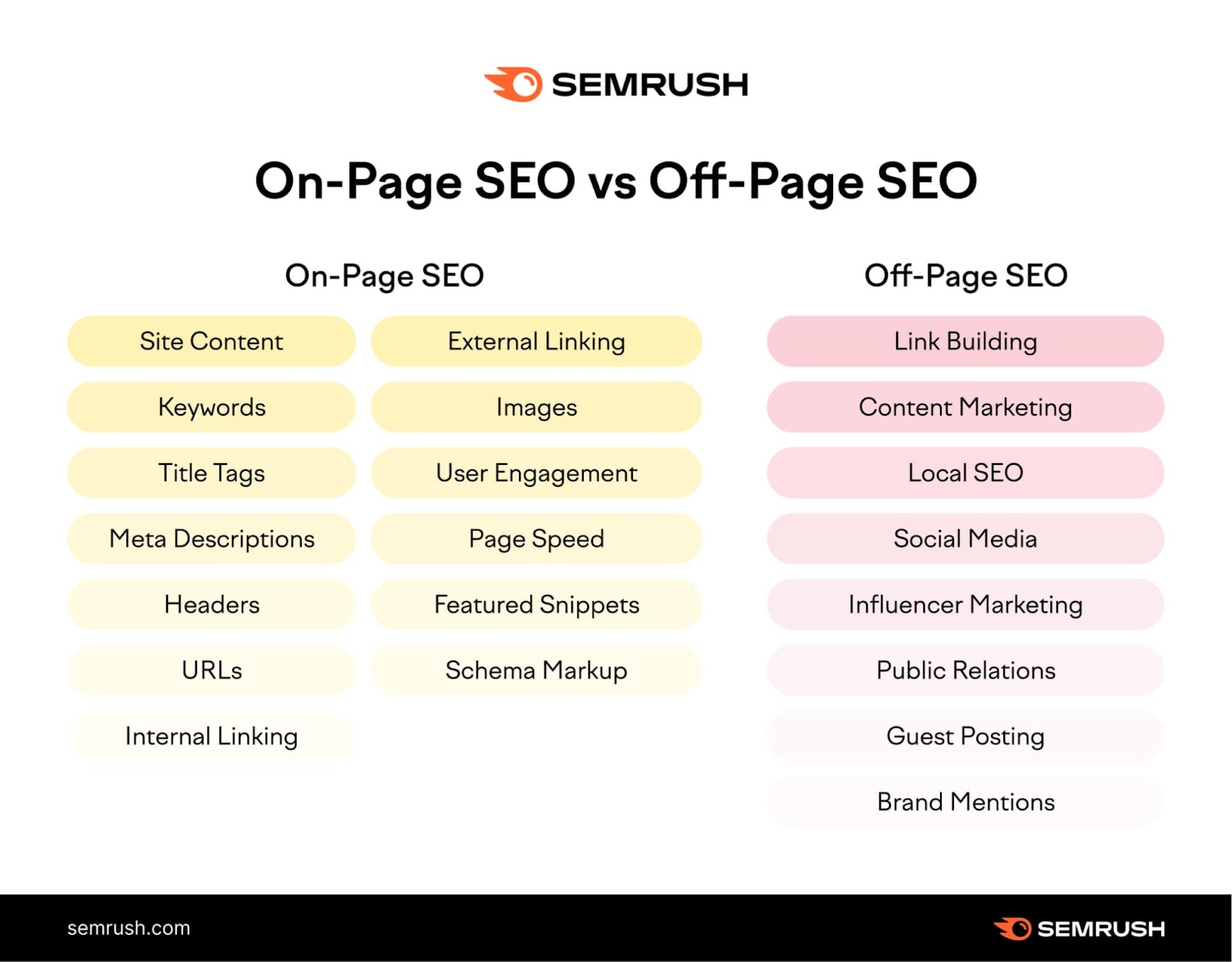
But first, let’s explore the difference between on-page SEO and off-page SEO:

On-Page SEO vs. Off-Page SEO

On-page SEO covers anything you can do on a webpage (or internally) to improve your rankings. 

Off-page SEO covers anything you can optimize outside of your site (or externally) in an attempt to boost your rankings. Backlinks are arguably the biggest off-page SEO factor. Other examples include social media and PR.

Both are important components of any good SEO strategy.

But you have more control over on-page SEO factors. So focusing on those is a good place to start.

On-page SEO vs Off-page SEO

Why Is On-Page SEO Important?

Search engines use keywords and other on-page SEO elements to check whether a page matches a user’s search intent. 

And if the page is relevant and useful, Google serves it to the user.

In other words:

Google pays attention to on-page SEO signals when ranking pages.

The Google algorithm is always changing, but Google continues to prioritize user experience. Google recommends focusing on “people-first content.” 

Meaning creating valuable content that matches user intent is more important than ever.

Now, let’s take a look at how you can update your content to reflect on-page SEO best practices.

Pro tip

To quickly get actionable on-page SEO optimization ideas for your site, run it through On Page SEO Checker.

8PBurtK4KLqV9AYVQTiYYIUUXHukkU562tZAf8cMRcEBtK9gBY4kH-B3T9nHzy3bInYLfEKH62U6_hSibTwGkrzAyS6SqYdrib4WZAKGHeYbPqyxew54dzPayZ9HBCQWOOqsO-5VSRrqwdjgiH_41Mk

9 On-Page SEO Techniques for Your Website

Here are some key on-page optimization techniques you should consider:

  1. Write unique, helpful content 
  2. Place target keywords strategically
  3. Write keyword-rich title tags
  4. Write click-worthy meta descriptions
  5. Use headings and subheadings to structure your page
  6. Optimize URLs
  7. Add internal links
  8. Add external links 
  9. Include and optimize images 

Let’s look at these in more detail.

Tip

Create a free Semrush account (no credit card needed) to follow along with the techniques in this guide. 

1. Write Unique, Helpful Content 

One of the most important on site SEO steps you should take is to create high-quality content that matches your readers’ search intent.

Start by performing keyword research to find relevant topics and target keywords.

For this example, we’ll use the Keyword Magic Tool.

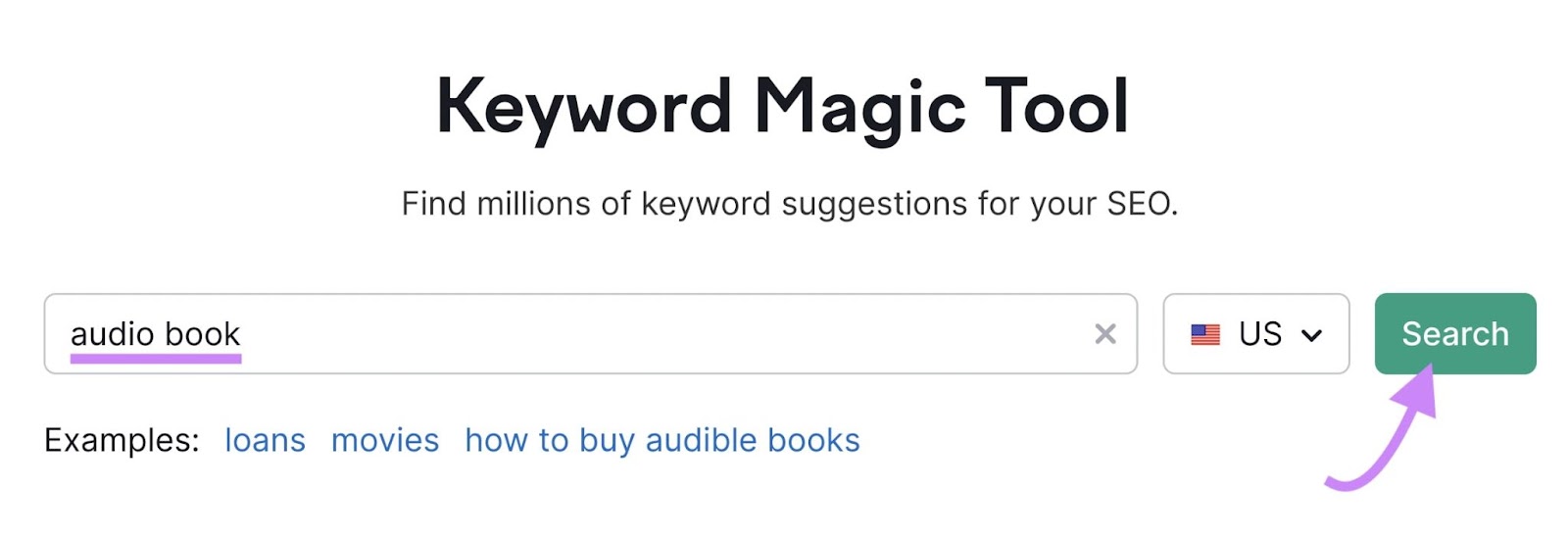
Enter the topic you want to research and click “Search.” We’ll use the keyword “audio book” as our example. 

"audio book" entered into the Keyword Magic Tool search bar

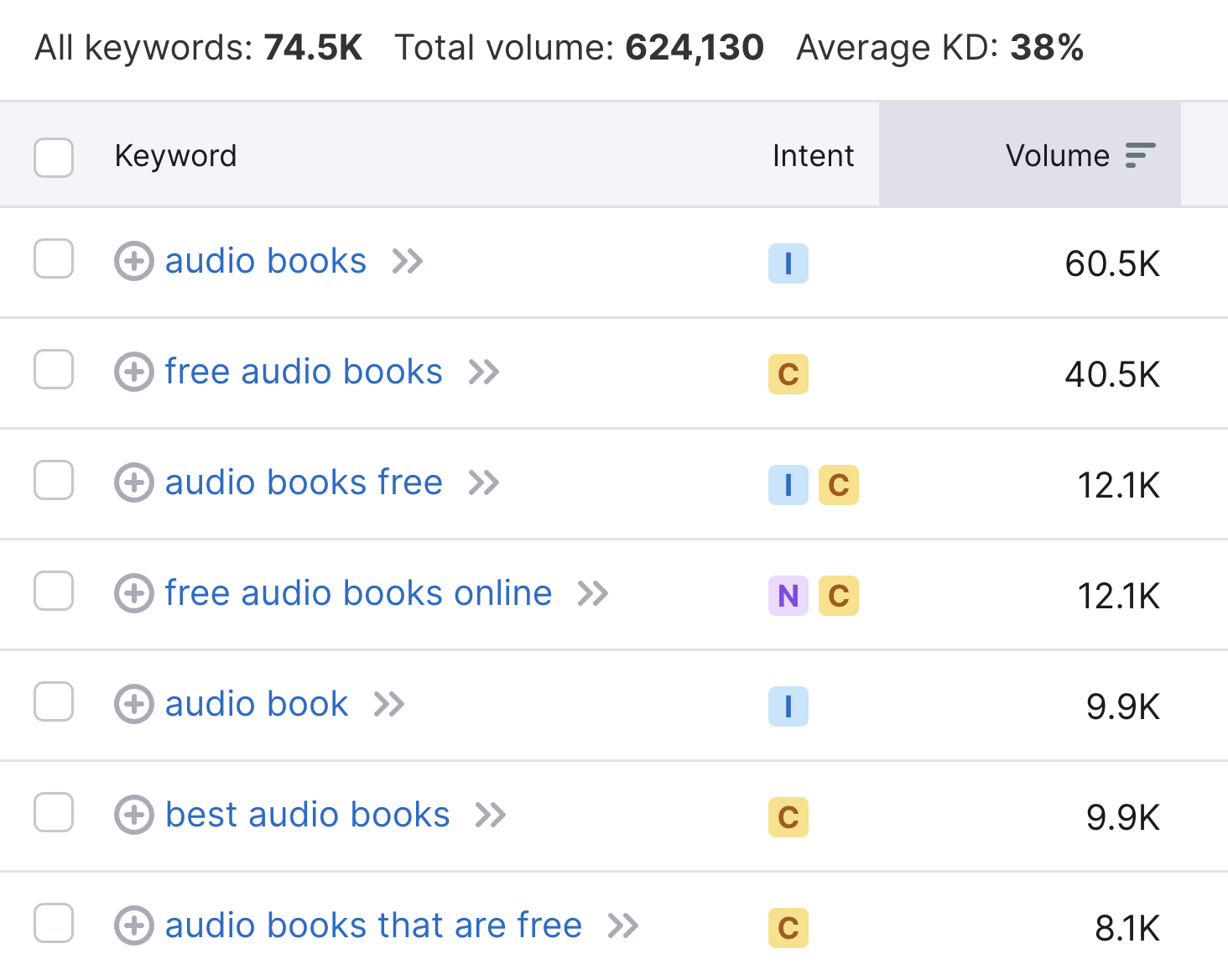
You’ll get a list of keywords related to your seed keyword, sorted by search volume.

A list of keywords related to "audio books"

High search volume can be useful to target. 

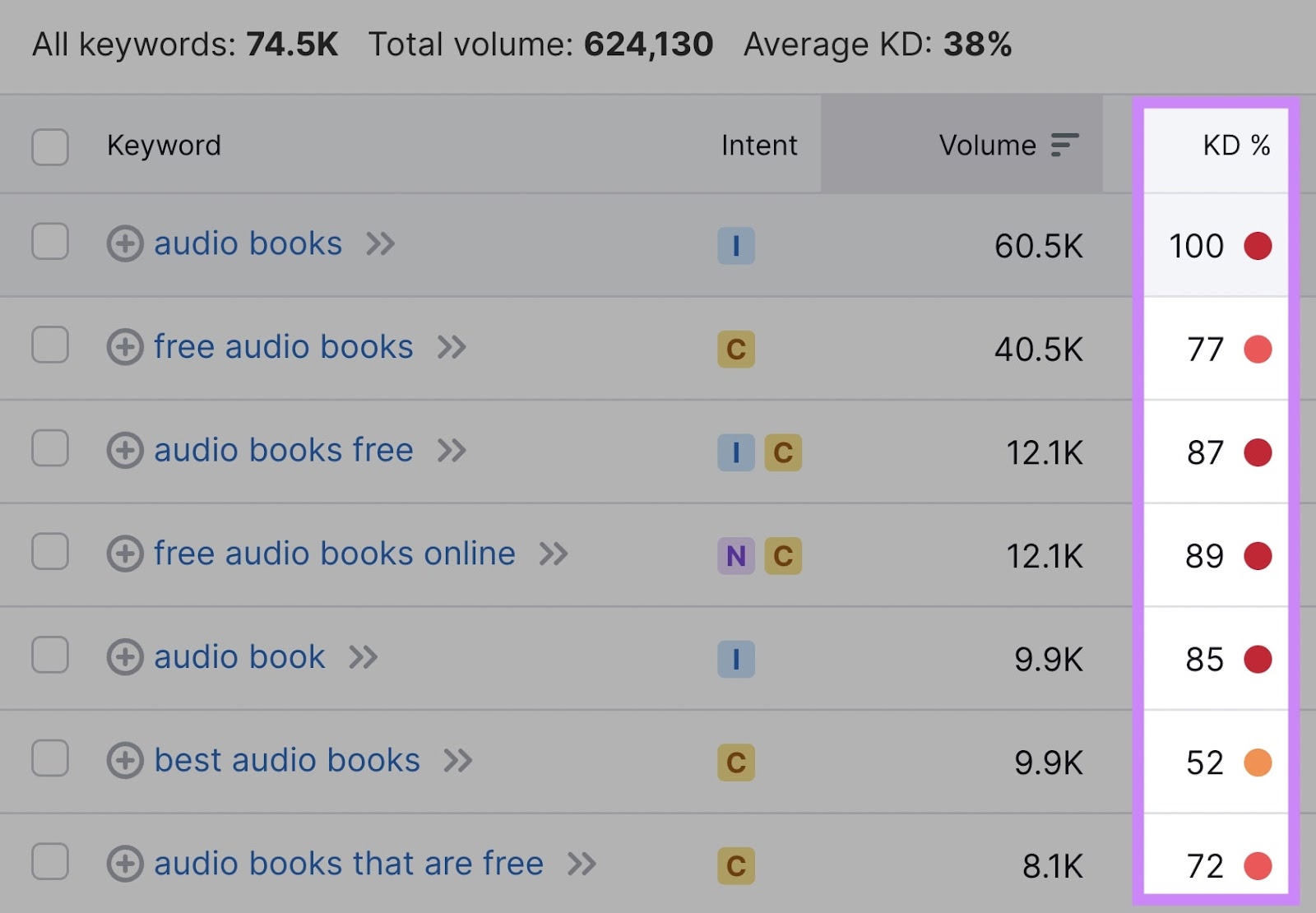
But pay attention to the keyword difficulty (KD %) level, too. It’s much more difficult to rank for more competitive keywords (which have higher KD % scores).

"KD%" column highlighted in keywords list

Target less competitive long-tail keywords, too. 

They often have lower search volume but lower keyword difficulty. Which means they can be easier to rank for.

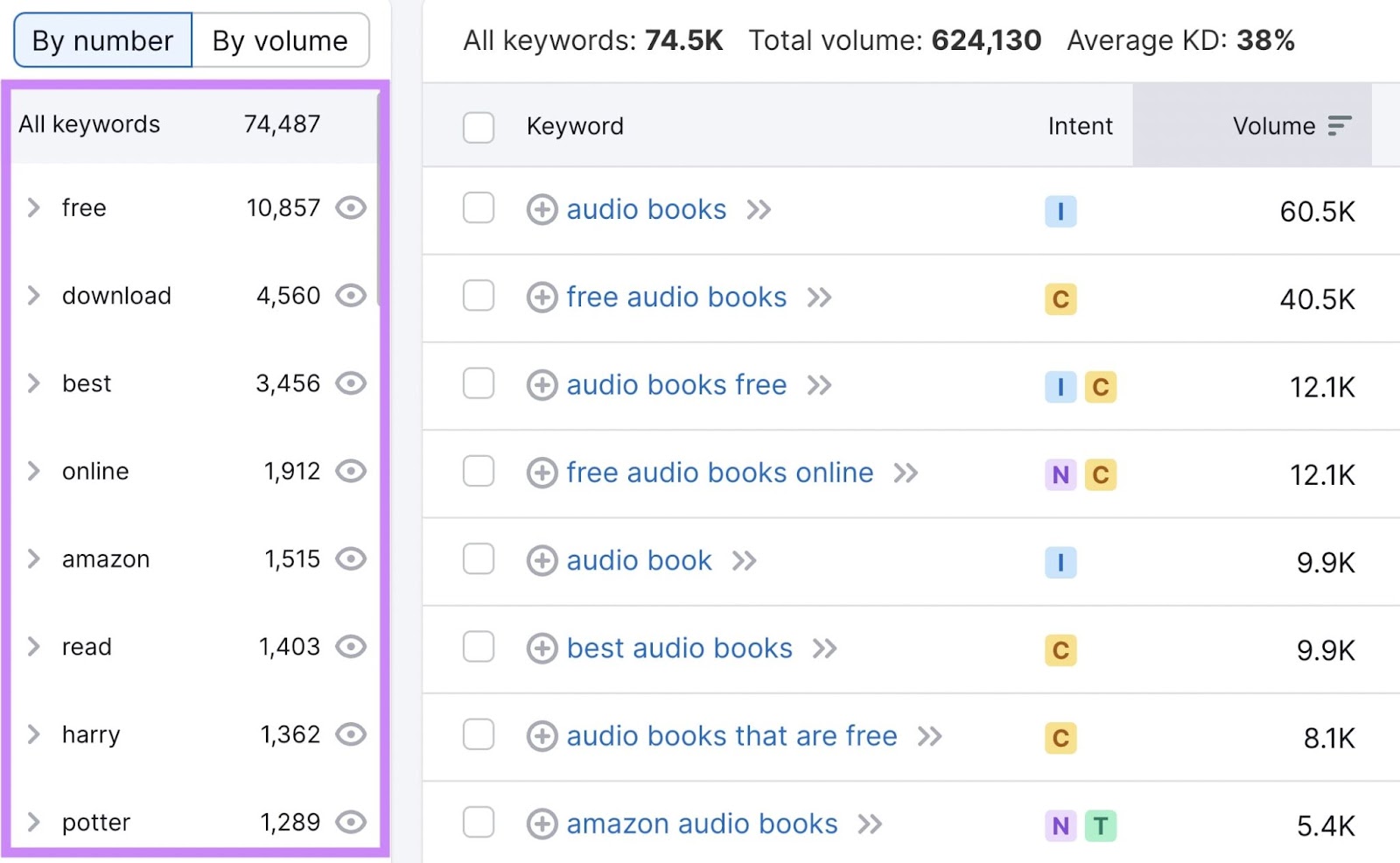
The Keyword Magic Tool automatically sorts related keywords into relevant categories.

They’re located in the left-hand sidebar. You can narrow your research by selecting one.

Here:

Keyword categories highlighted in the left-hand sidebar

Once you’ve selected your keywords, it’s time to create your content.

Read our guide to formatting a blog post when you’re ready to get started.

In the meantime, here are a few best practices to create optimized, high-quality content:

  • Incorporate keywords naturally into your content (and avoid keyword stuffing)
  • Make sure your content matches the search intent of your target keyword
  • Fully answer the query—your content should be useful to users
  • Write unique content that offers something competitors don’t
  • Include visual content (more on that later)

Further reading: What Is Quality Content & How to Create It

2. Place Target Keywords Strategically

So you have your target keywords. Now it’s time to strategically place them in your content. 

Google scans your content to see what a page is about—and readers will likely do the same.

So you should include your target keywords in these key areas:

  • H1
  • First paragraph
  • Subheaders (H2s, H3s, etc.)

This will help Google gain context about the topic of your page. And users will be able to quickly tell whether the page matches their search intent.

You can begin analyzing your content with On Page SEO Checker

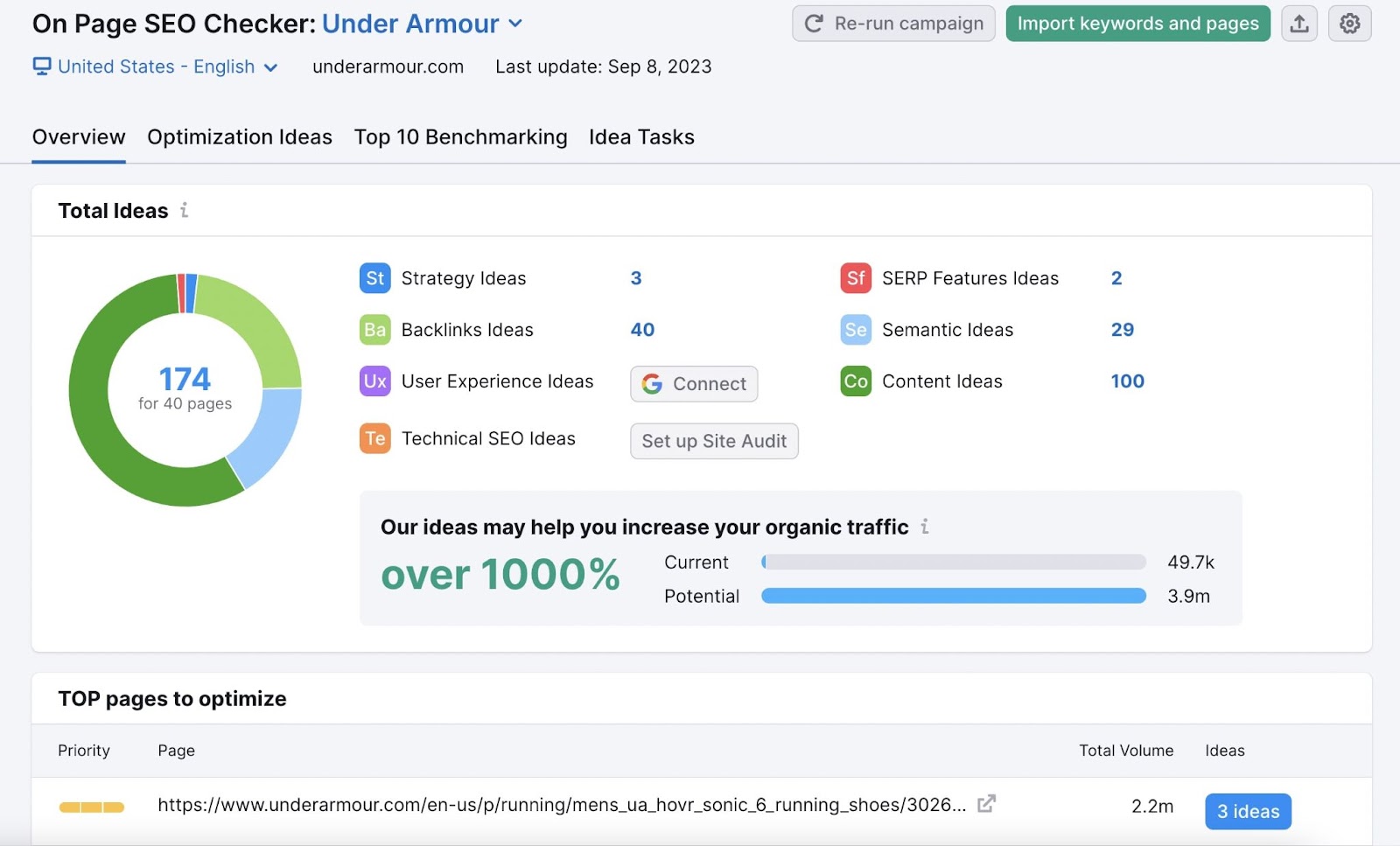
Start by configuring the tool for your site.

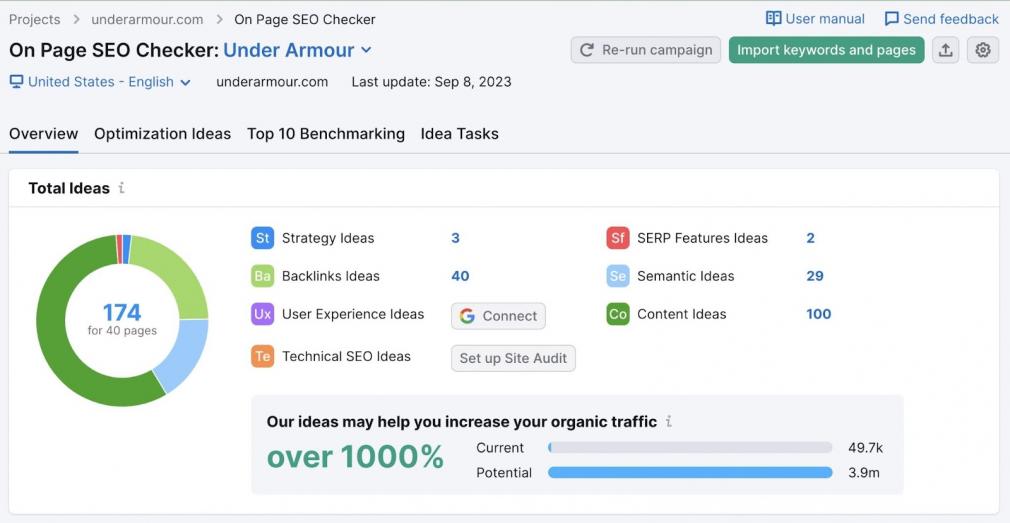
Once you complete the setup, you’ll see a page that looks like this:

On Page SEO Checker overview dashboard

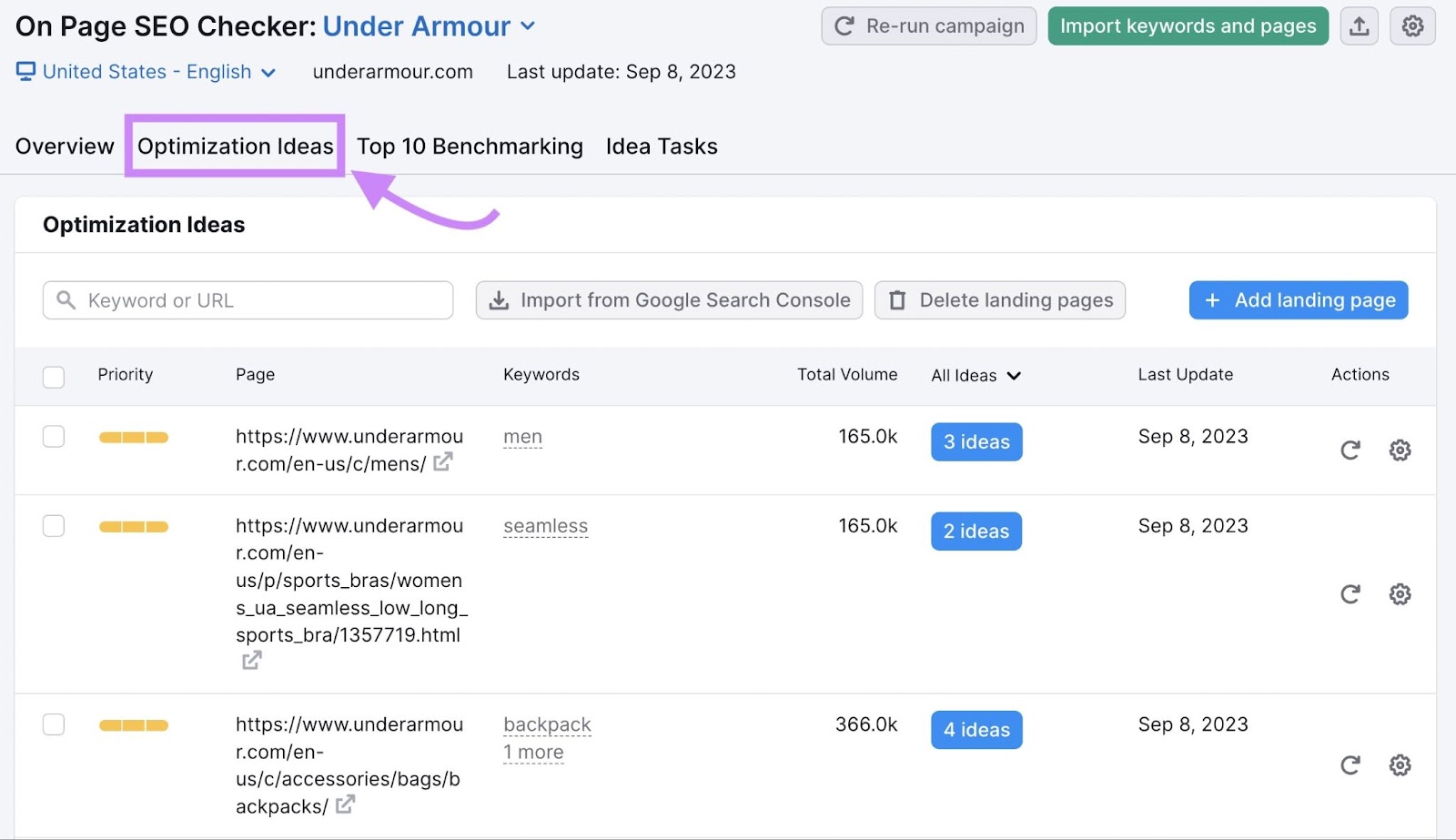
You can click on a specific page from the recommended “TOP pages to optimize” list, or review the “Optimization Ideas” tab for a complete overview.

"Optimization Ideas" tab highlighted in On Page SEO Checker

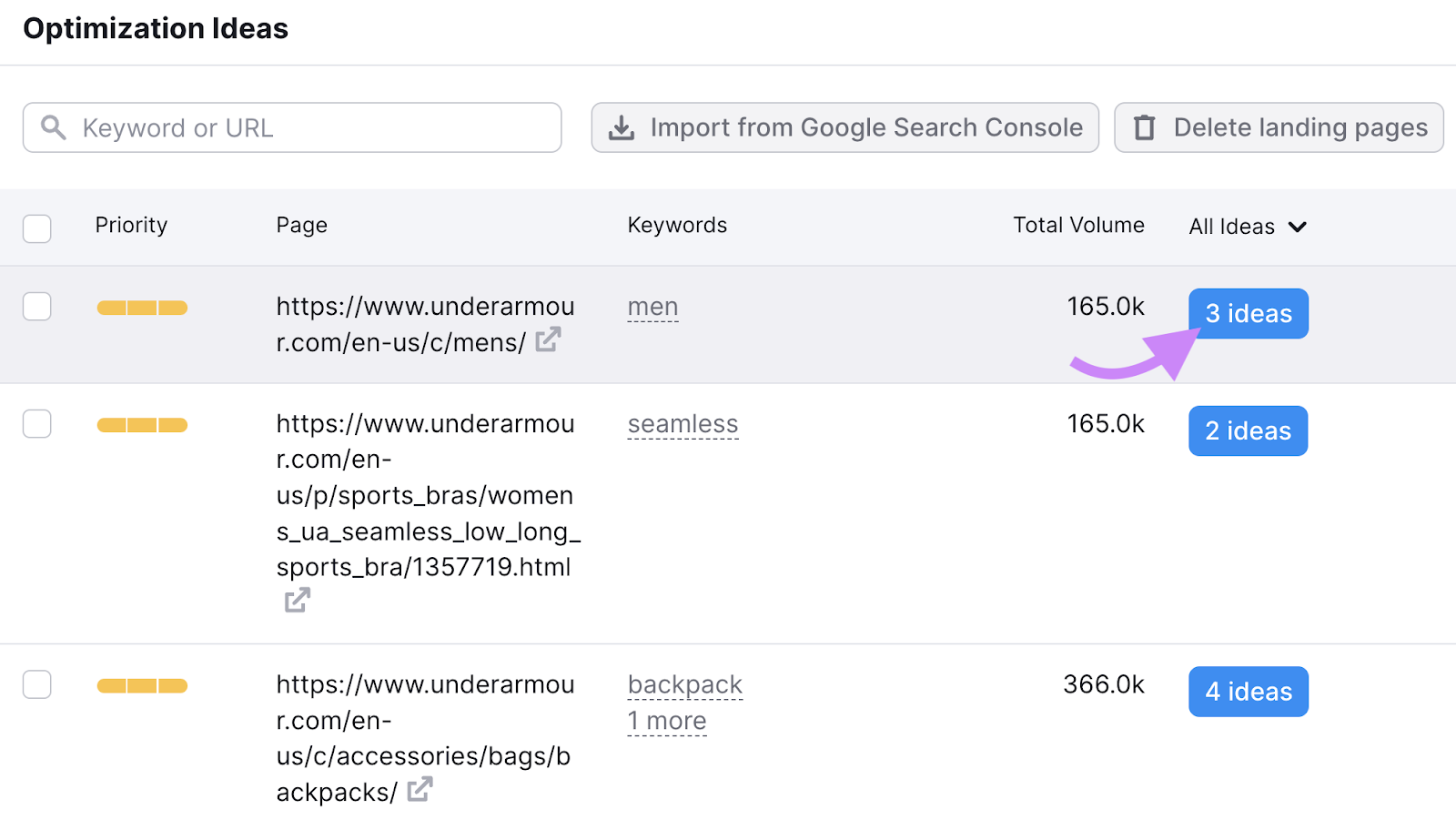
Click on the “# ideas” blue button to see recommendations.

"3 ideas" blue button highlighted under optimization ideas list

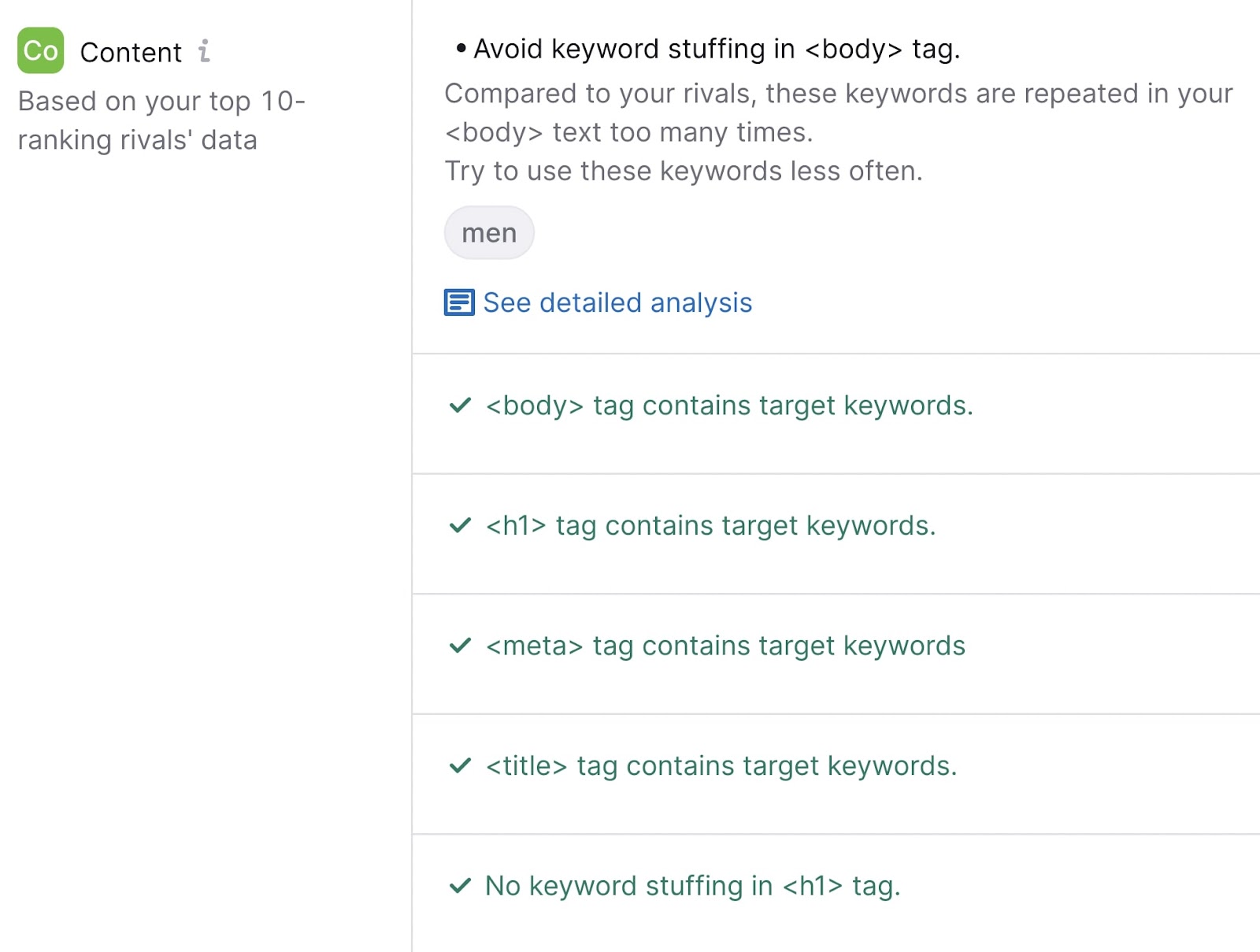
The content section will let you know whether you’ve used your target keywords in key places like the H1 and body of the of the page (and whether keyword stuffing is detected):

"Content" recommendations section in On Page SEO Checker

If the tool does detect issues, it will provide recommendations.

Like this:

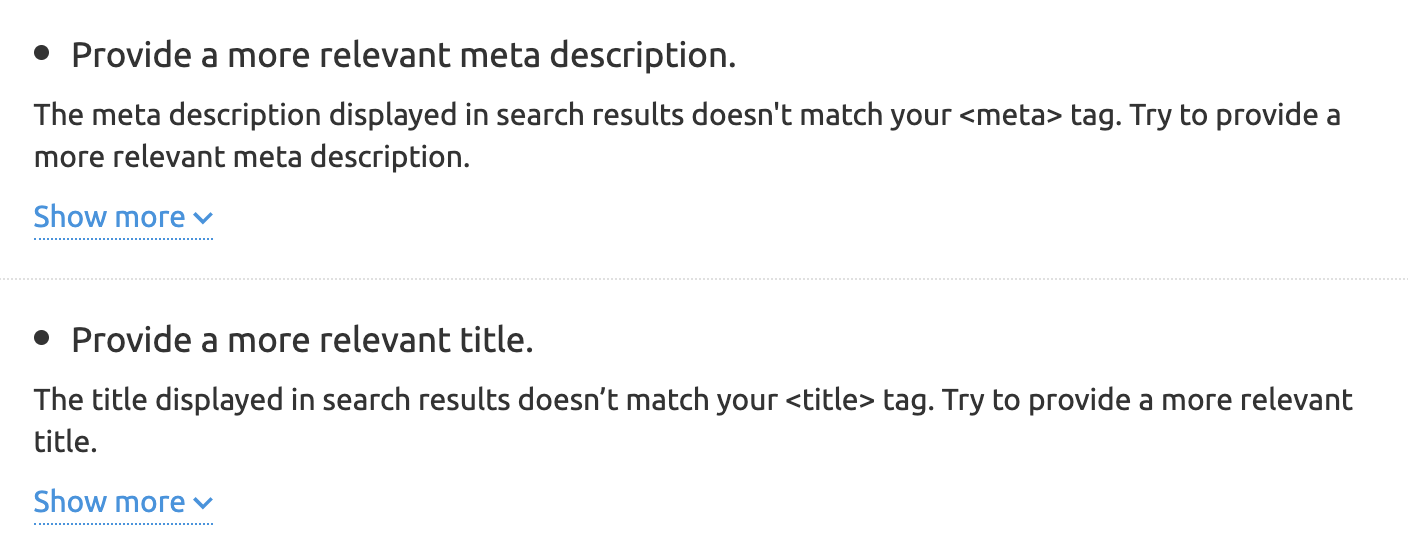
"Provide a more relevant meta description," and "Provide a more relevant title" ideas

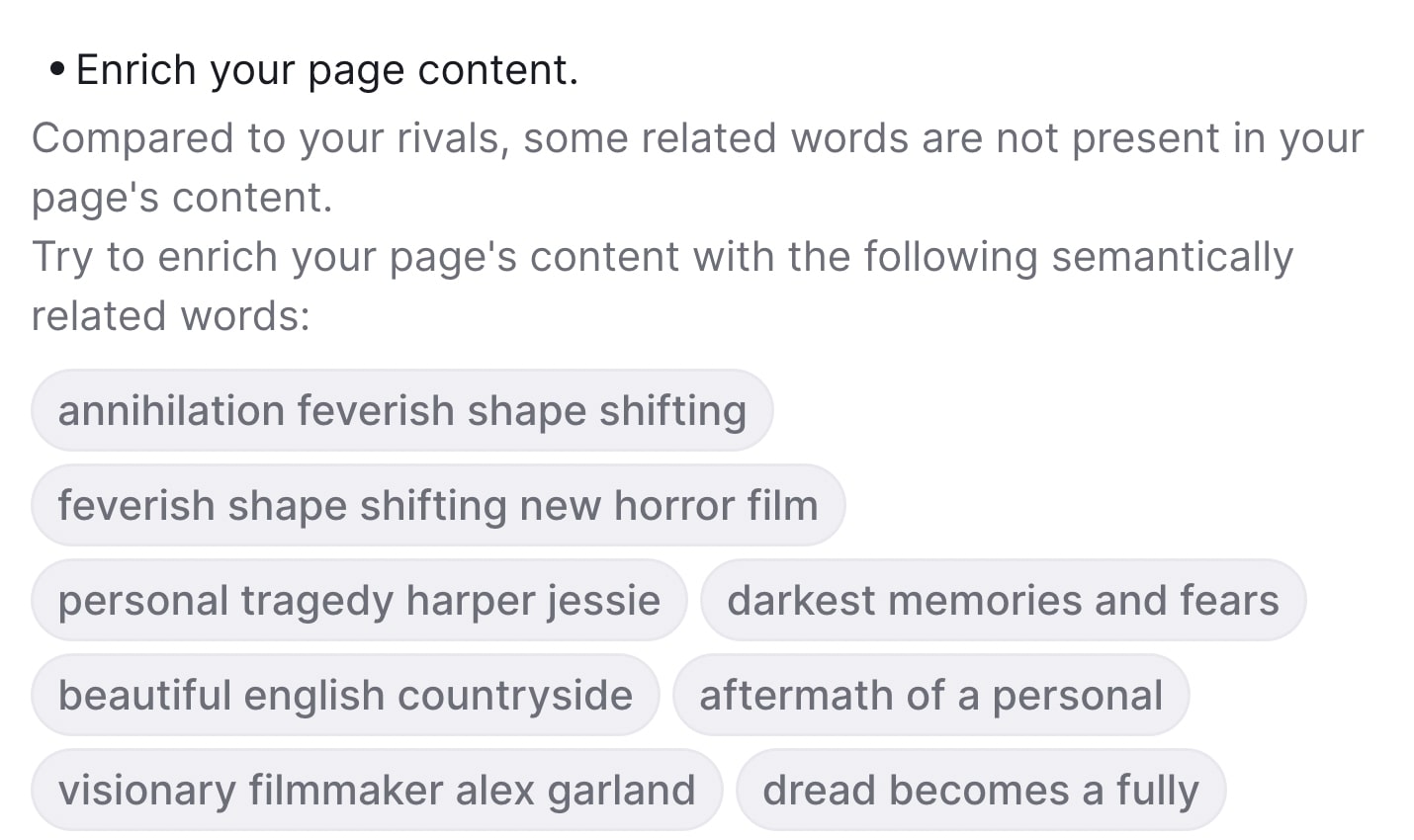
It also provides helpful information about related keywords you can add to your text to further optimize it.

"Enrich your page content" ideas section

Optimize Your Pages to Rank Better

with the On Page SEO Checker

Try for Free →

ADS illustration

3. Write Keyword-Rich Title Tags

Title tags are pieces of HTML code that indicate what the title of a page is. And display that title in search engines, social media posts, and browser tabs.

Additionally,they can influence whether a user decides to click on your page.

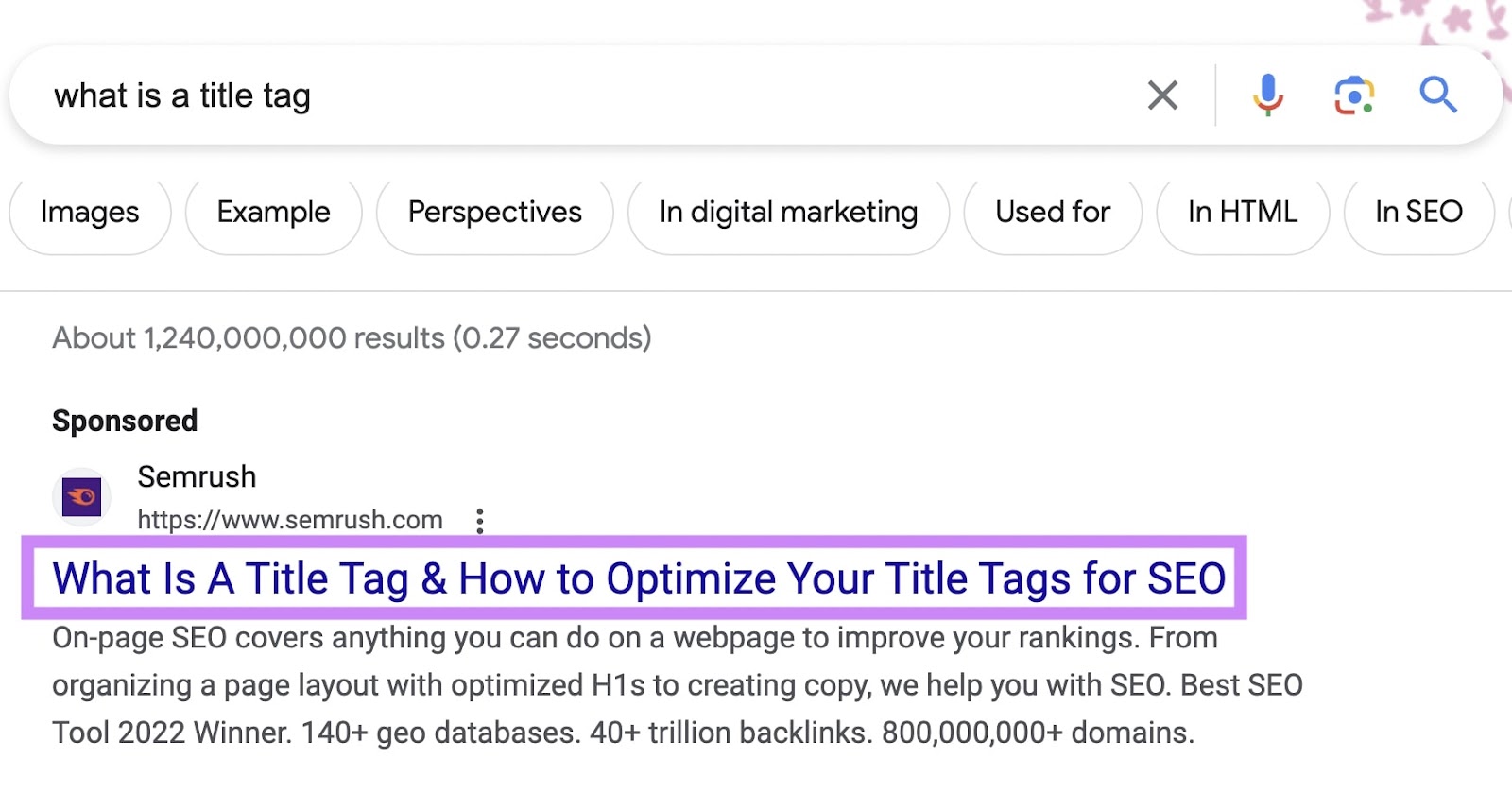
They can look like this on the SERP (search engine results page):

A title tag on SERP that reads "What is a title tag & how to optimize your title tags for SEO"

Here are a few tips to follow when writing your title tags:

  • Keep it brief. We recommend keeping title tags between 50 and 60 characters so Google doesn’t cut them off
  • Include your target keyword. This helps both Google and users determine what your page is about.
  • Be unique. Avoid duplicate title tags so that each individual page’s purpose is clear to Google (and users know what they’re clicking on).

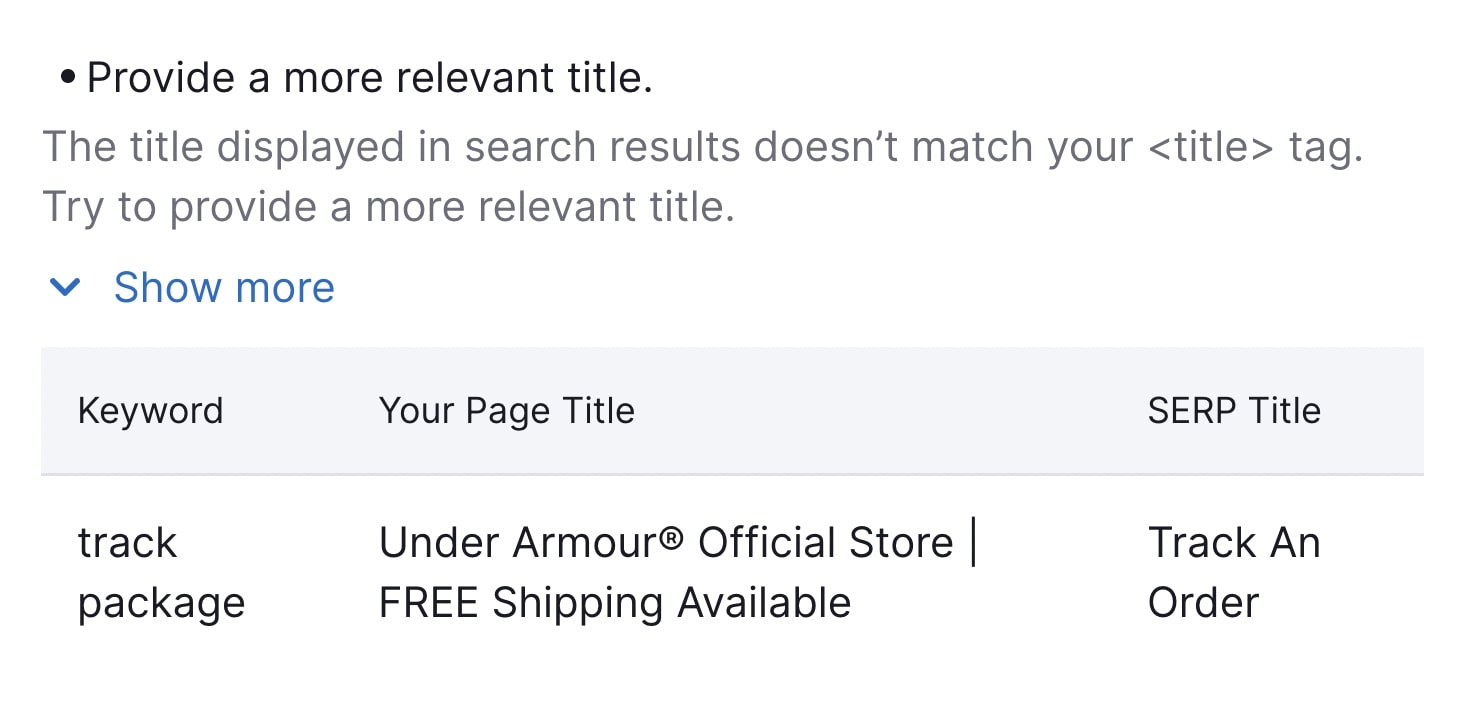
On Page SEO Checker will also provide tips to help you write better title tags. Plus information about what, how, and why to do it. 

"Provide a more relevant title" recommendation section

Further reading: What Is a Title Tag & How to Optimize Title Tags for Google

4. Write Click-Worthy Meta Descriptions

A meta description tag is an HTML element on a site that provides a brief summary of the page. And search engines like Google may use it to generate a snippet (the descriptive text part of a search result). 

It usually shows up on the SERP below your page’s title. Like this:

A meta description on SERP

Meta descriptions don’t directly influence Google rankings. 

Local SEO: What Is It & How to Do It

What Is Local SEO? 

Local SEO is the process of optimizing your online presence to increase local traffic, visibility, and brand awareness. 

Common local SEO tasks include:

  • Optimizing your Google Business Profile
  • Finding local keywords
  • Creating locally relevant content

Among others.

And any business that has a physical location or serves a geographic area can benefit from local SEO. 

This is an example of a local search result on Google:

an example of a local search result on Google

Local SEO can help your business appear in Google results for searches like these.

This article explains why local SEO is important, how it works, and how to do local SEO. 

Tip: create a free Semrush account so you can follow along. 

Why Is Local SEO Important? 

The best way to get your site in front of people in your area is to use local SEO marketing.

Over 75% of consumers in the United States, France, Germany, and the United Kingdom use Google when looking for business information. 

Making it the most dominant search engine for local search in those (and many other) countries. By far. 

And Google Maps searches for “shopping near me” have grown globally by more than 100% year over year. 

Mobile searches for “store open near me” also grew by over 250% in a recent two-year period. And “where to buy” + “near me” keywords by more than 200%. 

That’s hundreds of millions of searches every day. 

How Local SEO Works 

On top of Google’s usual ranking factors, its local search algorithms use three main factors to help find the best match:

  • Relevance (how closely related a Google Business Profile result is to the words a searcher uses in their query)
  • Distance (how far Google believes a user is from a business when they search)
  • Prominence (how important Google thinks a business is to its potential customers)

Then, Google displays two types of search results for local searches.

The “local pack” results (Google Maps and Business Profiles) and organic results. 

Organic results are the “normal” blue link search results we’re all used to seeing on Google. 

local pack (or map pack) is a Google feature that shows the top local business listings and a map. 

Like this:

local pack in Google search for "food near me"

For example, when you search for “nutritionist miami,” Google displays a local pack at the very top.

Google search for “nutritionist miami”

And the “regular” organic results underneath. 

Organic results in Google for “nutritionist miami”

But Google doesn’t just display local results for queries that contain a city, state, or “near me” keyword. 

If Google believes the intent of your search is local, it’ll display local results.

Even if your search isn’t explicitly local. 

For example, if you were in Los Angeles and searched for “barber shops,” Google would still display a local pack for Los Angeles barber shops. 

Like this:

Google search in Los Angeles for “barber shops”

How to Do Local SEO 

Now it’s time to create a strategy so you can increase your local rankings and boost traffic. The following steps will help you get started. 

Tip: Remember—you can create a free Semrush account to follow along. 

Do Local Keyword Research

Keyword research for local SEO is the process of finding keywords people use when searching for local products and services. 

Ranking for these keywords drives highly targeted local traffic to your site and sends more customers your way. 

To get started, you need a short list of keywords people can use to find your local business. 

Here are a few different ways to start.

Research Your Competitors

Seeing what your competitors are doing is an easy way to start gathering ideas. 

One of the best ways to do that is to use Semrush’s Organic Research tool.

Enter a competing site and click “Search.” 

Like so:

Semrush’s Organic Research tool

Then, go to the “Positions” tab. 

“Positions” tab

Click on “Advanced filters,” and exclude branded keywords (phrases that contain your competitor’s business name). 

using “Advanced filters” in Organic Research tool

And click the “KD%” column to sort the table by keyword difficulty. 

Like so:

“KD%” column

Now you have a list of keywords you might want to target.

a list of keywords results

If your competitors are targeting these keywords, then they’re likely highly relevant to your business, too. 

Check Local Keyword Volume Metrics 

You’ll also want to get a sense of how difficult it is for your content to rank locally for keywords you choose to target. 

Use the local volume metrics feature in the Keyword Overview tool to identify valuable keywords you’ll want to target in your content. 

Enter your desired keyword into the search bar at the top of the page and hit “Search.”

ou4RorXHRDM4svf_0XBlmoyvDmdG6ZiaaDcITtX4LMlvNZxWivxzEs1ZHWkJoqnaHSAn60XMTFxNGfPl8AWATXZjVl0DrzHu8rHgjjyzEa_Ib8yIvtfHPQTAr4KGUZPM93lqBeixrZCuBBc6RK2d68k

Once the tool delivers the keyword results, click on the drop-down bar labeled “Select location.” 

FvajtJ8WYwtcPnoUMjx9tV10tituXYw_oVRsAVHTuUonlJHsIMD9AiBGE7jVbM_QTyJJppCbz3oPVtOQxIvTLNG69uO2P5UuDy1wDl1XT4bQbkBQMiN0ZusSgegm3htqKs7UzKJnR5ly5NA8ddVgW18

Type in your locale. This could be a state, county, province, city, or municipality. Go as narrow on the location as you wish. 

59Ct9432qkmdX80FXt_27SACwJewRwMvDm2rFJ78NkqnOtv-RNrTxx8d14vPT7-PedwosWoQ5sGx2hrc8nwnuieqUkSkPOvMynXxJ3HrVFbcpB7ne7aQdCpa7XOBzzl9Jj1vz-ixvMVbkuBOuNaNnKw

You’ll get local data, as well as the comparative national data. So you can see how easy or difficult it is to rank for your keyword in your exact location. 

Note: Some of these widgets show local data (volume, difficulty, SERP analysis, etc.), while others remain national-level (keyword variations, questions, related keywords).

tgDQGvFDEnQeiHbKXRYnnFw4Sx94snCTVvElkga2kozl7AlYChTAvYEnH_WWO1RJ_jBlprgGjZ_J7uAKKyqEy7B_9a5ZmocdWe9hLmqti_DEYz75JT8E1SJ-p6O-tTiadlQD7RG7068Crj0zJh2mVSE

If you’re a business operating at the local level, this is an essential feature to leverage as you’re building your targeted keyword list. Use the data to get an edge over competitors by optimizing your content for your specific area.

Use Google Autocomplete

Google autocomplete is a feature within Google Search that makes it faster to complete searches when you start to type. 

Its purpose is to save users time by predicting what they’re going to search for.

And it can help you discover valuable long-tail keywords for local SEO.

That’s because Google’s autocomplete predictions depend partly on your location. 

For example, if you’re in Arcadia, California, and you type “best paella in” into the search bar, you’ll see something like this:

Google Autocomplete suggestions for “best paella in” in Arcadia, California

All these locations are near Arcadia or in California. 

So, to find valuable local keywords, start typing in keywords related to your business. 

For example, if you run a cleaning services business, type in “cleaning services” to get a list of local keyword suggestions.

Blog Post Examples and Best Practices to Inspire Your Writing

What Is a Blog Post?

A blog post is a piece of writing typically published on a website’s blog that presents information, opinions, experiences, or insights on a particular topic. Blog posts vary in length. And can include text, images, or videos, depending on the topic.

For instance, travel blogs are often rich in visuals. Showcasing the beauty or uniqueness of the places described. 

Like this blog post from travel blog Nomadic Matt:

Nomadic Matt's blog post titled "Where to stay in Brisbane: The best neighborhoods for your visit"

Business blog posts tend to be text-heavy. Focusing on data, expert interviews, industry news, statistics, and other helpful insights. 

Like this blog post on Entrepreneur

Entrepreneur's article on how AI is changing the way we look at job skills

What Is a Blog? 

A blog, or weblog, is a regularly updated website (or page on a website) that features blog posts on various topics. The content is usually written in a conversational style, addressing the reader directly.

Note

Depending on your goals, you can set up a standalone blog or integrate it into your website (e.g., https://www.myshop.com/blog/). The first option is more suitable if you plan to use your blog as an online journal or diary rather than a business tool.

How Does Blogging Benefit Your Business?

Blogging has many potential benefits. Here, we look at the top advantages of creating blog posts for your business. 

Builds Authority and Trust 

Blogging can be a powerful tool if you’re looking to establish authority in your industry. 

By consistently creating valuable and informative content, you can demonstrate expertise. And engage with your audience in meaningful ways.

Here’s how blogging helps build authority:

  • Showcases expertise: Blog posts that tackle industry issues, explain complex concepts, or provide how-to guides showcase your depth of knowledge. This helps position you as a thought leader in your industry. 
  • Improves SEO: Well-crafted blog posts that incorporate relevant keywords can improve a website’s search engine rankings. Higher visibility in search results can lead to increased website traffic. And leads. 
  • Builds trust: By providing valuable content without a hard sell, businesses can build trust with their audience 

Gives You Full Control 

With a blog, you have full control over the content you publish. Including the length, format, and topics you cover. 

Blogging platforms like Medium and social media sites like Facebook can remove content at any time. And for any reason. 

This may happen if what you write goes against their guidelines, someone (such as a competitor) reports your posts, or the platform goes out of business.

Another advantage of blogging is that it lets you build internal links, which can improve website navigation. Internal links connect various pages of your website, guiding customers through relevant content and product pages. 

A streamlined path makes it easier for customers to find and explore your products and other pages. 

An internal link from one page on your website (left) to another page with relevant content (right)

Let’s say you run an online store selling dietary supplements. You write about the benefits of protein on your blog. And link to product pages selling protein powder, protein bars, or other related products.

If your blog post is relevant and engaging, readers might click those links. And purchase the products you mentioned.

Improves Traffic and Visibility 

Incorporating SEO best practices into your content may lead to higher rankings, resulting in more traffic and exposure. 

For example, optimizing each blog post for specific keywords, such as “whey protein powder” or “vegan protein bars,” can help you get more targeted organic traffic. Keywords are search terms used by consumers to find information or products online.

Additionally, readers may share your blog posts on social media. Which can further boost website traffic and brand awareness.

Pro tip

Use Semrush’s Keyword Magic Tool to find top-performing search terms. Our tool can help you identify high-volume, low-competition keywords related to the topic you want to cover. 

Blog posts are a great way to build backlinks for your website or blog. Backlinks are incoming links from one website to another, acting as votes of confidence that help signal your site’s authority to search engines. 

High-quality backlinks can help boost your search engine rankings. And lead to more traffic. 

The more traffic you get, the likelier your target audience is to discover your brand and products. Some may become paying customers. And help spread the word about your business.

Lets You Target Users in All Funnel Stages

Blogging lets you create content for each stage of the marketing funnel. Which can help you attract, convert, and retain customers.

Here’s a quick look at how to apply the marketing funnel to blog content: 

  • Top of the funnel (ToFu): Create how-to posts, listicles, infographics, and other types of content for new audiences. These people are just discovering your blog, products, or services. The goal is to build awareness of the problem you can solve. 
  • Middle of the funnel (MoFu): Produce longer, more in-depth content, such as ultimate guides, case studies, and comparison posts, for readers who are already familiar with your business. At this point, you’ll want to generate interest in your offerings. 
  • Bottom of the funnel (BoFu): Go into detail about the products or services you promote on your blog with detailed reviews and product demos. Your readers are ready to take the desired action (e.g., book a consultation)—they just need an extra push. 
A visual of a simple conversion funnel, with tofu, mofu, and bofu sections

Further readingToFu, MoFu, BoFu: A Practical Guide to the Conversion Funnel

6 Effective Blog Post Formats

There’s more than one way to format blog posts, depending on where your target audience is in the funnel. And your goals for the content. 

With that in mind, let’s see some of the most common types of blog posts.

1. Listicles

Listicles are articles or blog posts organized in list format. 

For example, a blog post titled “Top 10 Movies to Watch This Weekend” or “10 Must-Have Kitchen Appliances Every Home Needs” would be considered a listicle. 

Use listicles to break complex topics into smaller, more manageable chunks. And share tips, strategies, products, or ideas.

For instance, Healthline uses this format to cover complex topics in a clear and engaging manner. 

Below, you can see a listicle blog post about health and nutrition, broken down into 27 tips.

Healthline's listicle blog post about health and nutrition, broken down into 27 tips

Each tip is numbered and covers one idea, such as “Don’t fear coffee” and “Eat fatty fish.” 

On-Page SEO: What It Is and How to Do It

On-page SEO (also called on-site SEO) is the process of optimizing webpages and their content for both search engines and users. It can help rank pages higher on Google and drive more organic traffic. 

Common tasks associated with on-page SEO include optimizing for search intent, title tags, internal links, and URLs.

Below, we’ll cover different techniques for optimizing your site for on-page concerns.

But first, let’s explore the difference between on-page SEO and off-page SEO:

On-Page SEO vs. Off-Page SEO

On-page SEO covers anything you can do on a webpage (or internally) to improve your rankings. 

Off-page SEO covers anything you can optimize outside of your site (or externally) in an attempt to boost your rankings. Backlinks are arguably the biggest off-page SEO factor. Other examples include social media and PR.

Both are important components of any good SEO strategy.

But you have more control over on-page SEO factors. So focusing on those is a good place to start.

On-page SEO vs Off-page SEO

Why Is On-Page SEO Important?

Search engines use keywords and other on-page SEO elements to check whether a page matches a user’s search intent. 

And if the page is relevant and useful, Google serves it to the user.

In other words:

Google pays attention to on-page SEO signals when ranking pages.

The Google algorithm is always changing, but Google continues to prioritize user experience. Google recommends focusing on “people-first content.” 

Meaning creating valuable content that matches user intent is more important than ever.

Now, let’s take a look at how you can update your content to reflect on-page SEO best practices.

Pro tip

To quickly get actionable on-page SEO optimization ideas for your site, run it through On Page SEO Checker.

8PBurtK4KLqV9AYVQTiYYIUUXHukkU562tZAf8cMRcEBtK9gBY4kH-B3T9nHzy3bInYLfEKH62U6_hSibTwGkrzAyS6SqYdrib4WZAKGHeYbPqyxew54dzPayZ9HBCQWOOqsO-5VSRrqwdjgiH_41Mk

9 On-Page SEO Techniques for Your Website

Here are some key on-page optimization techniques you should consider:

  1. Write unique, helpful content 
  2. Place target keywords strategically
  3. Write keyword-rich title tags
  4. Write click-worthy meta descriptions
  5. Use headings and subheadings to structure your page
  6. Optimize URLs
  7. Add internal links
  8. Add external links 
  9. Include and optimize images 

Let’s look at these in more detail.

Tip

Create a free Semrush account (no credit card needed) to follow along with the techniques in this guide. 

1. Write Unique, Helpful Content 

One of the most important on site SEO steps you should take is to create high-quality content that matches your readers’ search intent.

Start by performing keyword research to find relevant topics and target keywords.

For this example, we’ll use the Keyword Magic Tool.

Enter the topic you want to research and click “Search.” We’ll use the keyword “audio book” as our example. 

"audio book" entered into the Keyword Magic Tool search bar

You’ll get a list of keywords related to your seed keyword, sorted by search volume.

A list of keywords related to "audio books"

High search volume can be useful to target. 

But pay attention to the keyword difficulty (KD %) level, too. It’s much more difficult to rank for more competitive keywords (which have higher KD % scores).

"KD%" column highlighted in keywords list

Target less competitive long-tail keywords, too. 

They often have lower search volume but lower keyword difficulty. Which means they can be easier to rank for.

The Keyword Magic Tool automatically sorts related keywords into relevant categories.

They’re located in the left-hand sidebar. You can narrow your research by selecting one.

Here:

Keyword categories highlighted in the left-hand sidebar

Once you’ve selected your keywords, it’s time to create your content.

Read our guide to formatting a blog post when you’re ready to get started.

In the meantime, here are a few best practices to create optimized, high-quality content:

  • Incorporate keywords naturally into your content (and avoid keyword stuffing)
  • Make sure your content matches the search intent of your target keyword
  • Fully answer the query—your content should be useful to users
  • Write unique content that offers something competitors don’t
  • Include visual content (more on that later)

Further reading: What Is Quality Content & How to Create It

2. Place Target Keywords Strategically

So you have your target keywords. Now it’s time to strategically place them in your content. 

Google scans your content to see what a page is about—and readers will likely do the same.

So you should include your target keywords in these key areas:

  • H1
  • First paragraph
  • Subheaders (H2s, H3s, etc.)

This will help Google gain context about the topic of your page. And users will be able to quickly tell whether the page matches their search intent.

You can begin analyzing your content with On Page SEO Checker

Start by configuring the tool for your site.

Once you complete the setup, you’ll see a page that looks like this:

On Page SEO Checker overview dashboard

You can click on a specific page from the recommended “TOP pages to optimize” list, or review the “Optimization Ideas” tab for a complete overview.

"Optimization Ideas" tab highlighted in On Page SEO Checker

Click on the “# ideas” blue button to see recommendations.

"3 ideas" blue button highlighted under optimization ideas list

The content section will let you know whether you’ve used your target keywords in key places like the H1 and body of the of the page (and whether keyword stuffing is detected):

"Content" recommendations section in On Page SEO Checker

If the tool does detect issues, it will provide recommendations.

Like this:

"Provide a more relevant meta description," and "Provide a more relevant title" ideas

It also provides helpful information about related keywords you can add to your text to further optimize it.

"Enrich your page content" ideas section

Optimize Your Pages to Rank Better

with the On Page SEO Checker

Try for Free →

ADS illustration

3. Write Keyword-Rich Title Tags

Title tags are pieces of HTML code that indicate what the title of a page is. And display that title in search engines, social media posts, and browser tabs.

Additionally,they can influence whether a user decides to click on your page.

They can look like this on the SERP (search engine results page):

A title tag on SERP that reads "What is a title tag & how to optimize your title tags for SEO"

Here are a few tips to follow when writing your title tags:

  • Keep it brief. We recommend keeping title tags between 50 and 60 characters so Google doesn’t cut them off
  • Include your target keyword. This helps both Google and users determine what your page is about.
  • Be unique. Avoid duplicate title tags so that each individual page’s purpose is clear to Google (and users know what they’re clicking on).

On Page SEO Checker will also provide tips to help you write better title tags. Plus information about what, how, and why to do it. 

"Provide a more relevant title" recommendation section

Further reading: What Is a Title Tag & How to Optimize Title Tags for Google

4. Write Click-Worthy Meta Descriptions

A meta description tag is an HTML element on a site that provides a brief summary of the page. And search engines like Google may use it to generate a snippet (the descriptive text part of a search result). 

It usually shows up on the SERP below your page’s title. Like this:

A meta description on SERP

Meta descriptions don’t directly influence Google rankings. 

Local SEO: What Is It & How to Do It

What Is Local SEO? 

Local SEO is the process of optimizing your online presence to increase local traffic, visibility, and brand awareness. 

Common local SEO tasks include:

  • Optimizing your Google Business Profile
  • Finding local keywords
  • Creating locally relevant content

Among others.

And any business that has a physical location or serves a geographic area can benefit from local SEO. 

This is an example of a local search result on Google:

an example of a local search result on Google

Local SEO can help your business appear in Google results for searches like these.

This article explains why local SEO is important, how it works, and how to do local SEO. 

Tip: create a free Semrush account so you can follow along. 

Why Is Local SEO Important? 

The best way to get your site in front of people in your area is to use local SEO marketing.

Over 75% of consumers in the United States, France, Germany, and the United Kingdom use Google when looking for business information. 

Making it the most dominant search engine for local search in those (and many other) countries. By far. 

And Google Maps searches for “shopping near me” have grown globally by more than 100% year over year. 

Mobile searches for “store open near me” also grew by over 250% in a recent two-year period. And “where to buy” + “near me” keywords by more than 200%. 

That’s hundreds of millions of searches every day. 

How Local SEO Works 

On top of Google’s usual ranking factors, its local search algorithms use three main factors to help find the best match:

  • Relevance (how closely related a Google Business Profile result is to the words a searcher uses in their query)
  • Distance (how far Google believes a user is from a business when they search)
  • Prominence (how important Google thinks a business is to its potential customers)

Then, Google displays two types of search results for local searches.

The “local pack” results (Google Maps and Business Profiles) and organic results. 

Organic results are the “normal” blue link search results we’re all used to seeing on Google. 

local pack (or map pack) is a Google feature that shows the top local business listings and a map. 

Like this:

local pack in Google search for "food near me"

For example, when you search for “nutritionist miami,” Google displays a local pack at the very top.

Google search for “nutritionist miami”

And the “regular” organic results underneath. 

Organic results in Google for “nutritionist miami”

But Google doesn’t just display local results for queries that contain a city, state, or “near me” keyword. 

If Google believes the intent of your search is local, it’ll display local results.

Even if your search isn’t explicitly local. 

For example, if you were in Los Angeles and searched for “barber shops,” Google would still display a local pack for Los Angeles barber shops. 

Like this:

Google search in Los Angeles for “barber shops”

How to Do Local SEO 

Now it’s time to create a strategy so you can increase your local rankings and boost traffic. The following steps will help you get started. 

Tip: Remember—you can create a free Semrush account to follow along. 

Do Local Keyword Research

Keyword research for local SEO is the process of finding keywords people use when searching for local products and services. 

Ranking for these keywords drives highly targeted local traffic to your site and sends more customers your way. 

To get started, you need a short list of keywords people can use to find your local business. 

Here are a few different ways to start.

Research Your Competitors

Seeing what your competitors are doing is an easy way to start gathering ideas. 

One of the best ways to do that is to use Semrush’s Organic Research tool.

Enter a competing site and click “Search.” 

Like so:

Semrush’s Organic Research tool

Then, go to the “Positions” tab. 

“Positions” tab

Click on “Advanced filters,” and exclude branded keywords (phrases that contain your competitor’s business name). 

using “Advanced filters” in Organic Research tool

And click the “KD%” column to sort the table by keyword difficulty. 

Like so:

“KD%” column

Now you have a list of keywords you might want to target.

a list of keywords results

If your competitors are targeting these keywords, then they’re likely highly relevant to your business, too. 

Check Local Keyword Volume Metrics 

You’ll also want to get a sense of how difficult it is for your content to rank locally for keywords you choose to target. 

Use the local volume metrics feature in the Keyword Overview tool to identify valuable keywords you’ll want to target in your content. 

Enter your desired keyword into the search bar at the top of the page and hit “Search.”

ou4RorXHRDM4svf_0XBlmoyvDmdG6ZiaaDcITtX4LMlvNZxWivxzEs1ZHWkJoqnaHSAn60XMTFxNGfPl8AWATXZjVl0DrzHu8rHgjjyzEa_Ib8yIvtfHPQTAr4KGUZPM93lqBeixrZCuBBc6RK2d68k

Once the tool delivers the keyword results, click on the drop-down bar labeled “Select location.” 

FvajtJ8WYwtcPnoUMjx9tV10tituXYw_oVRsAVHTuUonlJHsIMD9AiBGE7jVbM_QTyJJppCbz3oPVtOQxIvTLNG69uO2P5UuDy1wDl1XT4bQbkBQMiN0ZusSgegm3htqKs7UzKJnR5ly5NA8ddVgW18

Type in your locale. This could be a state, county, province, city, or municipality. Go as narrow on the location as you wish. 

59Ct9432qkmdX80FXt_27SACwJewRwMvDm2rFJ78NkqnOtv-RNrTxx8d14vPT7-PedwosWoQ5sGx2hrc8nwnuieqUkSkPOvMynXxJ3HrVFbcpB7ne7aQdCpa7XOBzzl9Jj1vz-ixvMVbkuBOuNaNnKw

You’ll get local data, as well as the comparative national data. So you can see how easy or difficult it is to rank for your keyword in your exact location. 

Note: Some of these widgets show local data (volume, difficulty, SERP analysis, etc.), while others remain national-level (keyword variations, questions, related keywords).

tgDQGvFDEnQeiHbKXRYnnFw4Sx94snCTVvElkga2kozl7AlYChTAvYEnH_WWO1RJ_jBlprgGjZ_J7uAKKyqEy7B_9a5ZmocdWe9hLmqti_DEYz75JT8E1SJ-p6O-tTiadlQD7RG7068Crj0zJh2mVSE

If you’re a business operating at the local level, this is an essential feature to leverage as you’re building your targeted keyword list. Use the data to get an edge over competitors by optimizing your content for your specific area.

Use Google Autocomplete

Google autocomplete is a feature within Google Search that makes it faster to complete searches when you start to type. 

Its purpose is to save users time by predicting what they’re going to search for.

And it can help you discover valuable long-tail keywords for local SEO.

That’s because Google’s autocomplete predictions depend partly on your location. 

For example, if you’re in Arcadia, California, and you type “best paella in” into the search bar, you’ll see something like this:

Google Autocomplete suggestions for “best paella in” in Arcadia, California

All these locations are near Arcadia or in California. 

So, to find valuable local keywords, start typing in keywords related to your business. 

For example, if you run a cleaning services business, type in “cleaning services” to get a list of local keyword suggestions.
Blog Post Examples and Best Practices to Inspire Your Writing

What Is a Blog Post?

A blog post is a piece of writing typically published on a website’s blog that presents information, opinions, experiences, or insights on a particular topic. Blog posts vary in length. And can include text, images, or videos, depending on the topic.

For instance, travel blogs are often rich in visuals. Showcasing the beauty or uniqueness of the places described. 

Like this blog post from travel blog Nomadic Matt:

Nomadic Matt's blog post titled "Where to stay in Brisbane: The best neighborhoods for your visit"

Business blog posts tend to be text-heavy. Focusing on data, expert interviews, industry news, statistics, and other helpful insights. 

Like this blog post on Entrepreneur

Entrepreneur's article on how AI is changing the way we look at job skills

What Is a Blog? 

A blog, or weblog, is a regularly updated website (or page on a website) that features blog posts on various topics. The content is usually written in a conversational style, addressing the reader directly.

Note

Depending on your goals, you can set up a standalone blog or integrate it into your website (e.g., https://www.myshop.com/blog/). The first option is more suitable if you plan to use your blog as an online journal or diary rather than a business tool.

How Does Blogging Benefit Your Business?

Blogging has many potential benefits. Here, we look at the top advantages of creating blog posts for your business. 

Builds Authority and Trust 

Blogging can be a powerful tool if you’re looking to establish authority in your industry. 

By consistently creating valuable and informative content, you can demonstrate expertise. And engage with your audience in meaningful ways.

Here’s how blogging helps build authority:

  • Showcases expertise: Blog posts that tackle industry issues, explain complex concepts, or provide how-to guides showcase your depth of knowledge. This helps position you as a thought leader in your industry. 
  • Improves SEO: Well-crafted blog posts that incorporate relevant keywords can improve a website’s search engine rankings. Higher visibility in search results can lead to increased website traffic. And leads. 
  • Builds trust: By providing valuable content without a hard sell, businesses can build trust with their audience 

Gives You Full Control 

With a blog, you have full control over the content you publish. Including the length, format, and topics you cover. 

Blogging platforms like Medium and social media sites like Facebook can remove content at any time. And for any reason. 

This may happen if what you write goes against their guidelines, someone (such as a competitor) reports your posts, or the platform goes out of business.

Another advantage of blogging is that it lets you build internal links, which can improve website navigation. Internal links connect various pages of your website, guiding customers through relevant content and product pages. 

A streamlined path makes it easier for customers to find and explore your products and other pages. 

An internal link from one page on your website (left) to another page with relevant content (right)

Let’s say you run an online store selling dietary supplements. You write about the benefits of protein on your blog. And link to product pages selling protein powder, protein bars, or other related products.

If your blog post is relevant and engaging, readers might click those links. And purchase the products you mentioned.

Improves Traffic and Visibility 

Incorporating SEO best practices into your content may lead to higher rankings, resulting in more traffic and exposure. 

For example, optimizing each blog post for specific keywords, such as “whey protein powder” or “vegan protein bars,” can help you get more targeted organic traffic. Keywords are search terms used by consumers to find information or products online.

Additionally, readers may share your blog posts on social media. Which can further boost website traffic and brand awareness.

Pro tip

Use Semrush’s Keyword Magic Tool to find top-performing search terms. Our tool can help you identify high-volume, low-competition keywords related to the topic you want to cover. 

Blog posts are a great way to build backlinks for your website or blog. Backlinks are incoming links from one website to another, acting as votes of confidence that help signal your site’s authority to search engines. 

High-quality backlinks can help boost your search engine rankings. And lead to more traffic. 

The more traffic you get, the likelier your target audience is to discover your brand and products. Some may become paying customers. And help spread the word about your business.

Lets You Target Users in All Funnel Stages

Blogging lets you create content for each stage of the marketing funnel. Which can help you attract, convert, and retain customers.

Here’s a quick look at how to apply the marketing funnel to blog content: 

  • Top of the funnel (ToFu): Create how-to posts, listicles, infographics, and other types of content for new audiences. These people are just discovering your blog, products, or services. The goal is to build awareness of the problem you can solve. 
  • Middle of the funnel (MoFu): Produce longer, more in-depth content, such as ultimate guides, case studies, and comparison posts, for readers who are already familiar with your business. At this point, you’ll want to generate interest in your offerings. 
  • Bottom of the funnel (BoFu): Go into detail about the products or services you promote on your blog with detailed reviews and product demos. Your readers are ready to take the desired action (e.g., book a consultation)—they just need an extra push. 
A visual of a simple conversion funnel, with tofu, mofu, and bofu sections

Further readingToFu, MoFu, BoFu: A Practical Guide to the Conversion Funnel

6 Effective Blog Post Formats

There’s more than one way to format blog posts, depending on where your target audience is in the funnel. And your goals for the content. 

With that in mind, let’s see some of the most common types of blog posts.

1. Listicles

Listicles are articles or blog posts organized in list format. 

For example, a blog post titled “Top 10 Movies to Watch This Weekend” or “10 Must-Have Kitchen Appliances Every Home Needs” would be considered a listicle. 

Use listicles to break complex topics into smaller, more manageable chunks. And share tips, strategies, products, or ideas.

For instance, Healthline uses this format to cover complex topics in a clear and engaging manner. 

Below, you can see a listicle blog post about health and nutrition, broken down into 27 tips.

Healthline's listicle blog post about health and nutrition, broken down into 27 tips

Each tip is numbered and covers one idea, such as “Don’t fear coffee” and “Eat fatty fish.” 

On-Page SEO: What It Is and How to Do It

On-page SEO (also called on-site SEO) is the process of optimizing webpages and their content for both search engines and users. It can help rank pages higher on Google and drive more organic traffic. 

Common tasks associated with on-page SEO include optimizing for search intent, title tags, internal links, and URLs.

Below, we’ll cover different techniques for optimizing your site for on-page concerns.

But first, let’s explore the difference between on-page SEO and off-page SEO:

On-Page SEO vs. Off-Page SEO

On-page SEO covers anything you can do on a webpage (or internally) to improve your rankings. 

Off-page SEO covers anything you can optimize outside of your site (or externally) in an attempt to boost your rankings. Backlinks are arguably the biggest off-page SEO factor. Other examples include social media and PR.

Both are important components of any good SEO strategy.

But you have more control over on-page SEO factors. So focusing on those is a good place to start.

On-page SEO vs Off-page SEO

Why Is On-Page SEO Important?

Search engines use keywords and other on-page SEO elements to check whether a page matches a user’s search intent. 

And if the page is relevant and useful, Google serves it to the user.

In other words:

Google pays attention to on-page SEO signals when ranking pages.

The Google algorithm is always changing, but Google continues to prioritize user experience. Google recommends focusing on “people-first content.” 

Meaning creating valuable content that matches user intent is more important than ever.

Now, let’s take a look at how you can update your content to reflect on-page SEO best practices.

Pro tip

To quickly get actionable on-page SEO optimization ideas for your site, run it through On Page SEO Checker.

8PBurtK4KLqV9AYVQTiYYIUUXHukkU562tZAf8cMRcEBtK9gBY4kH-B3T9nHzy3bInYLfEKH62U6_hSibTwGkrzAyS6SqYdrib4WZAKGHeYbPqyxew54dzPayZ9HBCQWOOqsO-5VSRrqwdjgiH_41Mk

9 On-Page SEO Techniques for Your Website

Here are some key on-page optimization techniques you should consider:

  1. Write unique, helpful content 
  2. Place target keywords strategically
  3. Write keyword-rich title tags
  4. Write click-worthy meta descriptions
  5. Use headings and subheadings to structure your page
  6. Optimize URLs
  7. Add internal links
  8. Add external links 
  9. Include and optimize images 

Let’s look at these in more detail.

Tip

Create a free Semrush account (no credit card needed) to follow along with the techniques in this guide. 

1. Write Unique, Helpful Content 

One of the most important on site SEO steps you should take is to create high-quality content that matches your readers’ search intent.

Start by performing keyword research to find relevant topics and target keywords.

For this example, we’ll use the Keyword Magic Tool.

Enter the topic you want to research and click “Search.” We’ll use the keyword “audio book” as our example. 

"audio book" entered into the Keyword Magic Tool search bar

You’ll get a list of keywords related to your seed keyword, sorted by search volume.

A list of keywords related to "audio books"

High search volume can be useful to target. 

But pay attention to the keyword difficulty (KD %) level, too. It’s much more difficult to rank for more competitive keywords (which have higher KD % scores).

"KD%" column highlighted in keywords list

Target less competitive long-tail keywords, too. 

They often have lower search volume but lower keyword difficulty. Which means they can be easier to rank for.

The Keyword Magic Tool automatically sorts related keywords into relevant categories.

They’re located in the left-hand sidebar. You can narrow your research by selecting one.

Here:

Keyword categories highlighted in the left-hand sidebar

Once you’ve selected your keywords, it’s time to create your content.

Read our guide to formatting a blog post when you’re ready to get started.

In the meantime, here are a few best practices to create optimized, high-quality content:

  • Incorporate keywords naturally into your content (and avoid keyword stuffing)
  • Make sure your content matches the search intent of your target keyword
  • Fully answer the query—your content should be useful to users
  • Write unique content that offers something competitors don’t
  • Include visual content (more on that later)

Further reading: What Is Quality Content & How to Create It

2. Place Target Keywords Strategically

So you have your target keywords. Now it’s time to strategically place them in your content. 

Google scans your content to see what a page is about—and readers will likely do the same.

So you should include your target keywords in these key areas:

  • H1
  • First paragraph
  • Subheaders (H2s, H3s, etc.)

This will help Google gain context about the topic of your page. And users will be able to quickly tell whether the page matches their search intent.

You can begin analyzing your content with On Page SEO Checker

Start by configuring the tool for your site.

Once you complete the setup, you’ll see a page that looks like this:

On Page SEO Checker overview dashboard

You can click on a specific page from the recommended “TOP pages to optimize” list, or review the “Optimization Ideas” tab for a complete overview.

"Optimization Ideas" tab highlighted in On Page SEO Checker

Click on the “# ideas” blue button to see recommendations.

"3 ideas" blue button highlighted under optimization ideas list

The content section will let you know whether you’ve used your target keywords in key places like the H1 and body of the of the page (and whether keyword stuffing is detected):

"Content" recommendations section in On Page SEO Checker

If the tool does detect issues, it will provide recommendations.

Like this:

"Provide a more relevant meta description," and "Provide a more relevant title" ideas

It also provides helpful information about related keywords you can add to your text to further optimize it.

"Enrich your page content" ideas section

Optimize Your Pages to Rank Better

with the On Page SEO Checker

Try for Free →

ADS illustration

3. Write Keyword-Rich Title Tags

Title tags are pieces of HTML code that indicate what the title of a page is. And display that title in search engines, social media posts, and browser tabs.

Additionally,they can influence whether a user decides to click on your page.

They can look like this on the SERP (search engine results page):

A title tag on SERP that reads "What is a title tag & how to optimize your title tags for SEO"

Here are a few tips to follow when writing your title tags:

  • Keep it brief. We recommend keeping title tags between 50 and 60 characters so Google doesn’t cut them off
  • Include your target keyword. This helps both Google and users determine what your page is about.
  • Be unique. Avoid duplicate title tags so that each individual page’s purpose is clear to Google (and users know what they’re clicking on).

On Page SEO Checker will also provide tips to help you write better title tags. Plus information about what, how, and why to do it. 

"Provide a more relevant title" recommendation section

Further reading: What Is a Title Tag & How to Optimize Title Tags for Google

4. Write Click-Worthy Meta Descriptions

A meta description tag is an HTML element on a site that provides a brief summary of the page. And search engines like Google may use it to generate a snippet (the descriptive text part of a search result). 

It usually shows up on the SERP below your page’s title. Like this:

A meta description on SERP

Meta descriptions don’t directly influence Google rankings. 

On-Page SEO: What It Is and How to Do It

On-page SEO (also called on-site SEO) is the process of optimizing webpages and their content for both search engines and users. It can help rank pages higher on Google and drive more organic traffic. 

Common tasks associated with on-page SEO include optimizing for search intent, title tags, internal links, and URLs.

Below, we’ll cover different techniques for optimizing your site for on-page concerns.

But first, let’s explore the difference between on-page SEO and off-page SEO:

On-Page SEO vs. Off-Page SEO

On-page SEO covers anything you can do on a webpage (or internally) to improve your rankings. 

Off-page SEO covers anything you can optimize outside of your site (or externally) in an attempt to boost your rankings. Backlinks are arguably the biggest off-page SEO factor. Other examples include social media and PR.

Both are important components of any good SEO strategy.

But you have more control over on-page SEO factors. So focusing on those is a good place to start.

On-page SEO vs Off-page SEO

Why Is On-Page SEO Important?

Search engines use keywords and other on-page SEO elements to check whether a page matches a user’s search intent. 

And if the page is relevant and useful, Google serves it to the user.

In other words:

Google pays attention to on-page SEO signals when ranking pages.

The Google algorithm is always changing, but Google continues to prioritize user experience. Google recommends focusing on “people-first content.” 

Meaning creating valuable content that matches user intent is more important than ever.

Now, let’s take a look at how you can update your content to reflect on-page SEO best practices.

Pro tip

To quickly get actionable on-page SEO optimization ideas for your site, run it through On Page SEO Checker.

8PBurtK4KLqV9AYVQTiYYIUUXHukkU562tZAf8cMRcEBtK9gBY4kH-B3T9nHzy3bInYLfEKH62U6_hSibTwGkrzAyS6SqYdrib4WZAKGHeYbPqyxew54dzPayZ9HBCQWOOqsO-5VSRrqwdjgiH_41Mk

9 On-Page SEO Techniques for Your Website

Here are some key on-page optimization techniques you should consider:

  1. Write unique, helpful content 
  2. Place target keywords strategically
  3. Write keyword-rich title tags
  4. Write click-worthy meta descriptions
  5. Use headings and subheadings to structure your page
  6. Optimize URLs
  7. Add internal links
  8. Add external links 
  9. Include and optimize images 

Let’s look at these in more detail.

Tip

Create a free Semrush account (no credit card needed) to follow along with the techniques in this guide. 

1. Write Unique, Helpful Content 

One of the most important on site SEO steps you should take is to create high-quality content that matches your readers’ search intent.

Start by performing keyword research to find relevant topics and target keywords.

For this example, we’ll use the Keyword Magic Tool.

Enter the topic you want to research and click “Search.” We’ll use the keyword “audio book” as our example. 

"audio book" entered into the Keyword Magic Tool search bar

You’ll get a list of keywords related to your seed keyword, sorted by search volume.

A list of keywords related to "audio books"

High search volume can be useful to target. 

But pay attention to the keyword difficulty (KD %) level, too. It’s much more difficult to rank for more competitive keywords (which have higher KD % scores).

"KD%" column highlighted in keywords list

Target less competitive long-tail keywords, too. 

They often have lower search volume but lower keyword difficulty. Which means they can be easier to rank for.

The Keyword Magic Tool automatically sorts related keywords into relevant categories.

They’re located in the left-hand sidebar. You can narrow your research by selecting one.

Here:

Keyword categories highlighted in the left-hand sidebar

Once you’ve selected your keywords, it’s time to create your content.

Read our guide to formatting a blog post when you’re ready to get started.

In the meantime, here are a few best practices to create optimized, high-quality content:

  • Incorporate keywords naturally into your content (and avoid keyword stuffing)
  • Make sure your content matches the search intent of your target keyword
  • Fully answer the query—your content should be useful to users
  • Write unique content that offers something competitors don’t
  • Include visual content (more on that later)

Further reading: What Is Quality Content & How to Create It

2. Place Target Keywords Strategically

So you have your target keywords. Now it’s time to strategically place them in your content. 

Google scans your content to see what a page is about—and readers will likely do the same.

So you should include your target keywords in these key areas:

  • H1
  • First paragraph
  • Subheaders (H2s, H3s, etc.)

This will help Google gain context about the topic of your page. And users will be able to quickly tell whether the page matches their search intent.

You can begin analyzing your content with On Page SEO Checker

Start by configuring the tool for your site.

Once you complete the setup, you’ll see a page that looks like this:

On Page SEO Checker overview dashboard

You can click on a specific page from the recommended “TOP pages to optimize” list, or review the “Optimization Ideas” tab for a complete overview.

"Optimization Ideas" tab highlighted in On Page SEO Checker

Click on the “# ideas” blue button to see recommendations.

"3 ideas" blue button highlighted under optimization ideas list

The content section will let you know whether you’ve used your target keywords in key places like the H1 and body of the of the page (and whether keyword stuffing is detected):

"Content" recommendations section in On Page SEO Checker

If the tool does detect issues, it will provide recommendations.

Like this:

"Provide a more relevant meta description," and "Provide a more relevant title" ideas

It also provides helpful information about related keywords you can add to your text to further optimize it.

"Enrich your page content" ideas section

Optimize Your Pages to Rank Better

with the On Page SEO Checker

Try for Free →

ADS illustration

3. Write Keyword-Rich Title Tags

Title tags are pieces of HTML code that indicate what the title of a page is. And display that title in search engines, social media posts, and browser tabs.

Additionally,they can influence whether a user decides to click on your page.

They can look like this on the SERP (search engine results page):

A title tag on SERP that reads "What is a title tag & how to optimize your title tags for SEO"

Here are a few tips to follow when writing your title tags:

  • Keep it brief. We recommend keeping title tags between 50 and 60 characters so Google doesn’t cut them off
  • Include your target keyword. This helps both Google and users determine what your page is about.
  • Be unique. Avoid duplicate title tags so that each individual page’s purpose is clear to Google (and users know what they’re clicking on).

On Page SEO Checker will also provide tips to help you write better title tags. Plus information about what, how, and why to do it. 

"Provide a more relevant title" recommendation section

Further reading: What Is a Title Tag & How to Optimize Title Tags for Google

4. Write Click-Worthy Meta Descriptions

A meta description tag is an HTML element on a site that provides a brief summary of the page. And search engines like Google may use it to generate a snippet (the descriptive text part of a search result). 

It usually shows up on the SERP below your page’s title. Like this:

A meta description on SERP

Meta descriptions don’t directly influence Google rankings. 

Local SEO: What Is It & How to Do It

What Is Local SEO? 

Local SEO is the process of optimizing your online presence to increase local traffic, visibility, and brand awareness. 

Common local SEO tasks include:

  • Optimizing your Google Business Profile
  • Finding local keywords
  • Creating locally relevant content

Among others.

And any business that has a physical location or serves a geographic area can benefit from local SEO. 

This is an example of a local search result on Google:

an example of a local search result on Google

Local SEO can help your business appear in Google results for searches like these.

This article explains why local SEO is important, how it works, and how to do local SEO. 

Tip: create a free Semrush account so you can follow along. 

Why Is Local SEO Important? 

The best way to get your site in front of people in your area is to use local SEO marketing.

Over 75% of consumers in the United States, France, Germany, and the United Kingdom use Google when looking for business information. 

Making it the most dominant search engine for local search in those (and many other) countries. By far. 

And Google Maps searches for “shopping near me” have grown globally by more than 100% year over year. 

Mobile searches for “store open near me” also grew by over 250% in a recent two-year period. And “where to buy” + “near me” keywords by more than 200%. 

That’s hundreds of millions of searches every day. 

How Local SEO Works 

On top of Google’s usual ranking factors, its local search algorithms use three main factors to help find the best match:

  • Relevance (how closely related a Google Business Profile result is to the words a searcher uses in their query)
  • Distance (how far Google believes a user is from a business when they search)
  • Prominence (how important Google thinks a business is to its potential customers)

Then, Google displays two types of search results for local searches.

The “local pack” results (Google Maps and Business Profiles) and organic results. 

Organic results are the “normal” blue link search results we’re all used to seeing on Google. 

local pack (or map pack) is a Google feature that shows the top local business listings and a map. 

Like this:

local pack in Google search for "food near me"

For example, when you search for “nutritionist miami,” Google displays a local pack at the very top.

Google search for “nutritionist miami”

And the “regular” organic results underneath. 

Organic results in Google for “nutritionist miami”

But Google doesn’t just display local results for queries that contain a city, state, or “near me” keyword. 

If Google believes the intent of your search is local, it’ll display local results.

Even if your search isn’t explicitly local. 

For example, if you were in Los Angeles and searched for “barber shops,” Google would still display a local pack for Los Angeles barber shops. 

Like this:

Google search in Los Angeles for “barber shops”

How to Do Local SEO 

Now it’s time to create a strategy so you can increase your local rankings and boost traffic. The following steps will help you get started. 

Tip: Remember—you can create a free Semrush account to follow along. 

Do Local Keyword Research

Keyword research for local SEO is the process of finding keywords people use when searching for local products and services. 

Ranking for these keywords drives highly targeted local traffic to your site and sends more customers your way. 

To get started, you need a short list of keywords people can use to find your local business. 

Here are a few different ways to start.

Research Your Competitors

Seeing what your competitors are doing is an easy way to start gathering ideas. 

One of the best ways to do that is to use Semrush’s Organic Research tool.

Enter a competing site and click “Search.” 

Like so:

Semrush’s Organic Research tool

Then, go to the “Positions” tab. 

“Positions” tab

Click on “Advanced filters,” and exclude branded keywords (phrases that contain your competitor’s business name). 

using “Advanced filters” in Organic Research tool

And click the “KD%” column to sort the table by keyword difficulty. 

Like so:

“KD%” column

Now you have a list of keywords you might want to target.

a list of keywords results

If your competitors are targeting these keywords, then they’re likely highly relevant to your business, too. 

Check Local Keyword Volume Metrics 

You’ll also want to get a sense of how difficult it is for your content to rank locally for keywords you choose to target. 

Use the local volume metrics feature in the Keyword Overview tool to identify valuable keywords you’ll want to target in your content. 

Enter your desired keyword into the search bar at the top of the page and hit “Search.”

ou4RorXHRDM4svf_0XBlmoyvDmdG6ZiaaDcITtX4LMlvNZxWivxzEs1ZHWkJoqnaHSAn60XMTFxNGfPl8AWATXZjVl0DrzHu8rHgjjyzEa_Ib8yIvtfHPQTAr4KGUZPM93lqBeixrZCuBBc6RK2d68k

Once the tool delivers the keyword results, click on the drop-down bar labeled “Select location.” 

FvajtJ8WYwtcPnoUMjx9tV10tituXYw_oVRsAVHTuUonlJHsIMD9AiBGE7jVbM_QTyJJppCbz3oPVtOQxIvTLNG69uO2P5UuDy1wDl1XT4bQbkBQMiN0ZusSgegm3htqKs7UzKJnR5ly5NA8ddVgW18

Type in your locale. This could be a state, county, province, city, or municipality. Go as narrow on the location as you wish. 

59Ct9432qkmdX80FXt_27SACwJewRwMvDm2rFJ78NkqnOtv-RNrTxx8d14vPT7-PedwosWoQ5sGx2hrc8nwnuieqUkSkPOvMynXxJ3HrVFbcpB7ne7aQdCpa7XOBzzl9Jj1vz-ixvMVbkuBOuNaNnKw

You’ll get local data, as well as the comparative national data. So you can see how easy or difficult it is to rank for your keyword in your exact location. 

Note: Some of these widgets show local data (volume, difficulty, SERP analysis, etc.), while others remain national-level (keyword variations, questions, related keywords).

tgDQGvFDEnQeiHbKXRYnnFw4Sx94snCTVvElkga2kozl7AlYChTAvYEnH_WWO1RJ_jBlprgGjZ_J7uAKKyqEy7B_9a5ZmocdWe9hLmqti_DEYz75JT8E1SJ-p6O-tTiadlQD7RG7068Crj0zJh2mVSE

If you’re a business operating at the local level, this is an essential feature to leverage as you’re building your targeted keyword list. Use the data to get an edge over competitors by optimizing your content for your specific area.

Use Google Autocomplete

Google autocomplete is a feature within Google Search that makes it faster to complete searches when you start to type. 

Its purpose is to save users time by predicting what they’re going to search for.

And it can help you discover valuable long-tail keywords for local SEO.

That’s because Google’s autocomplete predictions depend partly on your location. 

For example, if you’re in Arcadia, California, and you type “best paella in” into the search bar, you’ll see something like this:

Google Autocomplete suggestions for “best paella in” in Arcadia, California

All these locations are near Arcadia or in California. 

So, to find valuable local keywords, start typing in keywords related to your business. 

For example, if you run a cleaning services business, type in “cleaning services” to get a list of local keyword suggestions.
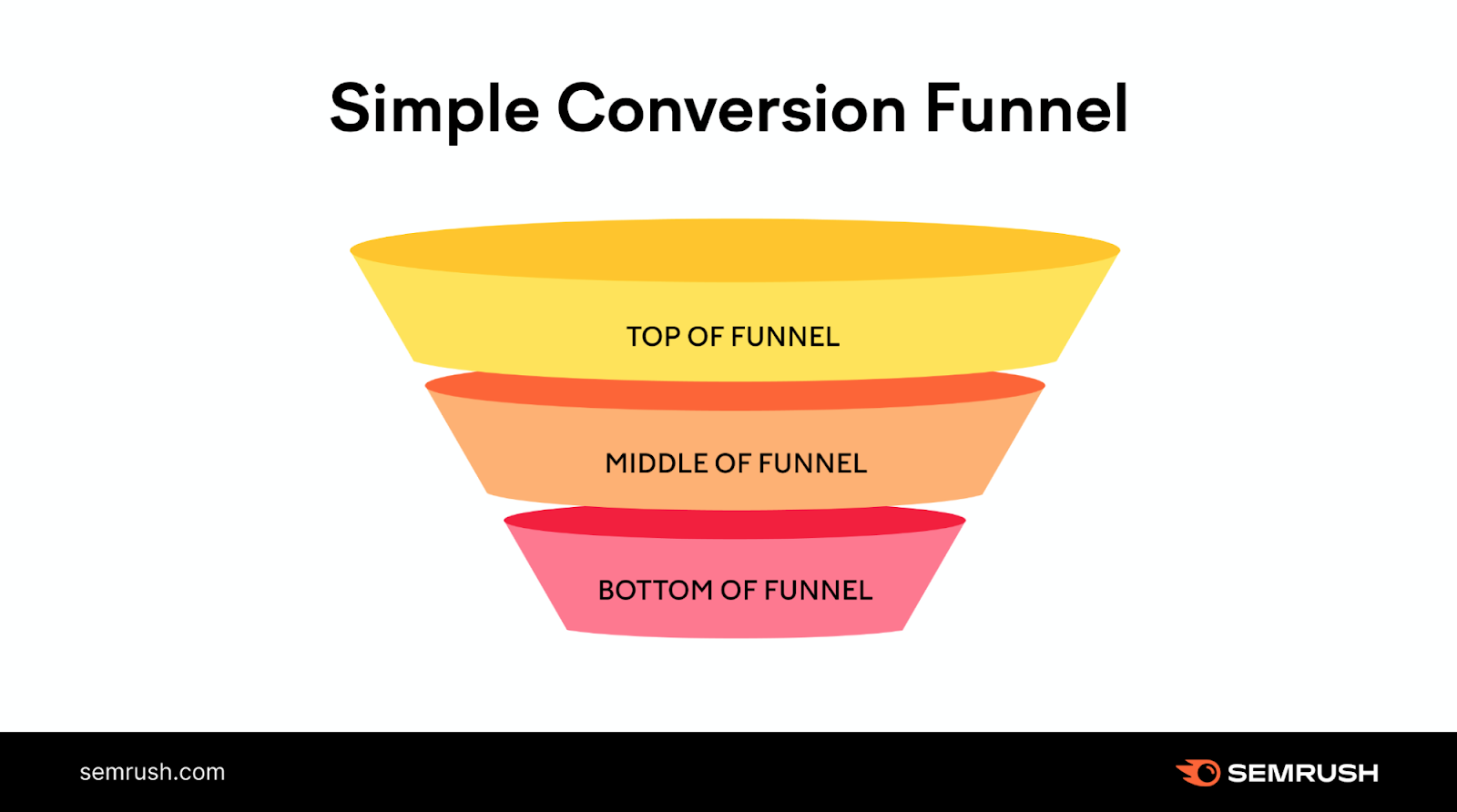
Local SEO: What Is It & How to Do It

What Is Local SEO? 

Local SEO is the process of optimizing your online presence to increase local traffic, visibility, and brand awareness. 

Common local SEO tasks include:

  • Optimizing your Google Business Profile
  • Finding local keywords
  • Creating locally relevant content

Among others.

And any business that has a physical location or serves a geographic area can benefit from local SEO. 

This is an example of a local search result on Google:

an example of a local search result on Google

Local SEO can help your business appear in Google results for searches like these.

This article explains why local SEO is important, how it works, and how to do local SEO. 

Tip: create a free Semrush account so you can follow along. 

Why Is Local SEO Important? 

The best way to get your site in front of people in your area is to use local SEO marketing.

Over 75% of consumers in the United States, France, Germany, and the United Kingdom use Google when looking for business information. 

Making it the most dominant search engine for local search in those (and many other) countries. By far. 

And Google Maps searches for “shopping near me” have grown globally by more than 100% year over year. 

Mobile searches for “store open near me” also grew by over 250% in a recent two-year period. And “where to buy” + “near me” keywords by more than 200%. 

That’s hundreds of millions of searches every day. 

How Local SEO Works 

On top of Google’s usual ranking factors, its local search algorithms use three main factors to help find the best match:

  • Relevance (how closely related a Google Business Profile result is to the words a searcher uses in their query)
  • Distance (how far Google believes a user is from a business when they search)
  • Prominence (how important Google thinks a business is to its potential customers)

Then, Google displays two types of search results for local searches.

The “local pack” results (Google Maps and Business Profiles) and organic results. 

Organic results are the “normal” blue link search results we’re all used to seeing on Google. 

local pack (or map pack) is a Google feature that shows the top local business listings and a map. 

Like this:

local pack in Google search for "food near me"

For example, when you search for “nutritionist miami,” Google displays a local pack at the very top.

Google search for “nutritionist miami”

And the “regular” organic results underneath. 

Organic results in Google for “nutritionist miami”

But Google doesn’t just display local results for queries that contain a city, state, or “near me” keyword. 

If Google believes the intent of your search is local, it’ll display local results.

Even if your search isn’t explicitly local. 

For example, if you were in Los Angeles and searched for “barber shops,” Google would still display a local pack for Los Angeles barber shops. 

Like this:

Google search in Los Angeles for “barber shops”

How to Do Local SEO 

Now it’s time to create a strategy so you can increase your local rankings and boost traffic. The following steps will help you get started. 

Tip: Remember—you can create a free Semrush account to follow along. 

Do Local Keyword Research

Keyword research for local SEO is the process of finding keywords people use when searching for local products and services. 

Ranking for these keywords drives highly targeted local traffic to your site and sends more customers your way. 

To get started, you need a short list of keywords people can use to find your local business. 

Here are a few different ways to start.

Research Your Competitors

Seeing what your competitors are doing is an easy way to start gathering ideas. 

One of the best ways to do that is to use Semrush’s Organic Research tool.

Enter a competing site and click “Search.” 

Like so:

Semrush’s Organic Research tool

Then, go to the “Positions” tab. 

“Positions” tab

Click on “Advanced filters,” and exclude branded keywords (phrases that contain your competitor’s business name). 

using “Advanced filters” in Organic Research tool

And click the “KD%” column to sort the table by keyword difficulty. 

Like so:

“KD%” column

Now you have a list of keywords you might want to target.

a list of keywords results

If your competitors are targeting these keywords, then they’re likely highly relevant to your business, too. 

Check Local Keyword Volume Metrics 

You’ll also want to get a sense of how difficult it is for your content to rank locally for keywords you choose to target. 

Use the local volume metrics feature in the Keyword Overview tool to identify valuable keywords you’ll want to target in your content. 

Enter your desired keyword into the search bar at the top of the page and hit “Search.”

ou4RorXHRDM4svf_0XBlmoyvDmdG6ZiaaDcITtX4LMlvNZxWivxzEs1ZHWkJoqnaHSAn60XMTFxNGfPl8AWATXZjVl0DrzHu8rHgjjyzEa_Ib8yIvtfHPQTAr4KGUZPM93lqBeixrZCuBBc6RK2d68k

Once the tool delivers the keyword results, click on the drop-down bar labeled “Select location.” 

FvajtJ8WYwtcPnoUMjx9tV10tituXYw_oVRsAVHTuUonlJHsIMD9AiBGE7jVbM_QTyJJppCbz3oPVtOQxIvTLNG69uO2P5UuDy1wDl1XT4bQbkBQMiN0ZusSgegm3htqKs7UzKJnR5ly5NA8ddVgW18

Type in your locale. This could be a state, county, province, city, or municipality. Go as narrow on the location as you wish. 

59Ct9432qkmdX80FXt_27SACwJewRwMvDm2rFJ78NkqnOtv-RNrTxx8d14vPT7-PedwosWoQ5sGx2hrc8nwnuieqUkSkPOvMynXxJ3HrVFbcpB7ne7aQdCpa7XOBzzl9Jj1vz-ixvMVbkuBOuNaNnKw

You’ll get local data, as well as the comparative national data. So you can see how easy or difficult it is to rank for your keyword in your exact location. 

Note: Some of these widgets show local data (volume, difficulty, SERP analysis, etc.), while others remain national-level (keyword variations, questions, related keywords).

tgDQGvFDEnQeiHbKXRYnnFw4Sx94snCTVvElkga2kozl7AlYChTAvYEnH_WWO1RJ_jBlprgGjZ_J7uAKKyqEy7B_9a5ZmocdWe9hLmqti_DEYz75JT8E1SJ-p6O-tTiadlQD7RG7068Crj0zJh2mVSE

If you’re a business operating at the local level, this is an essential feature to leverage as you’re building your targeted keyword list. Use the data to get an edge over competitors by optimizing your content for your specific area.

Use Google Autocomplete

Google autocomplete is a feature within Google Search that makes it faster to complete searches when you start to type. 

Its purpose is to save users time by predicting what they’re going to search for.

And it can help you discover valuable long-tail keywords for local SEO.

That’s because Google’s autocomplete predictions depend partly on your location. 

For example, if you’re in Arcadia, California, and you type “best paella in” into the search bar, you’ll see something like this:

Google Autocomplete suggestions for “best paella in” in Arcadia, California

All these locations are near Arcadia or in California. 

So, to find valuable local keywords, start typing in keywords related to your business. 

For example, if you run a cleaning services business, type in “cleaning services” to get a list of local keyword suggestions.