Why Is My Business Not Showing Up on Google? [+ Solutions]

For customers to find your business online, ranking on Google is key. Because 49% of shoppers start their search for a product or service on Google. 

Google not only dominates local business searches. It’s also the gateway for global exposure. Making your business discoverable by Google allows the search engine to direct both local and international customers to your site.

Considering that approximately 74% of in-store shoppers search online for store-related information before visiting, online visibility is vital for your business. 

To boost online visibility, optimize your website for search engines—using relevant keywords and a mobile-friendly design—and maintain an accurate, up-to-date business listing. 

That’s where your Google Business Profile, or GBP, comes in. It looks like this:
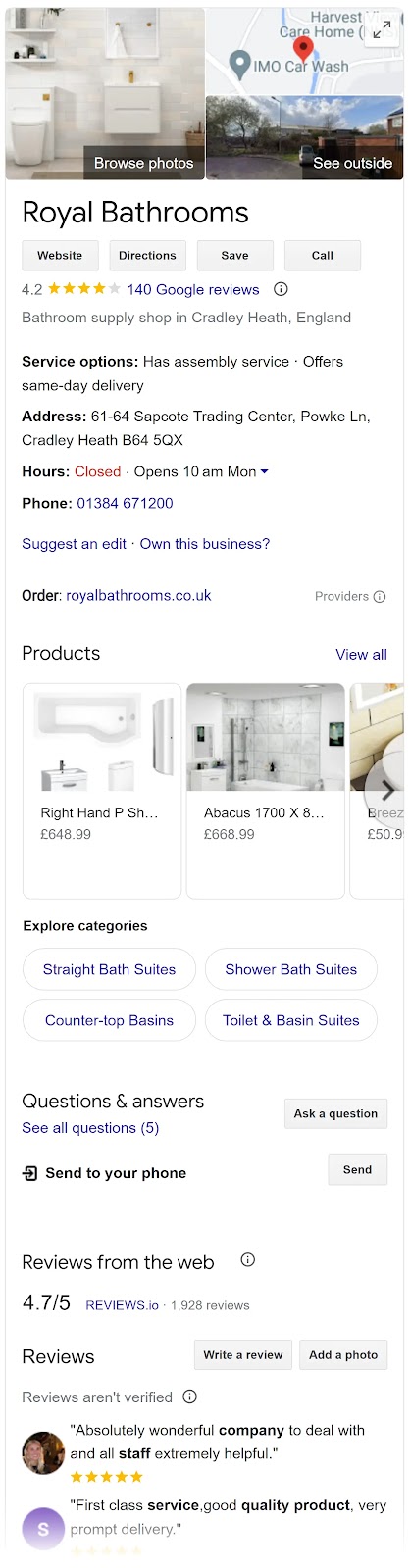
Google Business Profile for "Royal Bathrooms"

This profile pops up when someone looks you up or searches for your products or services on Google Search or Google Maps. Bridging the gap between an online presence and your store’s physical location.

Why Is It Important for Businesses to Show Up on Google Maps?

Although consumers rely heavily on online organic searches to find local businesses, Google Maps has an added advantage because it addresses local search queries specifically. 

Say you provide dry cleaning services. When someone searches for dry cleaning in their area on Google Maps, they’ll be able to see a listing with your address, hours of operation, and contact details. All pulled from the information you entered into your Google Business Profile. 

Visibility and accessibility on Google Maps complements your GBP, local, and overall SEO strategy. 

While a general Google Search helps users discover your business online, Google Maps targets those searching in your immediate area and vicinity—effectively capturing local demand.
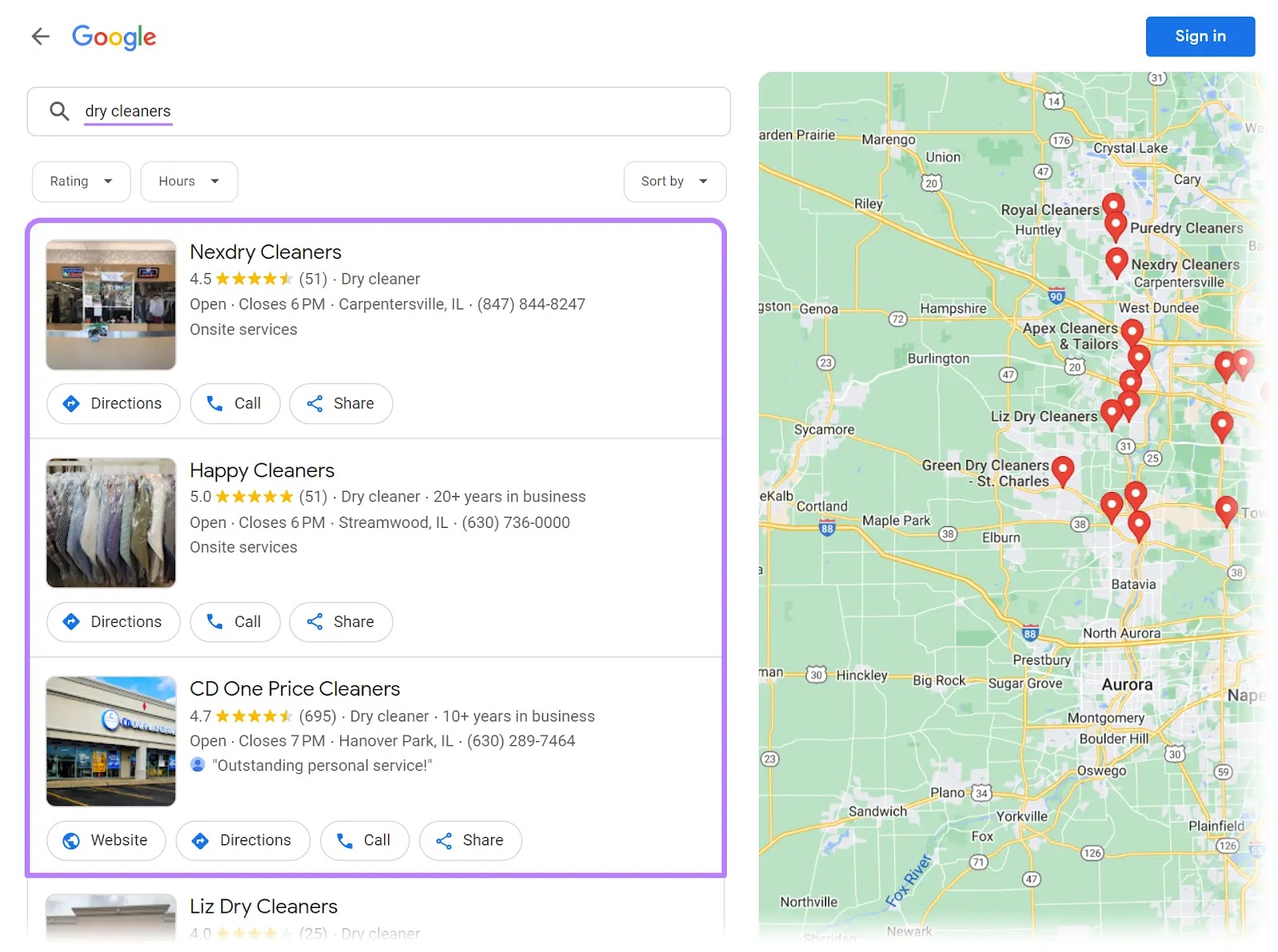
Google Maps results for "dry cleaners"

Essentially, showing up on Google Maps can significantly increase your business’s foot traffic and local sales.

Further reading8 Google Maps Marketing Tactics to Drive Local Business

Your business will be visible only if you set up your Google Business Profile correctly. If you’ve created one but still aren’t showing up on Google, there may be many reasons why. 

Possible Reasons Why Your Business Isn’t Showing Up on Google

1. You Need to Claim an Existing Business Profile

Your business might not appear on Google Maps if you still need to claim your GBP listing. 

An unclaimed listing means the business information is present on Google Maps but still needs to be verified or managed by the business owner. 

Both claiming and verifying your business listing are essential for managing your online presence and ensuring the accuracy of your information. 

To check and claim ownership of your business, follow some simple steps: 

Step 1: Sign in to GBP 

Log in to GBP on your desktop or the mobile app using your Google Account. Click the Google apps button next to your profile icon, and find “Business Profile Manager” in the top-right corner of the menu.
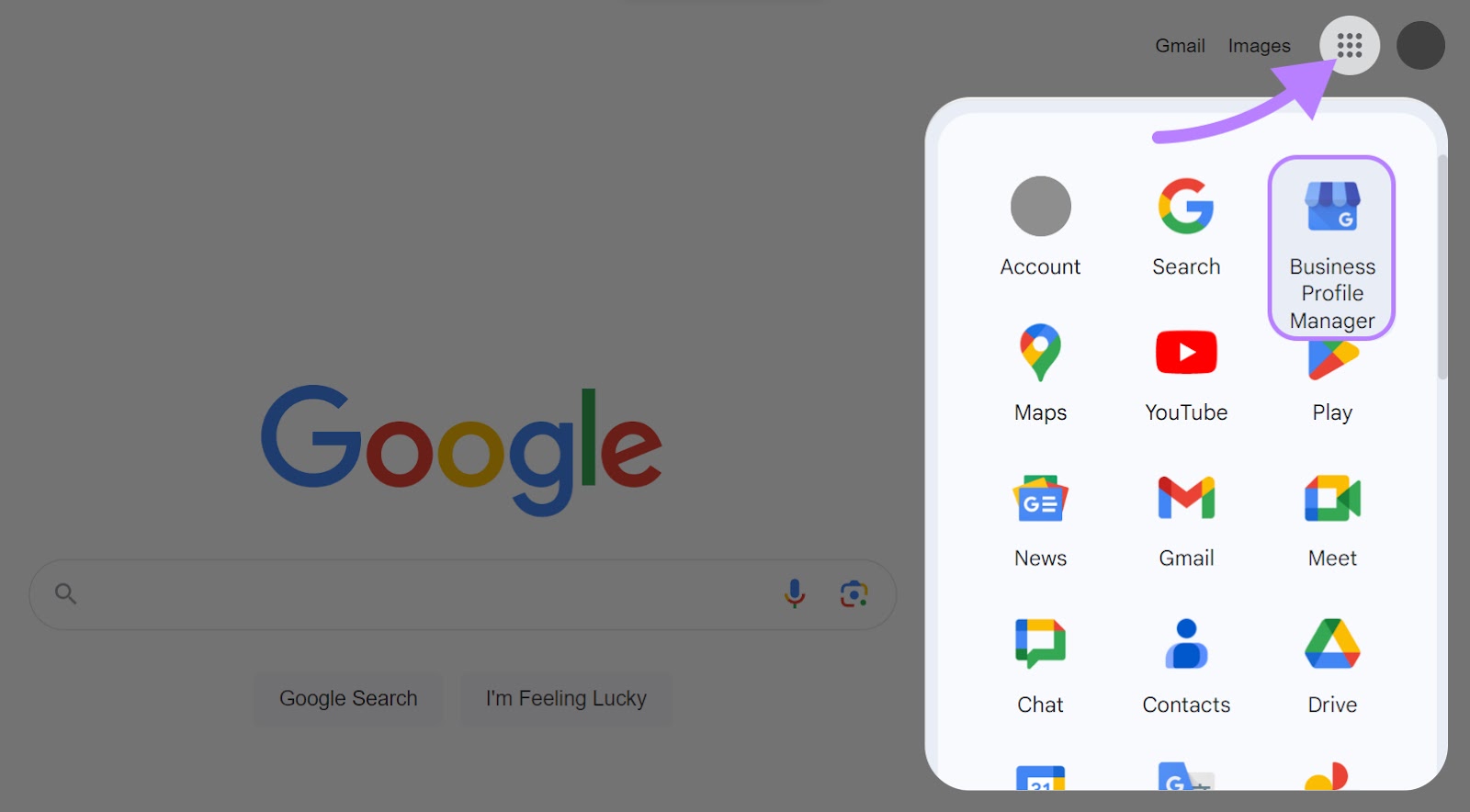
“Business Profile Manager” selected from Google apps

Step 2: Claim existing ownership of a verified Google Business Profile

If you own and have verified your business, Google will redirect you to the GBP dashboard. If not, move on to step three to claim your business.

Step 3: Access your business profile

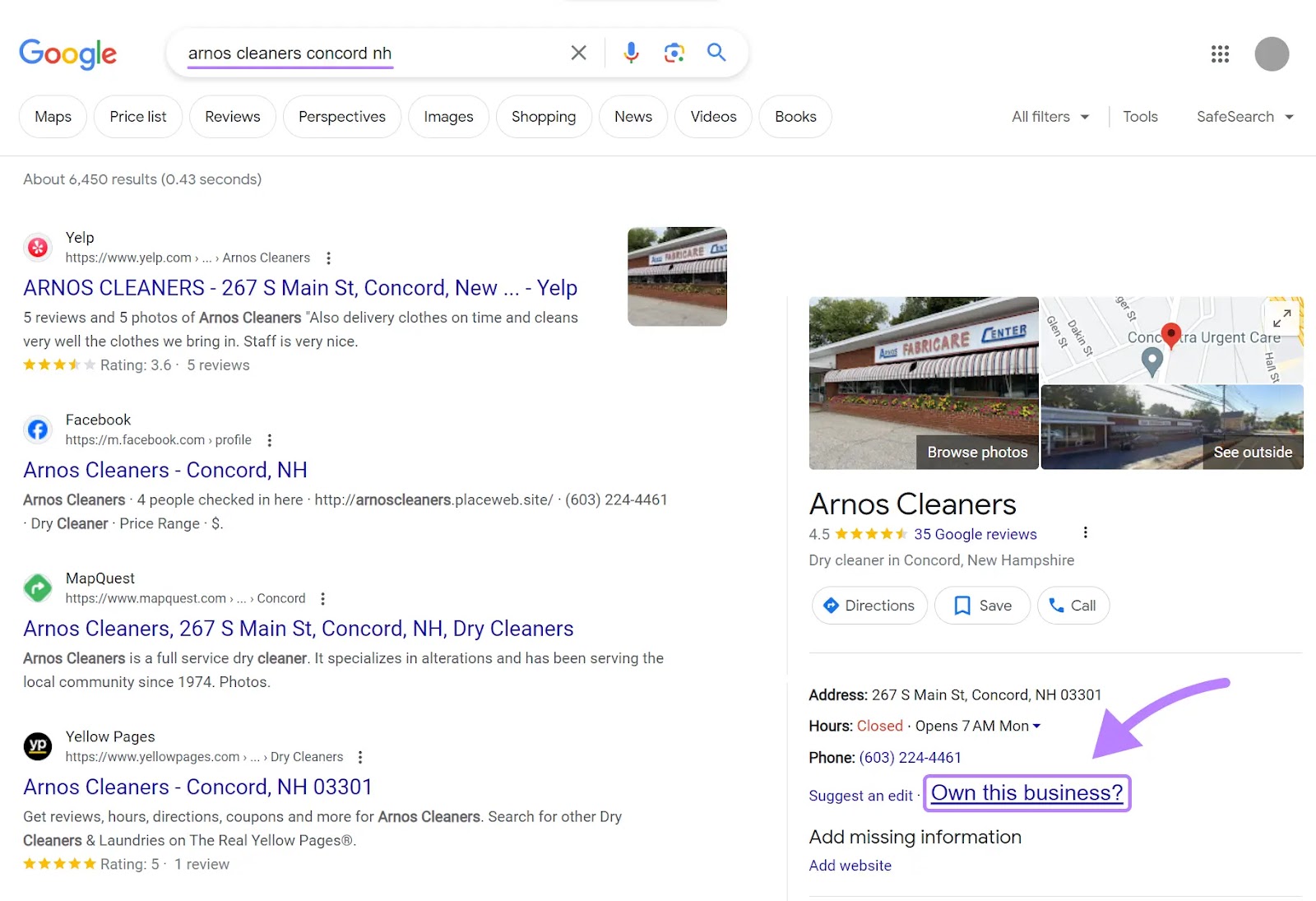
Search for your business name and location on Google.com. If your profile appears on the right-hand side, click “Own this business?

“Own this business?” link highlighted under "Arnos Cleaners" business on Google

Step 4: Request for claim 

A prompt will appear on the screen. Click “Manage now.”
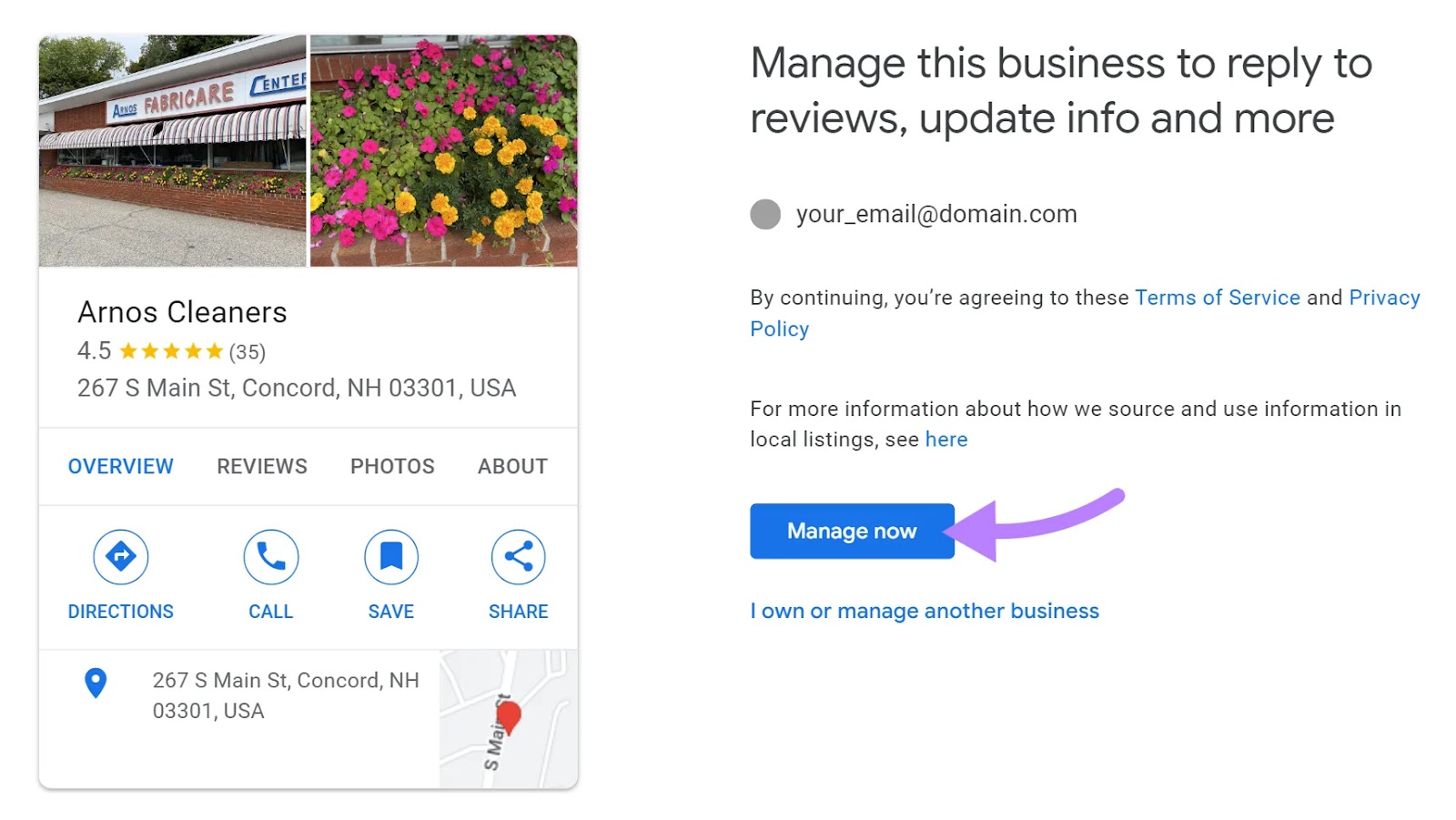
“Manage now" selected for "Arnos Cleaners" business

If someone else has already claimed this business, you might see something like this:
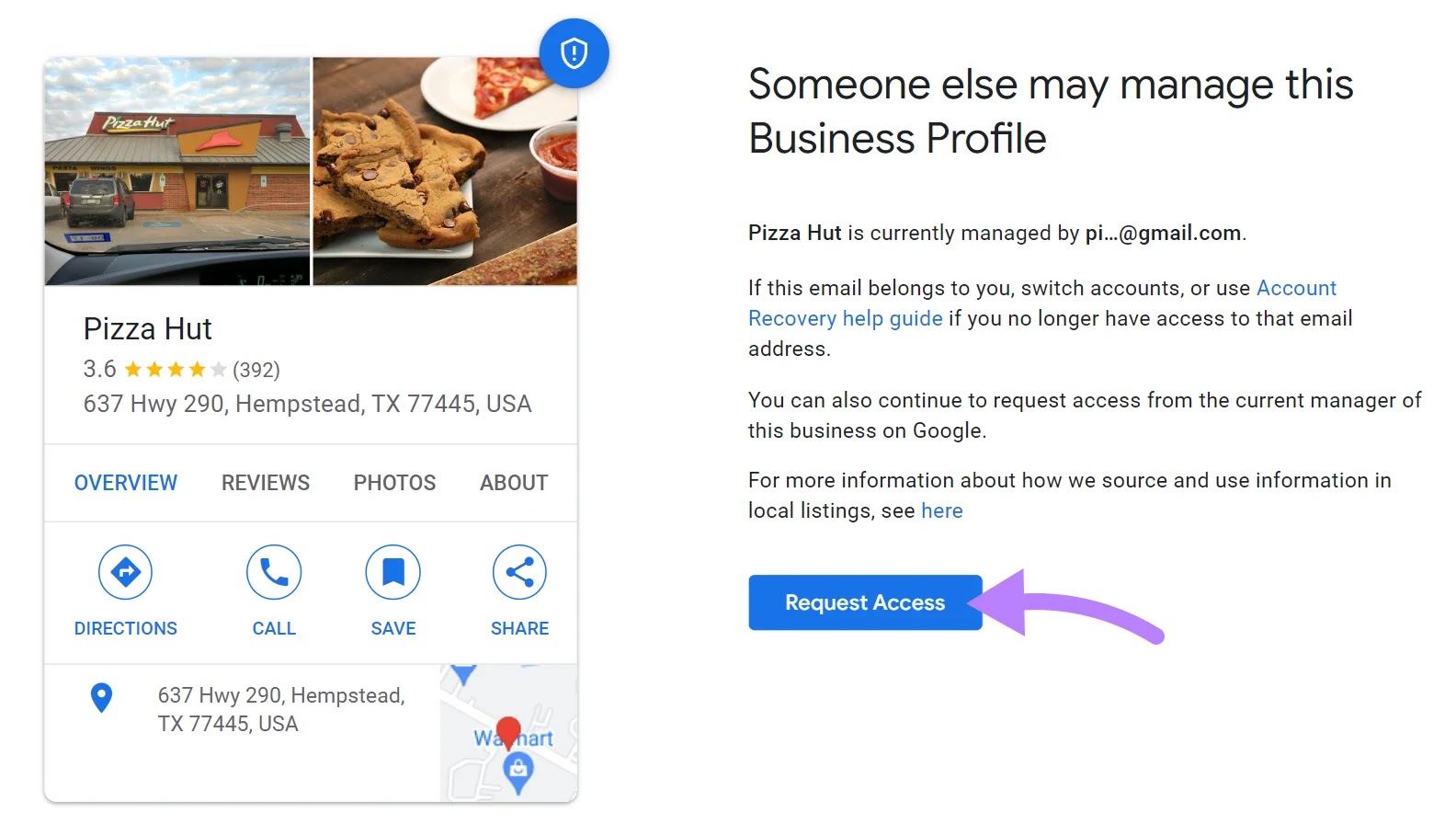
"Someone else mat manage this Business Profile" screen

Click “Request Access.” Google will then ask about your level of ownership.
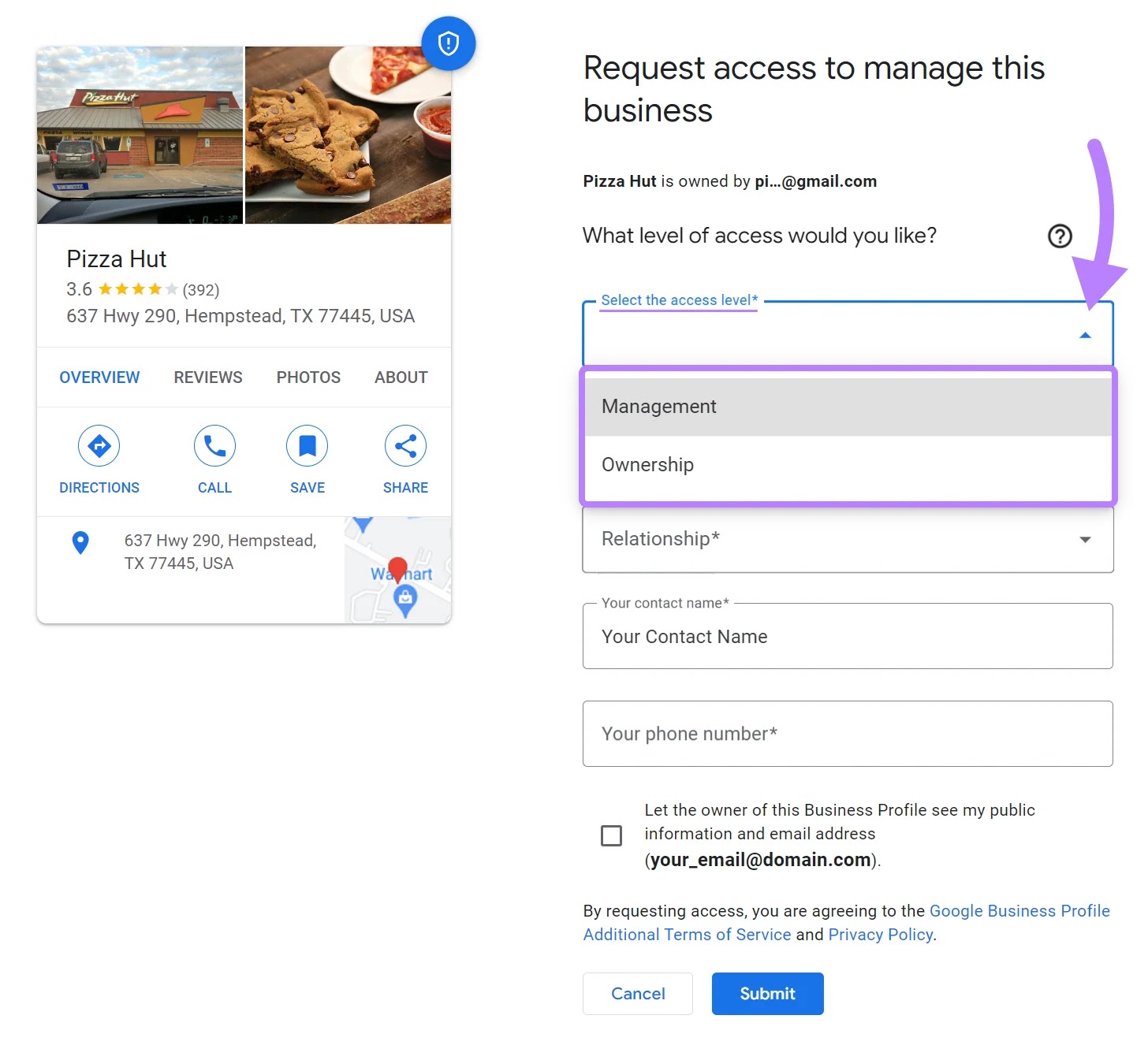
"Request access to manage this business" form in GBP

Fill in the required fields, and tick the option to let the business owner see your details.

If you don’t select this option, you won’t be able to move forward. Once done, hit “Submit.”
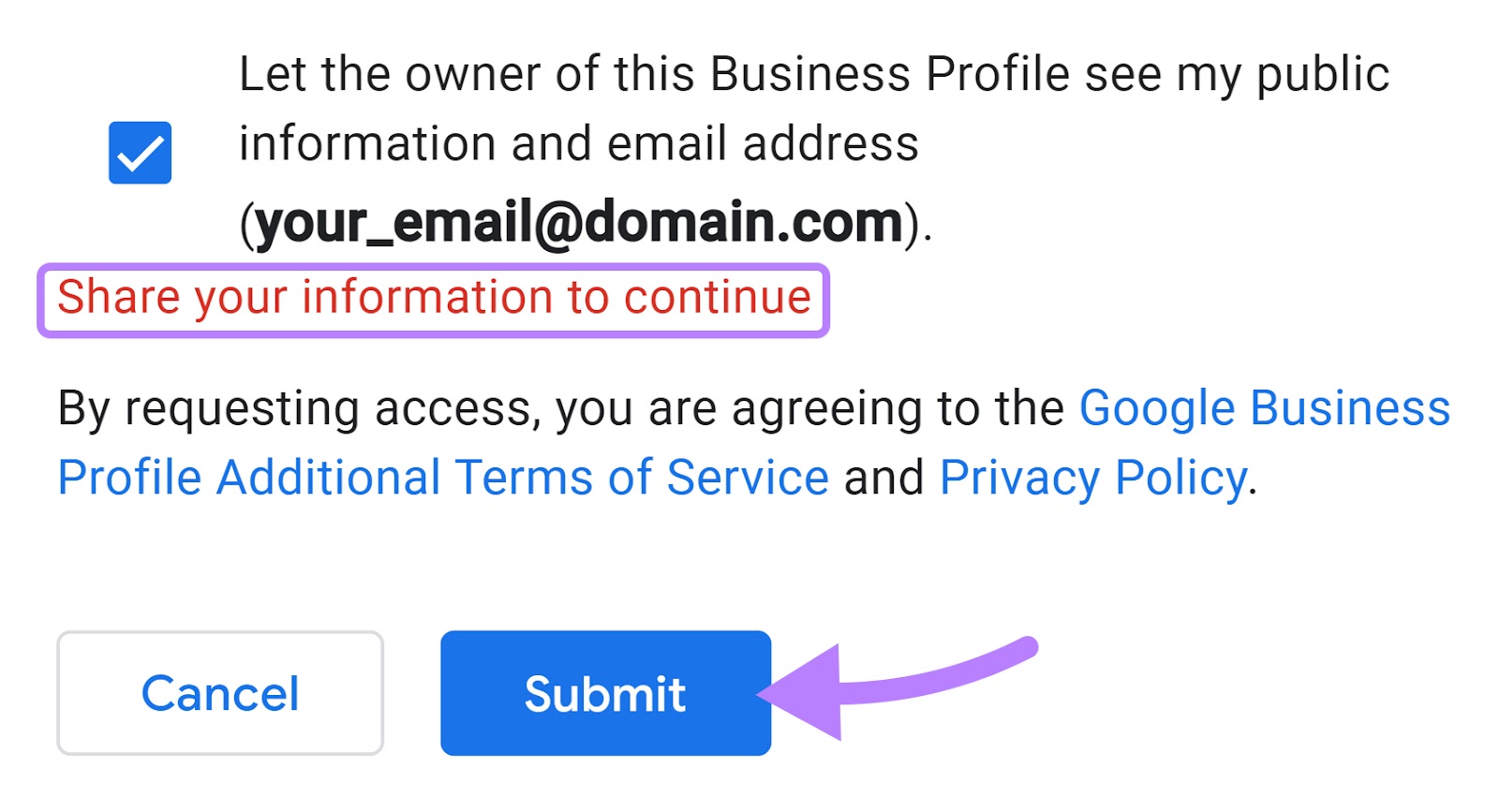
Submit your request to Google

You will then get a confirmation prompt. And a date of when you should get ownership of your business profile if the current owner doesn’t respond.

Click “Done” and wait until you get access to your GBP.
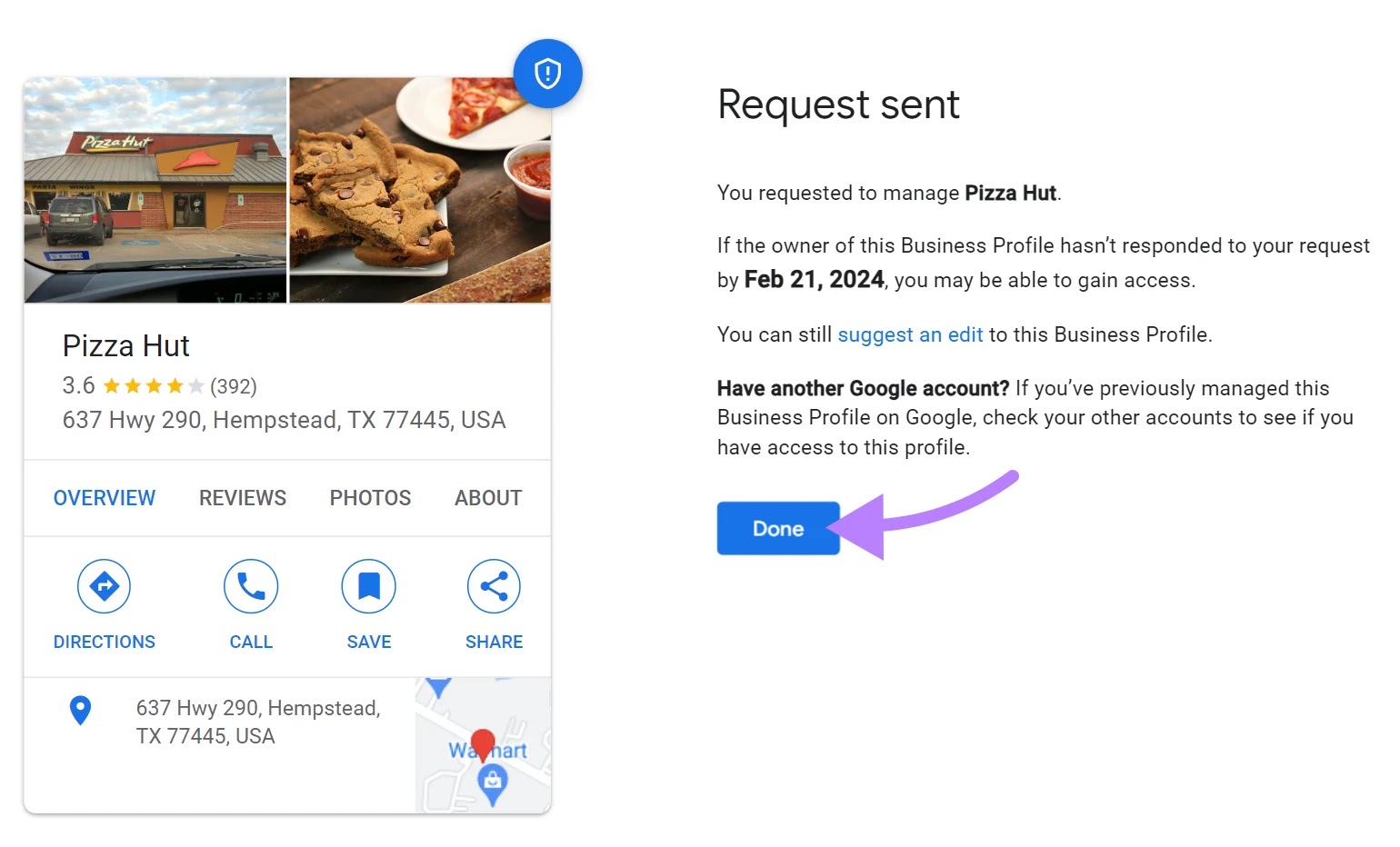
"Request sent" screen on Google

Further readingRequest ownership of a Business Profile by Google Support.

Step 5: Verify business ownership 

After you click “Manage now,” the app will prompt you to provide ownership information.

Depending on your business type and circumstances, you may get instant validation or receive a verification code.
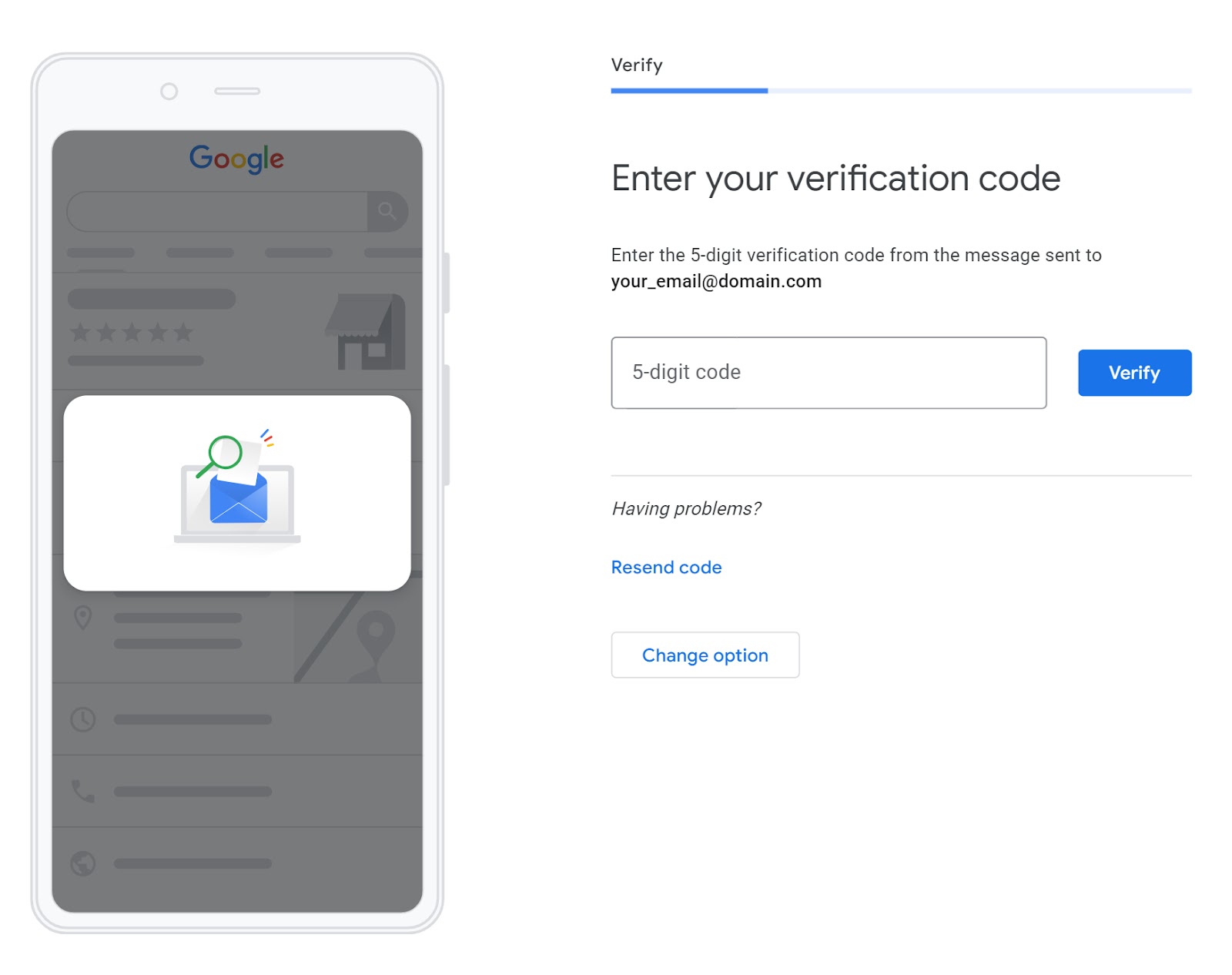
"Enter your verification code" screen in GBP

If a verification code is required, you may receive it via regular mail, email, or text. Enter the code into your Google Business dashboard to complete verification.

Then, you’ll gain full ownership of your Google Business Profile.

2. Your Listing Is Not Verified on Google Maps 

Google prioritizes verified businesses to ensure reliability and accuracy in its listings.

Verification can be a part of the initial setup process or it can be completed afterward for existing profiles.

To verify your existing Google Business Profile, follow these steps:

  • Log in: Access your profile at google.com/business and follow Google’s verification steps
  • Verification method: Choose a verification option (phone, text, email, or video)
  • Enter the code: Follow the instructions to verify, typically entering a code sent to you
  • Review period: Verification reviews can take up to seven business days
  • Confirmation: Once verified, you’ll receive a confirmation of your profile’s status

Here’s a video that sums up the GBP verification steps:
Youtube video thumbnail

Further Reading: Learn more about setting up a Google Business Profile.

3. Your Website Is Not Optimized 

Effective website optimization plays a significant role in enhancing your business’s visibility in organic search results. Which positively influences how your business appears on both Google Maps and Search. 

Google’s algorithms consider various factors on a website to determine its relevance and authority. Like relevant content, mobile-friendliness, and user experience. These factors contribute to how well your business ranks in organic search results. 

A higher ranking in search results can lead to better visibility in local searches, including on Google Maps.

It’s a key step toward improving your online visibility, particularly if you’re a new business with a limited online presence

Efforts to optimize both your website and Google Business Profile are interconnected, as both elements can contribute to your overall online visibility.

Here’s a quick optimization checklist for your website:

  1. Homepage clarity: Make sure your homepage clearly explains your business and offerings
  2. Regular updates: Keep your website updated with relevant information about your products and services 
  3. SEO: Follow SEO best practices sitewide, including using relevant keywords, meta tags, and mobile-friendly design

Consider Ruth’s Nutrition’s GBP as an example. 
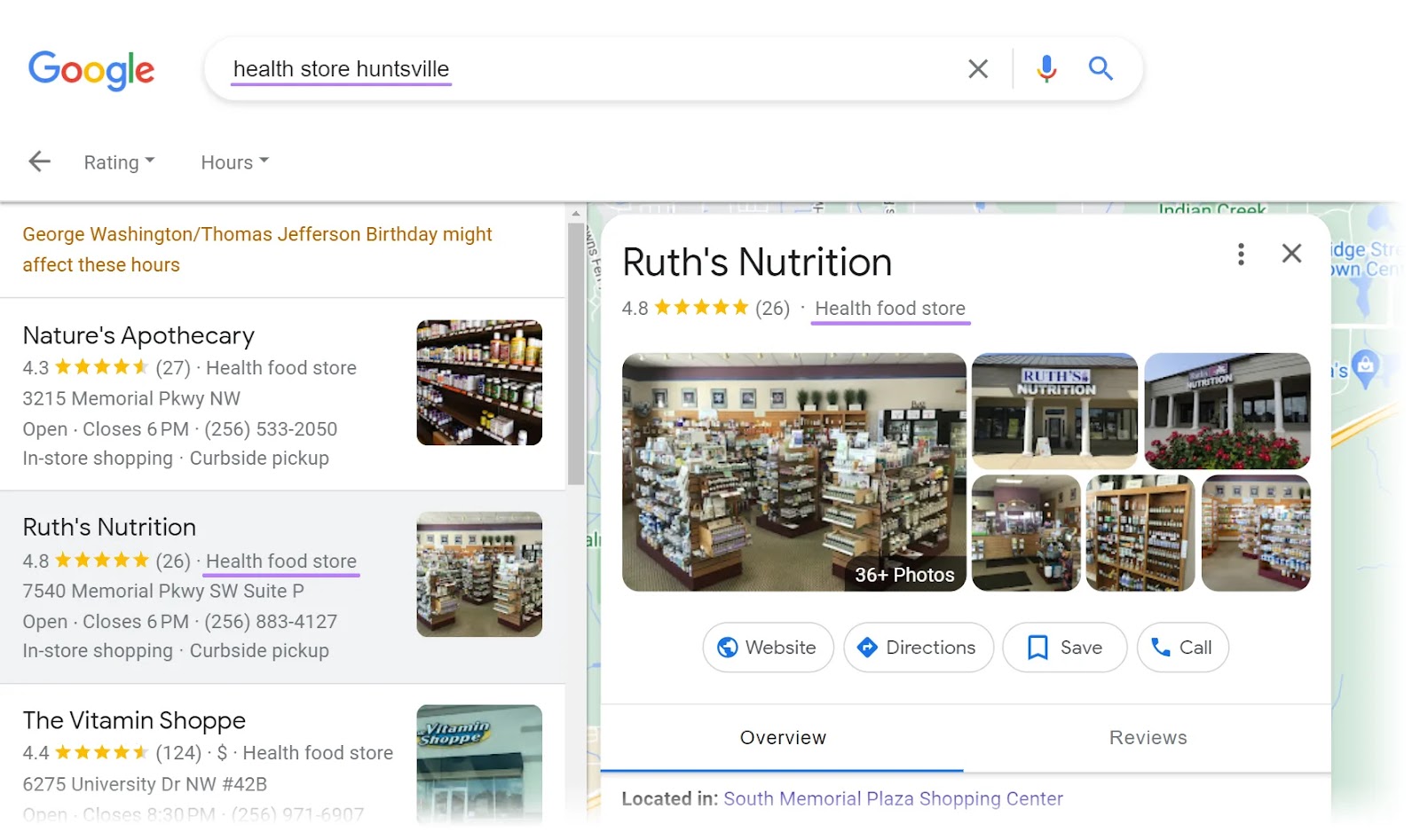
Ruth’s Nutrition’s Google Business Profile with "health food store" category highlighted

The business uses similar keywords across its profile and website to connect both platforms.
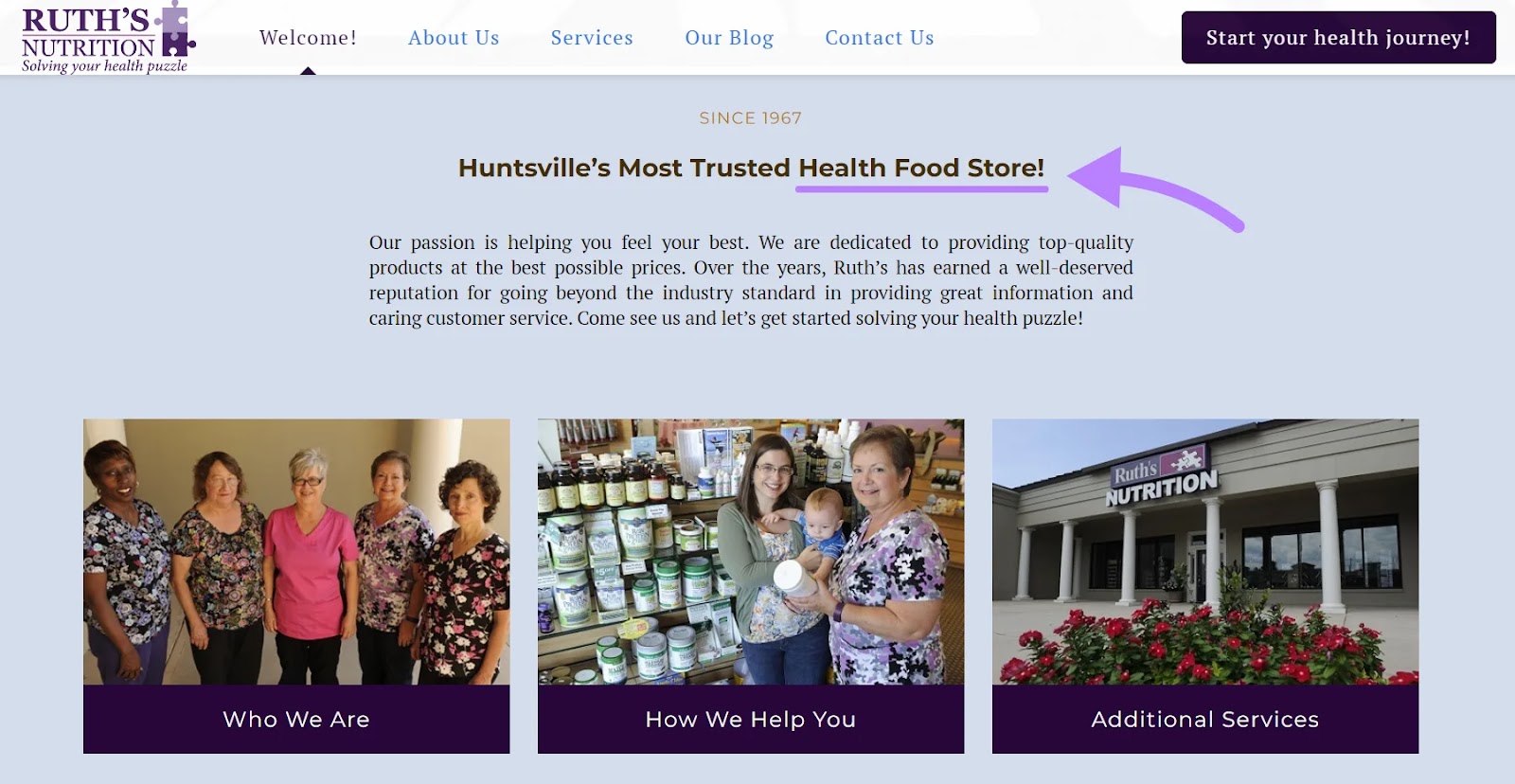
Ruth’s Nutrition’s website with "health food store" keyword highlighted

Pro tip

Regular updates and local SEO strategies can improve your search rankings and attract more customers. 

4. Your Website Uses Too Few, Too Many, or the Wrong Keywords

Using too few keywords may lead to poor discoverability. Using irrelevant or incorrect keywords can attract the wrong audience. Or no audience at all.

Consider The Philadelphia Flower Market, which often appears in the top search results for the keyword “florist shop” for users located in that city. 
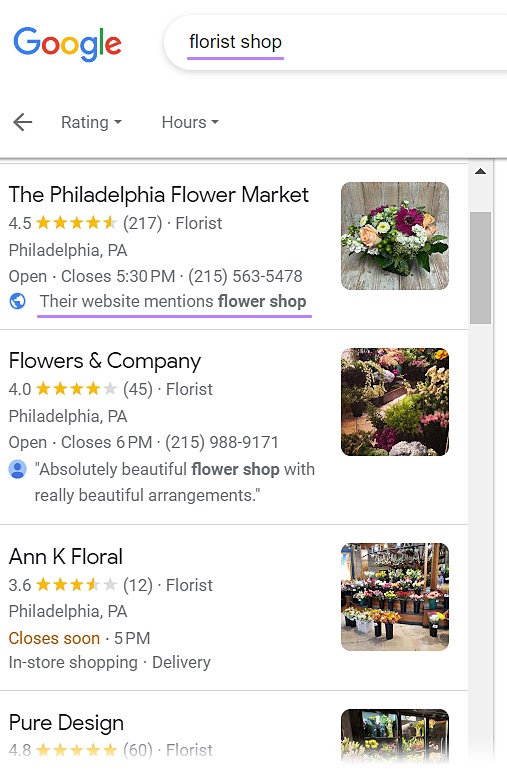
The Philadelphia Flower Market appears in the top search results for "florist shop" search

The website content includes a variation of the specific search query, “flower shop.”

By including relevant keywords in its website content, The Philadelphia Flower Market aligns more closely with users’ search intent. And signals a relevant connection to search engines.

Meanwhile, the GBP listing uses the terms “florist,” “flowers,” and “market.” 

Why Is My Business Not Showing Up on Google? [+ Solutions]

For customers to find your business online, ranking on Google is key. Because 49% of shoppers start their search for a product or service on Google. 

Google not only dominates local business searches. It’s also the gateway for global exposure. Making your business discoverable by Google allows the search engine to direct both local and international customers to your site.

Considering that approximately 74% of in-store shoppers search online for store-related information before visiting, online visibility is vital for your business. 

To boost online visibility, optimize your website for search engines—using relevant keywords and a mobile-friendly design—and maintain an accurate, up-to-date business listing. 

That’s where your Google Business Profile, or GBP, comes in. It looks like this:

Google Business Profile for "Royal Bathrooms"

This profile pops up when someone looks you up or searches for your products or services on Google Search or Google Maps. Bridging the gap between an online presence and your store’s physical location.

Why Is It Important for Businesses to Show Up on Google Maps?

Although consumers rely heavily on online organic searches to find local businesses, Google Maps has an added advantage because it addresses local search queries specifically. 

Say you provide dry cleaning services. When someone searches for dry cleaning in their area on Google Maps, they’ll be able to see a listing with your address, hours of operation, and contact details. All pulled from the information you entered into your Google Business Profile. 

Visibility and accessibility on Google Maps complements your GBP, local, and overall SEO strategy. 

While a general Google Search helps users discover your business online, Google Maps targets those searching in your immediate area and vicinity—effectively capturing local demand.

Google Maps results for "dry cleaners"

Essentially, showing up on Google Maps can significantly increase your business’s foot traffic and local sales.

Further reading8 Google Maps Marketing Tactics to Drive Local Business

Your business will be visible only if you set up your Google Business Profile correctly. If you’ve created one but still aren’t showing up on Google, there may be many reasons why. 

Possible Reasons Why Your Business Isn’t Showing Up on Google

1. You Need to Claim an Existing Business Profile

Your business might not appear on Google Maps if you still need to claim your GBP listing. 

An unclaimed listing means the business information is present on Google Maps but still needs to be verified or managed by the business owner. 

Both claiming and verifying your business listing are essential for managing your online presence and ensuring the accuracy of your information. 

To check and claim ownership of your business, follow some simple steps: 

Step 1: Sign in to GBP 

Log in to GBP on your desktop or the mobile app using your Google Account. Click the Google apps button next to your profile icon, and find “Business Profile Manager” in the top-right corner of the menu.

“Business Profile Manager” selected from Google apps

Step 2: Claim existing ownership of a verified Google Business Profile

If you own and have verified your business, Google will redirect you to the GBP dashboard. If not, move on to step three to claim your business.

Step 3: Access your business profile

Search for your business name and location on Google.com. If your profile appears on the right-hand side, click “Own this business?

“Own this business?” link highlighted under "Arnos Cleaners" business on Google

Step 4: Request for claim 

A prompt will appear on the screen. Click “Manage now.”

“Manage now" selected for "Arnos Cleaners" business

If someone else has already claimed this business, you might see something like this:

"Someone else mat manage this Business Profile" screen

Click “Request Access.” Google will then ask about your level of ownership.

"Request access to manage this business" form in GBP

Fill in the required fields, and tick the option to let the business owner see your details.

If you don’t select this option, you won’t be able to move forward. Once done, hit “Submit.”

Submit your request to Google

You will then get a confirmation prompt. And a date of when you should get ownership of your business profile if the current owner doesn’t respond.

Click “Done” and wait until you get access to your GBP.

"Request sent" screen on Google

Further readingRequest ownership of a Business Profile by Google Support.

Step 5: Verify business ownership 

After you click “Manage now,” the app will prompt you to provide ownership information.

Depending on your business type and circumstances, you may get instant validation or receive a verification code.

"Enter your verification code" screen in GBP

If a verification code is required, you may receive it via regular mail, email, or text. Enter the code into your Google Business dashboard to complete verification.

Then, you’ll gain full ownership of your Google Business Profile.

2. Your Listing Is Not Verified on Google Maps 

Google prioritizes verified businesses to ensure reliability and accuracy in its listings.

Verification can be a part of the initial setup process or it can be completed afterward for existing profiles.

To verify your existing Google Business Profile, follow these steps:

  • Log in: Access your profile at google.com/business and follow Google’s verification steps
  • Verification method: Choose a verification option (phone, text, email, or video)
  • Enter the code: Follow the instructions to verify, typically entering a code sent to you
  • Review period: Verification reviews can take up to seven business days
  • Confirmation: Once verified, you’ll receive a confirmation of your profile’s status

Here’s a video that sums up the GBP verification steps:

Youtube video thumbnail

Further Reading: Learn more about setting up a Google Business Profile.

3. Your Website Is Not Optimized 

Effective website optimization plays a significant role in enhancing your business’s visibility in organic search results. Which positively influences how your business appears on both Google Maps and Search. 

Google’s algorithms consider various factors on a website to determine its relevance and authority. Like relevant content, mobile-friendliness, and user experience. These factors contribute to how well your business ranks in organic search results. 

A higher ranking in search results can lead to better visibility in local searches, including on Google Maps.

It’s a key step toward improving your online visibility, particularly if you’re a new business with a limited online presence

Efforts to optimize both your website and Google Business Profile are interconnected, as both elements can contribute to your overall online visibility.

Here’s a quick optimization checklist for your website:

  1. Homepage clarity: Make sure your homepage clearly explains your business and offerings
  2. Regular updates: Keep your website updated with relevant information about your products and services 
  3. SEO: Follow SEO best practices sitewide, including using relevant keywords, meta tags, and mobile-friendly design

Consider Ruth’s Nutrition’s GBP as an example. 

Ruth’s Nutrition’s Google Business Profile with "health food store" category highlighted

The business uses similar keywords across its profile and website to connect both platforms.

Ruth’s Nutrition’s website with "health food store" keyword highlighted

Pro tip

Regular updates and local SEO strategies can improve your search rankings and attract more customers. 

4. Your Website Uses Too Few, Too Many, or the Wrong Keywords

Using too few keywords may lead to poor discoverability. Using irrelevant or incorrect keywords can attract the wrong audience. Or no audience at all.

Consider The Philadelphia Flower Market, which often appears in the top search results for the keyword “florist shop” for users located in that city. 

The Philadelphia Flower Market appears in the top search results for "florist shop" search

The website content includes a variation of the specific search query, “flower shop.”

By including relevant keywords in its website content, The Philadelphia Flower Market aligns more closely with users’ search intent. And signals a relevant connection to search engines.

Meanwhile, the GBP listing uses the terms “florist,” “flowers,” and “market.” 

Why Is My Business Not Showing Up on Google? [+ Solutions]

For customers to find your business online, ranking on Google is key. Because 49% of shoppers start their search for a product or service on Google. 

Google not only dominates local business searches. It’s also the gateway for global exposure. Making your business discoverable by Google allows the search engine to direct both local and international customers to your site.

Considering that approximately 74% of in-store shoppers search online for store-related information before visiting, online visibility is vital for your business. 

To boost online visibility, optimize your website for search engines—using relevant keywords and a mobile-friendly design—and maintain an accurate, up-to-date business listing. 

That’s where your Google Business Profile, or GBP, comes in. It looks like this:

Google Business Profile for "Royal Bathrooms"

This profile pops up when someone looks you up or searches for your products or services on Google Search or Google Maps. Bridging the gap between an online presence and your store’s physical location.

Why Is It Important for Businesses to Show Up on Google Maps?

Although consumers rely heavily on online organic searches to find local businesses, Google Maps has an added advantage because it addresses local search queries specifically. 

Say you provide dry cleaning services. When someone searches for dry cleaning in their area on Google Maps, they’ll be able to see a listing with your address, hours of operation, and contact details. All pulled from the information you entered into your Google Business Profile. 

Visibility and accessibility on Google Maps complements your GBP, local, and overall SEO strategy. 

While a general Google Search helps users discover your business online, Google Maps targets those searching in your immediate area and vicinity—effectively capturing local demand.

Google Maps results for "dry cleaners"

Essentially, showing up on Google Maps can significantly increase your business’s foot traffic and local sales.

Further reading8 Google Maps Marketing Tactics to Drive Local Business

Your business will be visible only if you set up your Google Business Profile correctly. If you’ve created one but still aren’t showing up on Google, there may be many reasons why. 

Possible Reasons Why Your Business Isn’t Showing Up on Google

1. You Need to Claim an Existing Business Profile

Your business might not appear on Google Maps if you still need to claim your GBP listing. 

An unclaimed listing means the business information is present on Google Maps but still needs to be verified or managed by the business owner. 

Both claiming and verifying your business listing are essential for managing your online presence and ensuring the accuracy of your information. 

To check and claim ownership of your business, follow some simple steps: 

Step 1: Sign in to GBP 

Log in to GBP on your desktop or the mobile app using your Google Account. Click the Google apps button next to your profile icon, and find “Business Profile Manager” in the top-right corner of the menu.

“Business Profile Manager” selected from Google apps

Step 2: Claim existing ownership of a verified Google Business Profile

If you own and have verified your business, Google will redirect you to the GBP dashboard. If not, move on to step three to claim your business.

Step 3: Access your business profile

Search for your business name and location on Google.com. If your profile appears on the right-hand side, click “Own this business?

“Own this business?” link highlighted under "Arnos Cleaners" business on Google

Step 4: Request for claim 

A prompt will appear on the screen. Click “Manage now.”

“Manage now" selected for "Arnos Cleaners" business

If someone else has already claimed this business, you might see something like this:

"Someone else mat manage this Business Profile" screen

Click “Request Access.” Google will then ask about your level of ownership.

"Request access to manage this business" form in GBP

Fill in the required fields, and tick the option to let the business owner see your details.

If you don’t select this option, you won’t be able to move forward. Once done, hit “Submit.”

Submit your request to Google

You will then get a confirmation prompt. And a date of when you should get ownership of your business profile if the current owner doesn’t respond.

Click “Done” and wait until you get access to your GBP.

"Request sent" screen on Google

Further readingRequest ownership of a Business Profile by Google Support.

Step 5: Verify business ownership 

After you click “Manage now,” the app will prompt you to provide ownership information.

Depending on your business type and circumstances, you may get instant validation or receive a verification code.

"Enter your verification code" screen in GBP

If a verification code is required, you may receive it via regular mail, email, or text. Enter the code into your Google Business dashboard to complete verification.

Then, you’ll gain full ownership of your Google Business Profile.

2. Your Listing Is Not Verified on Google Maps 

Google prioritizes verified businesses to ensure reliability and accuracy in its listings.

Verification can be a part of the initial setup process or it can be completed afterward for existing profiles.

To verify your existing Google Business Profile, follow these steps:

  • Log in: Access your profile at google.com/business and follow Google’s verification steps
  • Verification method: Choose a verification option (phone, text, email, or video)
  • Enter the code: Follow the instructions to verify, typically entering a code sent to you
  • Review period: Verification reviews can take up to seven business days
  • Confirmation: Once verified, you’ll receive a confirmation of your profile’s status

Here’s a video that sums up the GBP verification steps:

Youtube video thumbnail

Further Reading: Learn more about setting up a Google Business Profile.

3. Your Website Is Not Optimized 

Effective website optimization plays a significant role in enhancing your business’s visibility in organic search results. Which positively influences how your business appears on both Google Maps and Search. 

Google’s algorithms consider various factors on a website to determine its relevance and authority. Like relevant content, mobile-friendliness, and user experience. These factors contribute to how well your business ranks in organic search results. 

A higher ranking in search results can lead to better visibility in local searches, including on Google Maps.

It’s a key step toward improving your online visibility, particularly if you’re a new business with a limited online presence

Efforts to optimize both your website and Google Business Profile are interconnected, as both elements can contribute to your overall online visibility.

Here’s a quick optimization checklist for your website:

  1. Homepage clarity: Make sure your homepage clearly explains your business and offerings
  2. Regular updates: Keep your website updated with relevant information about your products and services 
  3. SEO: Follow SEO best practices sitewide, including using relevant keywords, meta tags, and mobile-friendly design

Consider Ruth’s Nutrition’s GBP as an example. 

Ruth’s Nutrition’s Google Business Profile with "health food store" category highlighted

The business uses similar keywords across its profile and website to connect both platforms.

Ruth’s Nutrition’s website with "health food store" keyword highlighted

Pro tip

Regular updates and local SEO strategies can improve your search rankings and attract more customers. 

4. Your Website Uses Too Few, Too Many, or the Wrong Keywords

Using too few keywords may lead to poor discoverability. Using irrelevant or incorrect keywords can attract the wrong audience. Or no audience at all.

Consider The Philadelphia Flower Market, which often appears in the top search results for the keyword “florist shop” for users located in that city. 

The Philadelphia Flower Market appears in the top search results for "florist shop" search

The website content includes a variation of the specific search query, “flower shop.”

By including relevant keywords in its website content, The Philadelphia Flower Market aligns more closely with users’ search intent. And signals a relevant connection to search engines.

Meanwhile, the GBP listing uses the terms “florist,” “flowers,” and “market.” 

Why Is My Business Not Showing Up on Google? [+ Solutions]

For customers to find your business online, ranking on Google is key. Because 49% of shoppers start their search for a product or service on Google. 

Google not only dominates local business searches. It’s also the gateway for global exposure. Making your business discoverable by Google allows the search engine to direct both local and international customers to your site.

Considering that approximately 74% of in-store shoppers search online for store-related information before visiting, online visibility is vital for your business. 

To boost online visibility, optimize your website for search engines—using relevant keywords and a mobile-friendly design—and maintain an accurate, up-to-date business listing. 

That’s where your Google Business Profile, or GBP, comes in. It looks like this:

Google Business Profile for "Royal Bathrooms"

This profile pops up when someone looks you up or searches for your products or services on Google Search or Google Maps. Bridging the gap between an online presence and your store’s physical location.

Why Is It Important for Businesses to Show Up on Google Maps?

Although consumers rely heavily on online organic searches to find local businesses, Google Maps has an added advantage because it addresses local search queries specifically. 

Say you provide dry cleaning services. When someone searches for dry cleaning in their area on Google Maps, they’ll be able to see a listing with your address, hours of operation, and contact details. All pulled from the information you entered into your Google Business Profile. 

Visibility and accessibility on Google Maps complements your GBP, local, and overall SEO strategy. 

While a general Google Search helps users discover your business online, Google Maps targets those searching in your immediate area and vicinity—effectively capturing local demand.

Google Maps results for "dry cleaners"

Essentially, showing up on Google Maps can significantly increase your business’s foot traffic and local sales.

Further reading8 Google Maps Marketing Tactics to Drive Local Business

Your business will be visible only if you set up your Google Business Profile correctly. If you’ve created one but still aren’t showing up on Google, there may be many reasons why. 

Possible Reasons Why Your Business Isn’t Showing Up on Google

1. You Need to Claim an Existing Business Profile

Your business might not appear on Google Maps if you still need to claim your GBP listing. 

An unclaimed listing means the business information is present on Google Maps but still needs to be verified or managed by the business owner. 

Both claiming and verifying your business listing are essential for managing your online presence and ensuring the accuracy of your information. 

To check and claim ownership of your business, follow some simple steps: 

Step 1: Sign in to GBP 

Log in to GBP on your desktop or the mobile app using your Google Account. Click the Google apps button next to your profile icon, and find “Business Profile Manager” in the top-right corner of the menu.

“Business Profile Manager” selected from Google apps

Step 2: Claim existing ownership of a verified Google Business Profile

If you own and have verified your business, Google will redirect you to the GBP dashboard. If not, move on to step three to claim your business.

Step 3: Access your business profile

Search for your business name and location on Google.com. If your profile appears on the right-hand side, click “Own this business?

“Own this business?” link highlighted under "Arnos Cleaners" business on Google

Step 4: Request for claim 

A prompt will appear on the screen. Click “Manage now.”

“Manage now" selected for "Arnos Cleaners" business

If someone else has already claimed this business, you might see something like this:

"Someone else mat manage this Business Profile" screen

Click “Request Access.” Google will then ask about your level of ownership.

"Request access to manage this business" form in GBP

Fill in the required fields, and tick the option to let the business owner see your details.

If you don’t select this option, you won’t be able to move forward. Once done, hit “Submit.”

Submit your request to Google

You will then get a confirmation prompt. And a date of when you should get ownership of your business profile if the current owner doesn’t respond.

Click “Done” and wait until you get access to your GBP.

"Request sent" screen on Google

Further readingRequest ownership of a Business Profile by Google Support.

Step 5: Verify business ownership 

After you click “Manage now,” the app will prompt you to provide ownership information.

Depending on your business type and circumstances, you may get instant validation or receive a verification code.

"Enter your verification code" screen in GBP

If a verification code is required, you may receive it via regular mail, email, or text. Enter the code into your Google Business dashboard to complete verification.

Then, you’ll gain full ownership of your Google Business Profile.

2. Your Listing Is Not Verified on Google Maps 

Google prioritizes verified businesses to ensure reliability and accuracy in its listings.

Verification can be a part of the initial setup process or it can be completed afterward for existing profiles.

To verify your existing Google Business Profile, follow these steps:

  • Log in: Access your profile at google.com/business and follow Google’s verification steps
  • Verification method: Choose a verification option (phone, text, email, or video)
  • Enter the code: Follow the instructions to verify, typically entering a code sent to you
  • Review period: Verification reviews can take up to seven business days
  • Confirmation: Once verified, you’ll receive a confirmation of your profile’s status

Here’s a video that sums up the GBP verification steps:

Youtube video thumbnail

Further Reading: Learn more about setting up a Google Business Profile.

3. Your Website Is Not Optimized 

Effective website optimization plays a significant role in enhancing your business’s visibility in organic search results. Which positively influences how your business appears on both Google Maps and Search. 

Google’s algorithms consider various factors on a website to determine its relevance and authority. Like relevant content, mobile-friendliness, and user experience. These factors contribute to how well your business ranks in organic search results. 

A higher ranking in search results can lead to better visibility in local searches, including on Google Maps.

It’s a key step toward improving your online visibility, particularly if you’re a new business with a limited online presence

Efforts to optimize both your website and Google Business Profile are interconnected, as both elements can contribute to your overall online visibility.

Here’s a quick optimization checklist for your website:

  1. Homepage clarity: Make sure your homepage clearly explains your business and offerings
  2. Regular updates: Keep your website updated with relevant information about your products and services 
  3. SEO: Follow SEO best practices sitewide, including using relevant keywords, meta tags, and mobile-friendly design

Consider Ruth’s Nutrition’s GBP as an example. 

Ruth’s Nutrition’s Google Business Profile with "health food store" category highlighted

The business uses similar keywords across its profile and website to connect both platforms.

Ruth’s Nutrition’s website with "health food store" keyword highlighted

Pro tip

Regular updates and local SEO strategies can improve your search rankings and attract more customers. 

4. Your Website Uses Too Few, Too Many, or the Wrong Keywords

Using too few keywords may lead to poor discoverability. Using irrelevant or incorrect keywords can attract the wrong audience. Or no audience at all.

Consider The Philadelphia Flower Market, which often appears in the top search results for the keyword “florist shop” for users located in that city. 

The Philadelphia Flower Market appears in the top search results for "florist shop" search

The website content includes a variation of the specific search query, “flower shop.”

By including relevant keywords in its website content, The Philadelphia Flower Market aligns more closely with users’ search intent. And signals a relevant connection to search engines.

Meanwhile, the GBP listing uses the terms “florist,” “flowers,” and “market.” 

Why Is My Business Not Showing Up on Google? [+ Solutions]

For customers to find your business online, ranking on Google is key. Because 49% of shoppers start their search for a product or service on Google. 

Google not only dominates local business searches. It’s also the gateway for global exposure. Making your business discoverable by Google allows the search engine to direct both local and international customers to your site.

Considering that approximately 74% of in-store shoppers search online for store-related information before visiting, online visibility is vital for your business. 

To boost online visibility, optimize your website for search engines—using relevant keywords and a mobile-friendly design—and maintain an accurate, up-to-date business listing. 

That’s where your Google Business Profile, or GBP, comes in. It looks like this:

Google Business Profile for "Royal Bathrooms"

This profile pops up when someone looks you up or searches for your products or services on Google Search or Google Maps. Bridging the gap between an online presence and your store’s physical location.

Why Is It Important for Businesses to Show Up on Google Maps?

Although consumers rely heavily on online organic searches to find local businesses, Google Maps has an added advantage because it addresses local search queries specifically. 

Say you provide dry cleaning services. When someone searches for dry cleaning in their area on Google Maps, they’ll be able to see a listing with your address, hours of operation, and contact details. All pulled from the information you entered into your Google Business Profile. 

Visibility and accessibility on Google Maps complements your GBP, local, and overall SEO strategy. 

While a general Google Search helps users discover your business online, Google Maps targets those searching in your immediate area and vicinity—effectively capturing local demand.

Google Maps results for "dry cleaners"

Essentially, showing up on Google Maps can significantly increase your business’s foot traffic and local sales.

Further reading8 Google Maps Marketing Tactics to Drive Local Business

Your business will be visible only if you set up your Google Business Profile correctly. If you’ve created one but still aren’t showing up on Google, there may be many reasons why. 

Possible Reasons Why Your Business Isn’t Showing Up on Google

1. You Need to Claim an Existing Business Profile

Your business might not appear on Google Maps if you still need to claim your GBP listing. 

An unclaimed listing means the business information is present on Google Maps but still needs to be verified or managed by the business owner. 

Both claiming and verifying your business listing are essential for managing your online presence and ensuring the accuracy of your information. 

To check and claim ownership of your business, follow some simple steps: 

Step 1: Sign in to GBP 

Log in to GBP on your desktop or the mobile app using your Google Account. Click the Google apps button next to your profile icon, and find “Business Profile Manager” in the top-right corner of the menu.

“Business Profile Manager” selected from Google apps

Step 2: Claim existing ownership of a verified Google Business Profile

If you own and have verified your business, Google will redirect you to the GBP dashboard. If not, move on to step three to claim your business.

Step 3: Access your business profile

Search for your business name and location on Google.com. If your profile appears on the right-hand side, click “Own this business?

“Own this business?” link highlighted under "Arnos Cleaners" business on Google

Step 4: Request for claim 

A prompt will appear on the screen. Click “Manage now.”

“Manage now" selected for "Arnos Cleaners" business

If someone else has already claimed this business, you might see something like this:

"Someone else mat manage this Business Profile" screen

Click “Request Access.” Google will then ask about your level of ownership.

"Request access to manage this business" form in GBP

Fill in the required fields, and tick the option to let the business owner see your details.

If you don’t select this option, you won’t be able to move forward. Once done, hit “Submit.”

Submit your request to Google

You will then get a confirmation prompt. And a date of when you should get ownership of your business profile if the current owner doesn’t respond.

Click “Done” and wait until you get access to your GBP.

"Request sent" screen on Google

Further readingRequest ownership of a Business Profile by Google Support.

Step 5: Verify business ownership 

After you click “Manage now,” the app will prompt you to provide ownership information.

Depending on your business type and circumstances, you may get instant validation or receive a verification code.

"Enter your verification code" screen in GBP

If a verification code is required, you may receive it via regular mail, email, or text. Enter the code into your Google Business dashboard to complete verification.

Then, you’ll gain full ownership of your Google Business Profile.

2. Your Listing Is Not Verified on Google Maps 

Google prioritizes verified businesses to ensure reliability and accuracy in its listings.

Verification can be a part of the initial setup process or it can be completed afterward for existing profiles.

To verify your existing Google Business Profile, follow these steps:

  • Log in: Access your profile at google.com/business and follow Google’s verification steps
  • Verification method: Choose a verification option (phone, text, email, or video)
  • Enter the code: Follow the instructions to verify, typically entering a code sent to you
  • Review period: Verification reviews can take up to seven business days
  • Confirmation: Once verified, you’ll receive a confirmation of your profile’s status

Here’s a video that sums up the GBP verification steps:

Youtube video thumbnail

Further Reading: Learn more about setting up a Google Business Profile.

3. Your Website Is Not Optimized 

Effective website optimization plays a significant role in enhancing your business’s visibility in organic search results. Which positively influences how your business appears on both Google Maps and Search. 

Google’s algorithms consider various factors on a website to determine its relevance and authority. Like relevant content, mobile-friendliness, and user experience. These factors contribute to how well your business ranks in organic search results. 

A higher ranking in search results can lead to better visibility in local searches, including on Google Maps.

It’s a key step toward improving your online visibility, particularly if you’re a new business with a limited online presence

Efforts to optimize both your website and Google Business Profile are interconnected, as both elements can contribute to your overall online visibility.

Here’s a quick optimization checklist for your website:

  1. Homepage clarity: Make sure your homepage clearly explains your business and offerings
  2. Regular updates: Keep your website updated with relevant information about your products and services 
  3. SEO: Follow SEO best practices sitewide, including using relevant keywords, meta tags, and mobile-friendly design

Consider Ruth’s Nutrition’s GBP as an example. 

Ruth’s Nutrition’s Google Business Profile with "health food store" category highlighted

The business uses similar keywords across its profile and website to connect both platforms.

Ruth’s Nutrition’s website with "health food store" keyword highlighted

Pro tip

Regular updates and local SEO strategies can improve your search rankings and attract more customers. 

4. Your Website Uses Too Few, Too Many, or the Wrong Keywords

Using too few keywords may lead to poor discoverability. Using irrelevant or incorrect keywords can attract the wrong audience. Or no audience at all.

Consider The Philadelphia Flower Market, which often appears in the top search results for the keyword “florist shop” for users located in that city. 

The Philadelphia Flower Market appears in the top search results for "florist shop" search

The website content includes a variation of the specific search query, “flower shop.”

By including relevant keywords in its website content, The Philadelphia Flower Market aligns more closely with users’ search intent. And signals a relevant connection to search engines.

Meanwhile, the GBP listing uses the terms “florist,” “flowers,” and “market.” 

Why Is My Business Not Showing Up on Google? [+ Solutions]

For customers to find your business online, ranking on Google is key. Because 49% of shoppers start their search for a product or service on Google. 

Google not only dominates local business searches. It’s also the gateway for global exposure. Making your business discoverable by Google allows the search engine to direct both local and international customers to your site.

Considering that approximately 74% of in-store shoppers search online for store-related information before visiting, online visibility is vital for your business. 

To boost online visibility, optimize your website for search engines—using relevant keywords and a mobile-friendly design—and maintain an accurate, up-to-date business listing. 

That’s where your Google Business Profile, or GBP, comes in. It looks like this:

Google Business Profile for "Royal Bathrooms"

This profile pops up when someone looks you up or searches for your products or services on Google Search or Google Maps. Bridging the gap between an online presence and your store’s physical location.

Why Is It Important for Businesses to Show Up on Google Maps?

Although consumers rely heavily on online organic searches to find local businesses, Google Maps has an added advantage because it addresses local search queries specifically. 

Say you provide dry cleaning services. When someone searches for dry cleaning in their area on Google Maps, they’ll be able to see a listing with your address, hours of operation, and contact details. All pulled from the information you entered into your Google Business Profile. 

Visibility and accessibility on Google Maps complements your GBP, local, and overall SEO strategy. 

While a general Google Search helps users discover your business online, Google Maps targets those searching in your immediate area and vicinity—effectively capturing local demand.

Google Maps results for "dry cleaners"

Essentially, showing up on Google Maps can significantly increase your business’s foot traffic and local sales.

Further reading8 Google Maps Marketing Tactics to Drive Local Business

Your business will be visible only if you set up your Google Business Profile correctly. If you’ve created one but still aren’t showing up on Google, there may be many reasons why. 

Possible Reasons Why Your Business Isn’t Showing Up on Google

1. You Need to Claim an Existing Business Profile

Your business might not appear on Google Maps if you still need to claim your GBP listing. 

An unclaimed listing means the business information is present on Google Maps but still needs to be verified or managed by the business owner. 

Both claiming and verifying your business listing are essential for managing your online presence and ensuring the accuracy of your information. 

To check and claim ownership of your business, follow some simple steps: 

Step 1: Sign in to GBP 

Log in to GBP on your desktop or the mobile app using your Google Account. Click the Google apps button next to your profile icon, and find “Business Profile Manager” in the top-right corner of the menu.

“Business Profile Manager” selected from Google apps

Step 2: Claim existing ownership of a verified Google Business Profile

If you own and have verified your business, Google will redirect you to the GBP dashboard. If not, move on to step three to claim your business.

Step 3: Access your business profile

Search for your business name and location on Google.com. If your profile appears on the right-hand side, click “Own this business?

“Own this business?” link highlighted under "Arnos Cleaners" business on Google

Step 4: Request for claim 

A prompt will appear on the screen. Click “Manage now.”

“Manage now" selected for "Arnos Cleaners" business

If someone else has already claimed this business, you might see something like this:

"Someone else mat manage this Business Profile" screen

Click “Request Access.” Google will then ask about your level of ownership.

"Request access to manage this business" form in GBP

Fill in the required fields, and tick the option to let the business owner see your details.

If you don’t select this option, you won’t be able to move forward. Once done, hit “Submit.”

Submit your request to Google

You will then get a confirmation prompt. And a date of when you should get ownership of your business profile if the current owner doesn’t respond.

Click “Done” and wait until you get access to your GBP.

"Request sent" screen on Google

Further readingRequest ownership of a Business Profile by Google Support.

Step 5: Verify business ownership 

After you click “Manage now,” the app will prompt you to provide ownership information.

Depending on your business type and circumstances, you may get instant validation or receive a verification code.

"Enter your verification code" screen in GBP

If a verification code is required, you may receive it via regular mail, email, or text. Enter the code into your Google Business dashboard to complete verification.

Then, you’ll gain full ownership of your Google Business Profile.

2. Your Listing Is Not Verified on Google Maps 

Google prioritizes verified businesses to ensure reliability and accuracy in its listings.

Verification can be a part of the initial setup process or it can be completed afterward for existing profiles.

To verify your existing Google Business Profile, follow these steps:

  • Log in: Access your profile at google.com/business and follow Google’s verification steps
  • Verification method: Choose a verification option (phone, text, email, or video)
  • Enter the code: Follow the instructions to verify, typically entering a code sent to you
  • Review period: Verification reviews can take up to seven business days
  • Confirmation: Once verified, you’ll receive a confirmation of your profile’s status

Here’s a video that sums up the GBP verification steps:

Youtube video thumbnail

Further Reading: Learn more about setting up a Google Business Profile.

3. Your Website Is Not Optimized 

Effective website optimization plays a significant role in enhancing your business’s visibility in organic search results. Which positively influences how your business appears on both Google Maps and Search. 

Google’s algorithms consider various factors on a website to determine its relevance and authority. Like relevant content, mobile-friendliness, and user experience. These factors contribute to how well your business ranks in organic search results. 

A higher ranking in search results can lead to better visibility in local searches, including on Google Maps.

It’s a key step toward improving your online visibility, particularly if you’re a new business with a limited online presence

Efforts to optimize both your website and Google Business Profile are interconnected, as both elements can contribute to your overall online visibility.

Here’s a quick optimization checklist for your website:

  1. Homepage clarity: Make sure your homepage clearly explains your business and offerings
  2. Regular updates: Keep your website updated with relevant information about your products and services 
  3. SEO: Follow SEO best practices sitewide, including using relevant keywords, meta tags, and mobile-friendly design

Consider Ruth’s Nutrition’s GBP as an example. 

Ruth’s Nutrition’s Google Business Profile with "health food store" category highlighted

The business uses similar keywords across its profile and website to connect both platforms.

Ruth’s Nutrition’s website with "health food store" keyword highlighted

Pro tip

Regular updates and local SEO strategies can improve your search rankings and attract more customers. 

4. Your Website Uses Too Few, Too Many, or the Wrong Keywords

Using too few keywords may lead to poor discoverability. Using irrelevant or incorrect keywords can attract the wrong audience. Or no audience at all.

Consider The Philadelphia Flower Market, which often appears in the top search results for the keyword “florist shop” for users located in that city. 

The Philadelphia Flower Market appears in the top search results for "florist shop" search

The website content includes a variation of the specific search query, “flower shop.”

By including relevant keywords in its website content, The Philadelphia Flower Market aligns more closely with users’ search intent. And signals a relevant connection to search engines.

Meanwhile, the GBP listing uses the terms “florist,” “flowers,” and “market.” 

Things You Need To Know Before Hiking

Spring, autumns, and summers are the special seasons for wild-inspired hikers. Either you like an epic journey or just walk in woods, either you climb in group or alone, here are the things you need to know before hiking:

1. Test your Gears Of Hiking.

“In case you don’t know how something functions, it’s useless. Do a trial run of everything, from flame sticks to your pack and shoes, in a sheltered place,” says Dorothy-Brown Kwaiser, an officer for the Oregon State Parks and a Hiking Specialist

2. Offer your plans.

“Tell individuals what trailhead you’re beginning and what time you’ll return — specifically if hiking alone — so a companion knows where to send help in case you’re not back on time,” says Liz Bergeron, chief, and CEO of the Pacific Crest Trail Association.

3. Stock up on eatables and water for hiking.

“A decent dependable rule is one pint of water for at regular intervals or four miles, and one and a half pounds of food every day,” says April Sylva, who hiked the whole 2,663 miles of the PCT and even got married there. Pack protein bars, jerky, nuts, and dried organic products, in addition to extra H2O or Aquamira Water Purifier Tablets.

4. Mind your behavior.

“When you experience different hikers on a thin trail, the individual going downhill should stop and let the one going tough pass,” says Bergeron. Likewise, the “Leave no follow” moral implies bring all waste with you — even regular things like apple centers and orange peels.

5. A delivery person.

No 4G? The Spot Gen3 Satellite GPS ($150, findmespot.com) tells companions you’re protected. Hit the crisis catch to dial 911 and summon rescuers.

6. An ultralight backpack.

This one from Six Moon Designs ($230, sixmoondesigns.com) was outlined by long-distance climbers. Support weight at the hips, not the shoulders, to maintain a strategic distance from back agony.

Amazing Tips That Will Motivate You Today

Step by step instructions to Be Positive and Amazing Tips That Will Motivate You Today

If you need to be successful in this positive test, then take after the 10 steps bekow to channel the world with a brighter focal point and wind up noticeably happier.

1. Be certain. The most important perspective to being positive is being positive. It appears to be too essential to ever be valid, however I’ve found this is completely the case. You can either be negative with what life gives you, or choose to be positive. Remember this as you continue this reading, because each positive step advance initially down to your choice.

2. Be thankful. Feeling unsatisfied, envious, or frustrated? Grab a pen and a piece of paper to record each and every thing you’re thankful for. Begin with food and water, a bed, and afterwards, let your mind go. Soon you’ll understand the amount you can be appreciative for and your mentality will change from unsatisfied to positively thankful.

3. Smile! Every human’s DNA is hardwired to feel more joyful after Smiling. Grin yourself or from anyone else to encounter how your mind starts to feel more joyful. It’s remarkable! Furthermore, I bet the positive feeling from a grin or smile is the reason why smiling is the general language of kindnes over each culture.

4. Positive body act. Like smiling to feel positive, upright body act works in a similar way. Sit or stand tall, shoulders back, chin up, and chest out to give your body a chance to help your brain to begin thinking positive. Studies have proven that positive body act exchanges to a more positive personality.

5. Empower others. An honest to goodness effort saying “I thought of you” can make somebody’s entire day. Call your mother or father, send a long text to an old friend, or write a letter to your beloved one. You’ll become more joyful as you think about their excitement to hear from you.

6. Serve somebody. Doing an act of graciousness or kindness for another person enables you to gain a more noteworthy point of view outside of yourself. You’ll in a split second feel extraordinary and life’s little trials won’t hold as much weight when you’re helped to remember the vital things in life.

7. Generously give! Offering cash to a stranger is a great approach to improve their day and your day. Is the server having an unpleasant time taking care of ten tables all at once? Give a generous tip. Another extraordinary way to bless others is to show kindness by purchasing the individual’s food or a drink behind you. As the saying goes, it is much more rewarding to give than to get.

8. Change your objective. Many people are extremely hard on themselves since they shoot for flawlessness, which is impossible to accomplish. Rather than endeavoring to be perfect, strive to gain progress. This will enable you to stay positive, and in all likelihood be more successful.

9. Concentrate on the present and future. As much as you may attempt, you can’t change the past. What you can control is the manner by which you respond today and tomorrow by using your mistakes as wisdom. The best individuals got to where they are, because of how they used their past failures to their benefit.

10. Tune in to your most loved music. Music absolutely has the ability to change how you feel. In case you’re having a harsh day, shake out to your most loved music to change the force. Full revelation, tuning in to Taylor Swift gives me awesome positive vibes. It’s cool however, MS Dhoni and Virat Kohli feel a similar way.

These are the amazing tips that will motivate you Today to do your best and be kind and worthy for this world because at the end of this world, your Porsche is not coming with you to heaven, but your deeds and your kindness will.

Arrival – The best hollywood movie for 2018

Illud mediocrem pri no, illud honestatis eos ei, ex omittam propriae sententiae vim. Etiam dolorum patrioque has te, posse mnesarchum ex sit. Melius mediocrem mea cu, usu tamquam suscipit definitionem cu. Integre impedit eligendi cum an, vitae menandri definitionem in nec. Reque dicta voluptatibus an per, quem mollis vituperata sea an. Suas veniam scripserit et eum, ea sententiae argumentum eam.

Et delectus vivendum antiopam per. Erant reprehendunt cu mei, posse erant et pro, pri ei mediocrem molestiae. Regione diceret argumentum ne est, sed ei malorum appellantur. Affert dolore consequat est ei, qui in facer quaerendum. Te duo quando delectus, ius vero senserit scripserit an.

Nec debet molestiae dissentiunt ne, has ne illud fierent. Cum sumo posidonium eu. Qui nostro euripidis disputando in, te vel posse virtute, ea dolorem blandit duo. Ei integre volutpat omittantur eum, summo indoctum in eos. Vix an justo lucilius. In populo aperiri electram nec.

Shortcodes

Pos.NameScoreDuration
1admin29.17 %13 seconds
2admin12.5 %8 seconds
3asd0 %3 seconds

Pos.NameScoreDuration
There is no data yet

You must log in to see your results.